English | 简体中文





检测网页更新并通知用户刷新,支持 Vite、UmiJS、Webpack、Rspack 和 Nuxt。
以 git commit hash (也支持 svn revision number、package.json version、build timestamp、custom) 为版本号,打包时将版本号写入 json 文件。客户端轮询服务器上的版本号(浏览器窗口的 visibilitychange、focus 事件辅助),和本地作比较,如果不相同则通知用户刷新页面。


什么时候会检测更新(fetch version.json) ?
- 首次加载页面。
- 轮询 (default: 10601000 ms)。
- script 脚本资源加载失败 (404 ?)。
- 标签页 refocus or revisible。
如何才能看到更新提示
安装当前插件(使用默认配置),打包并部署 -> 打开浏览器访问网页(标签页A) -> 修改代码,重新打包并部署(默认 versionType 需要提交 git commit 才会更新版本号) -> 重新进入刚才打开的标签页 A。 这里你可以在右下角看到更新提示。 注意,开发模式下当前插件不会生效。
flowchart TD
    Start([插件启动: 构建阶段]) --> Detect[自动检测仓库类型<br/>查找 .git / .svn 目录]
    Detect --> Type{versionType?}

    Type -->|git_commit_hash| Git["git rev-parse --short HEAD"]
    Type -->|svn_revision_number| Svn["svnversion"]
    Type -->|pkg_version| Pkg["process.env.npm_package_version"]
    Type -->|build_timestamp| Ts["Date.now()"]
    Type -->|custom| Custom["customVersion 选项"]

    Git --> Check{获取成功?}
    Svn --> Check
    Pkg --> Check
    Check -->|失败| Fallback[降级到 build_timestamp]
    Check -->|成功| Version[得到 version]
    Ts --> Version
    Custom --> Version
    Fallback --> Version

    Version --> Emit[emitFile 生成产物<br/>version.json / .js / .css<br/>带 MD5 前 8 位内容哈希]
    Emit --> Inject[transformIndexHtml<br/>注入标签与锚点]
    Inject --> End([构建完成])
sequenceDiagram
    participant U as 用户/浏览器
    participant S as 注入脚本
    participant Srv as 服务器(version.json)

    Note over S: 内置 LOCAL_VERSION(打包时写入)

    rect rgb(235, 245, 255)
    Note over U,S: 触发检查的 4 种时机
    U->>S: 1. 首次加载页面 (checkImmediately)
    U->>S: 2. 轮询 (checkInterval, 默认 10 分钟)
    U->>S: 3. script 资源加载失败 404 (checkOnLoadFileError)
    U->>S: 4. 标签页 refocus / revisible (checkOnWindowFocus)
    end

    S->>Srv: fetch version.json
    Srv-->>S: { version, silence }

    alt 版本相同
        S-->>U: 不处理
    else 版本不同
        alt silence = true
            S-->>U: 静默,不提示
        else hiddenDefaultNotification = false
            S-->>U: 显示右下角更新通知
            U->>S: 点击「刷新」-> location.reload() / onClickRefresh
            U->>S: 点击「忽略」-> dismissUpdate()
        else hiddenDefaultNotification = true
            S-->>U: 派发 plugin_web_update_notice 事件<br/>(自定义通知/行为)
        end
    end
部分用户(老板)没有关闭网页的习惯,在网页有新版本更新或问题修复时,用户继续使用旧的版本,影响用户体验和后端数据准确性。也有可能会出现报错(文件404)、白屏的情况。
**仅支持 ESM:**当前版本仅支持 ESM。如果你的项目仍依赖 CommonJS,请安装
1.8.1版本。
# vite
pnpm add @plugin-web-update-notification/vite -D

# umijs
pnpm add @plugin-web-update-notification/umijs -D

# webpack plugin
pnpm add @plugin-web-update-notification/webpack -D

# rspack plugin
pnpm add @plugin-web-update-notification/rspack -D

# nuxt module
pnpm add @plugin-web-update-notification/nuxt -DVite | UmiJS | Webpack | Rspack | Nuxt
如果 index.html 存在缓存,可能刷新后,更新提示还会存在,所以需要禁用 index.html 的缓存。这也是 SPA 应用部署的一个最佳实践吧。
通过 nginx ,禁用缓存:
# nginx.conf
location / {
  index index.html index.htm;

  if ( $uri = '/index.html' ) { # disabled index.html cache
    add_header Cache-Control "no-cache, no-store, must-revalidate";
  }

  try_files $uri $uri/ /index.html;
}
直接通过 html meta 标签禁用缓存:
<!DOCTYPE html>
<html lang="en">
  <head>
    <meta http-equiv="Cache-Control" content="no-cache, no-store, must-revalidate" />
    <meta http-equiv="Pragma" content="no-cache" />
    <meta http-equiv="Expires" content="0" />
  </head>
</html>基础使用
// vite.config.ts
import { defineConfig } from 'vite'
import vue from '@vitejs/plugin-vue'
import { webUpdateNotice } from '@plugin-web-update-notification/vite'

// https://vitejs.dev/config/
export default defineConfig({
  plugins: [
    vue(),
    webUpdateNotice({
      logVersion: true,
    }),
  ],
})
自定义通知栏文本
// vite.config.ts
export default defineConfig({
  plugins: [
    vue(),
    webUpdateNotice({
      notificationProps: {
        title: '标题',
        description: 'System update, please refresh the page',
        buttonText: '刷新',
        dismissButtonText: '忽略',
      },
    }),
  ],
})
国际化
// vite.config.ts
export default defineConfig({
  plugins: [
    vue(),
    webUpdateNotice({
      // plugin preset: zh_CN | zh_TW | en_US
      locale: "en_US",
      localeData: {
        en_US: {
          title: "📢 system update",
          description: "System update, please refresh the page",
          buttonText: "refresh",
          dismissButtonText: "dismiss",
        },
        zh_CN: {
          ...
        },
        ...
      },
    }),
  ],
});


// other file to set locale
window.pluginWebUpdateNotice_.setLocale('zh_CN')
取消默认的通知栏,监听更新事件自定义行为
// vite.config.ts
export default defineConfig({
  plugins: [
    vue(),
    webUpdateNotice({
      hiddenDefaultNotification: true,
    }),
  ],
})

// 在其他文件中监听自定义更新事件
document.body.addEventListener('plugin_web_update_notice', (e) => {
  const { version, options } = e.detail
  // write some code, show your custom notification and etc.
  alert('System update!')
})不支持 umi2, umi2 可以尝试下通过 chainWebpack 配置 webpack 插件。
// .umirc.ts
import { defineConfig } from 'umi'
import type { Options as WebUpdateNotificationOptions } from '@plugin-web-update-notification/umijs'

export default {
  plugins: ['@plugin-web-update-notification/umijs'],
  webUpdateNotification: {
    versionType: 'git_commit_hash',
    logVersion: true,
    checkInterval: 0.5 * 60 * 1000,
    notificationProps: {
      title: 'system update',
      description: 'System update, please refresh the page',
      buttonText: 'refresh',
      dismissButtonText: 'dismiss',
    },
  } as WebUpdateNotificationOptions,
}// vue.config.js(vue-cli project)
const { WebUpdateNotificationPlugin } = require('@plugin-web-update-notification/webpack')
const { defineConfig } = require('@vue/cli-service')
module.exports = defineConfig({
// ...other config
configureWebpack: {
plugins: [
new WebUpdateNotificationPlugin({
logVersion: true,
}),
],
},
})// rspack.config.js
const { HtmlRspackPlugin } = require('@rspack/core')
const { WebUpdateNotificationPlugin } = require('@plugin-web-update-notification/rspack')
module.exports = {
plugins: [
new HtmlRspackPlugin(),
new WebUpdateNotificationPlugin({
logVersion: true,
}),
],
}同时支持 Rsbuild:
// rsbuild.config.ts
import { defineConfig } from '@rsbuild/core'
import { WebUpdateNotificationPlugin } from '@plugin-web-update-notification/rspack'

export default defineConfig({
  tools: {
    rspack: {
      plugins: [
        new WebUpdateNotificationPlugin({
          logVersion: true,
        }),
      ],
    },
  },
})// nuxt.config.ts
export default defineNuxtConfig({
modules: ['@plugin-web-update-notification/nuxt'],
webUpdateNotification: {
logVersion: true,
},
})支持 SSG(nuxt generate)、SPA(ssr: false)和 SSR(nuxt build)三种模式。该模块仅在生产构建时生效,开发模式下不会启用。
function webUpdateNotice(options?: Options): Plugin

export interface Options {
  /**
   * support 'git_commit_hash' | 'svn_revision_number' | 'pkg_version' | 'build_timestamp' | 'custom'
   * * if repository type is 'Git', default is 'git_commit_hash'
   * * if repository type is 'SVN', default is 'svn_revision_number'
   * * if repository type is 'unknown', default is 'build_timestamp'
   * */
  versionType?: VersionType
  /**
   * custom version, if versionType is 'custom', this option is required
   */
  customVersion?: string
  /** polling interval(ms)
   * if set to 0, it will not polling
   * @default 10*60*1000
   */
  checkInterval?: number
  /**
   * check update when window focus
   * @default true
   */
  checkOnWindowFocus?: boolean
  /**
   * check update immediately after page loaded
   * @default true
   */
  checkImmediately?: boolean
  /**
   * check update when load js file error
   * @default true
   */
  checkOnLoadFileError?: boolean
  /**
   * whether to output version in console
   *
   * you can also pass a function to handle the version
   * ```ts
   * logVersion: (version) => {
   *  console.log(`version: %c${version}`, 'color: #1890ff') // this is the default behavior
   * }
   * ```
   * @default true
   */
  logVersion?: boolean | ((version: string) => void)
  /**
   * whether to silence the notification.
   * such as when local version is v1.0, you can set this option to true and build a new version v1.0.1, then the notification will not show
   */
  silence?: boolean
  /**
   * @deprecated
   */
  customNotificationHTML?: string
  /** notificationProps have higher priority than locale */
  notificationProps?: NotificationProps
  notificationConfig?: NotificationConfig
  /**
   * preset: zh_CN | zh_TW | en_US
   * @default 'zh_CN'
   * */
  locale?: string
  /**
   * custom locale data
   * @link default data: https://github.com/GreatAuk/plugin-web-update-notification/blob/main/packages/core/src/locale.ts
   */
  localeData?: LocaleData
  /**
   * Whether to hide the default notification, if you set it to true, you need to custom behavior by yourself
   * ```ts
    document.body.addEventListener('plugin_web_update_notice', (e) => {
      const { version, options } = e.detail
      // write some code, show your custom notification and etc.
      alert('System update!')
    })
   * ```
   * @default false
   */
  hiddenDefaultNotification?: boolean
  /**
   * Whether to hide the dismiss button
   * @default false
   */
  hiddenDismissButton?: boolean
  /**
   * After version 1.2.0, you not need to set this option, it will be automatically detected from the base of vite config、publicPath of webpack config or publicPath of umi config
   *
   * Base public path for inject file, Valid values include:
   * * Absolute URL pathname, e.g. /foo/
   * * Full URL, e.g. https://foo.com/
   * * Empty string(default) or ./
   *
   * !!! Don't forget / at the end of the path
   */
  injectFileBase?: string
}

export type VersionType = 'git_commit_hash' | 'pkg_version' | 'build_timestamp' | 'custom'

export interface NotificationConfig {
  /**
   * refresh button color
   * @default '#1677ff'
   */
  primaryColor?: string
  /**
   * dismiss button color
   * @default 'rgba(0,0,0,.25)'
   */
  secondaryColor?: string
  /** @default 'bottomRight' */
  placement?: 'topLeft' | 'topRight' | 'bottomLeft' | 'bottomRight'
}

export interface NotificationProps {
  title?: string
  description?: string
  /** refresh button text */
  buttonText?: string
  /** dismiss button text */
  dismissButtonText?: string
}

export type LocaleData = Record<string, NotificationProps>| name | params | describe |
|---|---|---|
| window.pluginWebUpdateNotice_.setLocale | locale(preset: zh_CN、zh_TW、en_US) | set locale |
| window.pluginWebUpdateNotice_.closeNotification | close notification | |
| window.pluginWebUpdateNotice_.dismissUpdate | dismiss current update and close notification,same behavior as dismiss button | |
| window.pluginWebUpdateNotice_.checkUpdate | manual check update, a function wrap by debounce(5000ms) |
interface Window {
  pluginWebUpdateNotice_: {
    /**
     * set language.
     * preset: zh_CN、zh_TW、en_US
     */
    setLocale: (locale: string) => void
    /**
     * manual check update, a function wrap by debounce(5000ms)
     */
    checkUpdate: () => void
    /** dismiss current update and close notification, same behavior as dismiss the button */
    dismissUpdate: () => void
    /** close notification */
    closeNotification: () => void
    /**
     * refresh button click event, if you set it, it will cover the default event (location.reload())
     */
    onClickRefresh?: (version: string) => void
    /**
     * dismiss button click event, if you set it, it will cover the default event (dismissUpdate())
     */
    onClickDismiss?: (version: string) => void
  }
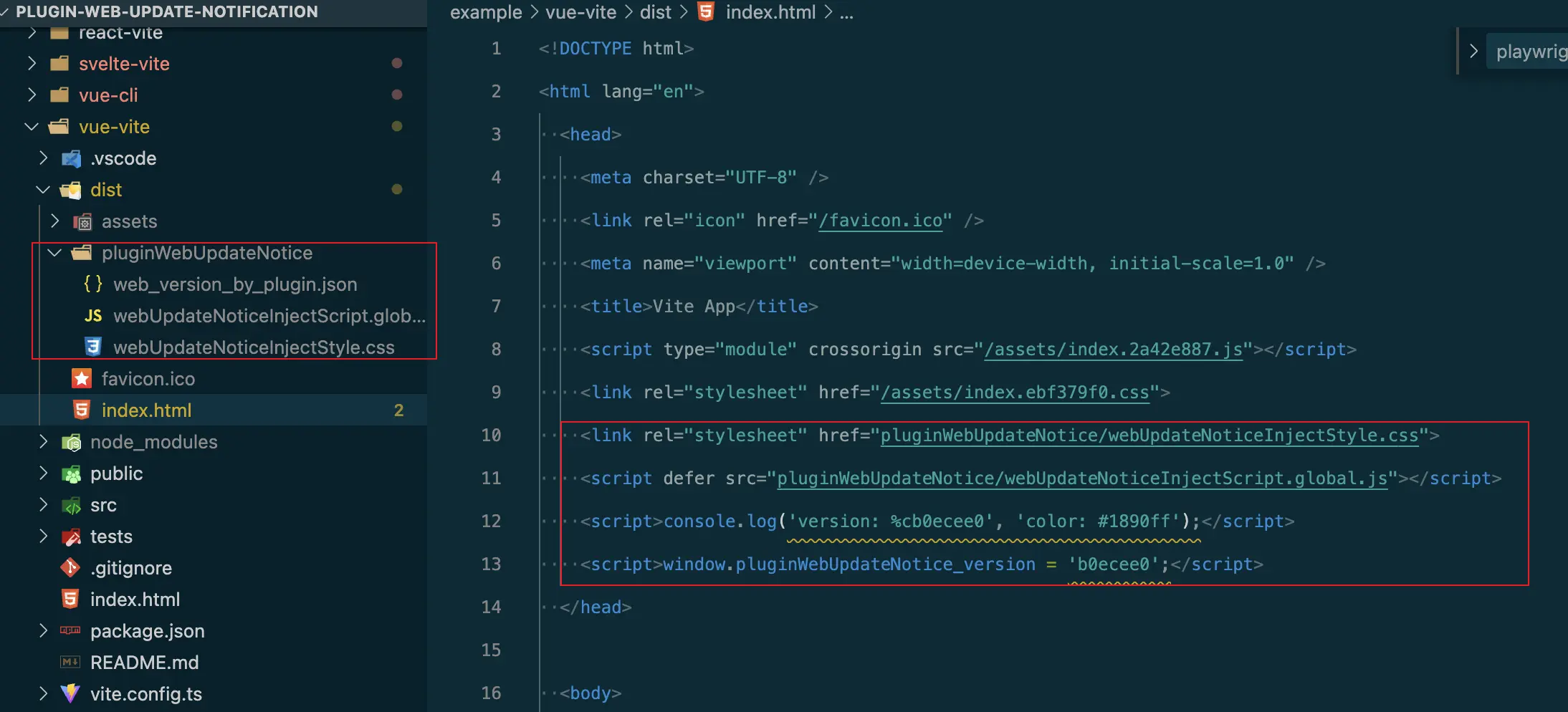
}
-
TypeScript的智能提示, 如果你想使用window.pluginWebUpdateNotice_.或监听自定义更新事件。// src/shim.d.ts // if you use vite plugin /// <reference types="@plugin-web-update-notification/vite" /> // if you use umi plugin /// <reference types="@plugin-web-update-notification/umijs" /> // if you use webpack plugin /// <reference types="@plugin-web-update-notification/webpack" />
-
请求
version.json文件提示404 error。上传打包内容到 cdn 服务器:
// vite.config.ts

const prod = process.env.NODE_ENV === 'production'

const cdnServerUrl = 'https://foo.com/'

export default defineConfig({
  base: prod ? cdnServerUrl : '/',
  plugins: [
    vue(),
    webUpdateNotice({
      injectFileBase: cdnServerUrl,
    }),
  ],
})
在非根目录下部署的项目:
// vite.config.ts

const prod = process.env.NODE_ENV === 'production'

const base = '/folder/' // https://example.com/folder/

export default defineConfig({
  base,
  plugins: [
    vue(),
    webUpdateNotice({
      injectFileBase: base,
    }),
  ],
})
After version 1.2.0, you not need to set this option, it will be automatically detected from the base of vite config、publicPath of webpack config or publicPath of umi config
-
自定义
notification的刷新和忽略按钮事件。// refresh button click event, if you set it, it will cover the default event (location.reload()) window.pluginWebUpdateNotice_.onClickRefresh = (version) => { alert(`click refresh btn: ${version}`) } // dismiss button click event, if you set it, it will cover the default event (dismissUpdate()) window.pluginWebUpdateNotice_.onClickDismiss = (version) => { alert(`click dismiss btn: ${version}`) }
-
自定义 notification 样式。
你可以通过更高的权重覆盖默认样式。(default css file)
<!-- notification html content -->

<div class="plugin-web-update-notice-anchor">
  <div class="plugin-web-update-notice">
    <div class="plugin-web-update-notice-content" data-cy="notification-content">
      <div class="plugin-web-update-notice-content-title">📢 system update</div>
      <div class="plugin-web-update-notice-content-desc">
        System update, please refresh the page
      </div>
      <div class="plugin-web-update-notice-tools">
        <a class="plugin-web-update-notice-btn plugin-web-update-notice-dismiss-btn">dismiss</a>
        <a class="plugin-web-update-notice-btn plugin-web-update-notice-refresh-btn">
          refresh
        </a>
      </div>
    </div>
  </div>
</div>
-
手动检测更新
// vue-router check update before each route change
router.beforeEach((to, from, next) => {
  window.pluginWebUpdateNotice_.checkUpdate()
  next()
})
-
部分版本不通知。如客户版本是
v1.0, 你需要更新v1.0.1, 但不想显示更新提示。webUpdateNotice({ ... silence: true })