- Download the latest Unity Package. Check the releases on this repository to find the version you want, or click here for the latest release.
- Extract the Unity Package in your project.
Optional - If you leave Global Gravity on, objects will still react as normal as well with the gravity sources, however you might want to make global gravity weaker or gravity sources stronger - Set 3D global gravity to 0.
- To change 3D physics, go to ProjectSettings -> Physics

Optional - If you leave Global Gravity on, objects will still react as normal as well with the gravity sources, however you might want to make global gravity weaker or gravity sources stronger - Set 2D global gravity to 0.
- To change 2D physics, go to ProjectSettings -> Physics 2D

- Apply a
ColliderandRigidbodyto your item. - Make sure
Use Gravityis TRUE on the rigidbody. IfUse Gravityis false, it will not be affected by the gravity sources. - Add a
GravityItemScript to the item.
- Apply a
Collider2DandRigidbody2Dto your item. - Make sure
Gravity Scaleis ABOVE 0 on the rigidbody. IfGravity Scaleis below 0, it will not be affected by the gravity sources. - Add a
GravityItem2DScript to the item.
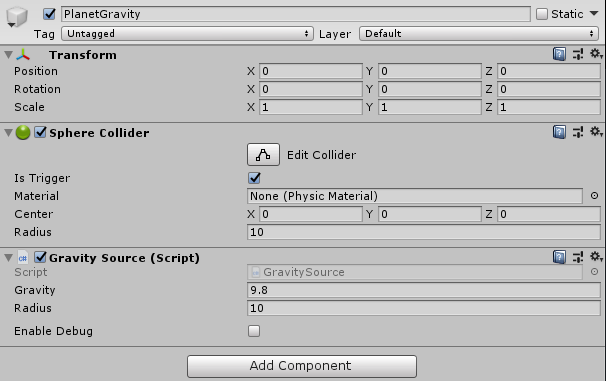
- Create an Empty GameObject in the centre of your planet or platform.
- Add a
Collider- You can use any collider, but sphere colliders are best for planet gravity - Make sure
Is Triggeris TRUE on the collider. - You can add multiple colliders and they will all work as the gravity field. - But they MUST be on this GameObject
- Add any gravity source script to the GameObject with the Colliders.
- Optional - Set the
Gravity Strengthon the Gravity Source. The default gravity is Earth's Gravity - Optional - Set
Enable Debugto true to see the radius of the Gravity Source and what objects are being affected by the Gravity Source. - Optional - On Directional Gravity Set
Gravity Directionto control which way gravity will face. The default option is down.
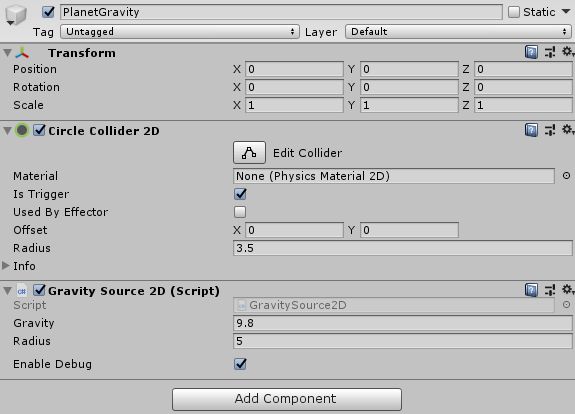
- Create an Empty GameObject in the centre of your planet or platform.
- Add a
Collider2D- You can use any collider, but circle colliders are best for planet gravity - Make sure
Is Triggeris TRUE on the collider 2D. - You can add multiple colliders and they will all work as the gravity field. - But they MUST be on this GameObject
- Add any Gravity Source 2D script to the GameObject with the Colliders.
- Optional - Set the
Gravity Strengthon the Gravity Source. The default gravity is Earth's Gravity - Optional - Set
Enable Debugto true to see the radius of the Gravity Source and what objects are being affected by the Gravity Source. - Optional - On Directional Gravity Set
Gravity Directionto control which way gravity will face. The default option is down.