
Replies: 14 comments

|
Hi @jkhamler, We'll need to look into this with your use case in mind, as this is something we did not consider but could definitely be achievable. Did you look into extending Twill's |

|
Hi @ifox thanks for getting back to me. For now I've decided to just work within the 'out of the box' Twill setup as that's proving enough of a challenge for now. May well come back to this in due course. |
|
Hi @ifox @yanhao-li - it's time that I looked back at this. Essentially I want to authenticate using our existing functionality (which is based on standard Laravel authentication) so that the Twill/CMS section can just sit within our existing application without having to login twice or maintain a separate users table. I'm guessing I need to override some functionality in If you could offer some pointers to steer me in the right direction that would be incredibly useful - thanks guys! |
|
Just a brief comment to hopefully bump this issue back up. We are urgently looking for a way to use Twill with our existing login/authentication - a question of consolidating the middleware I think. |

|
This is exactly what I need too :) |
|
Glad to hear I'm not the only one @tchapi - I would have thought this was a fairly common use case, as the whole point of Twill is that it integrates so nicely with existing Laravel applications. I'm absolutely loving what it can do, I've just got a few things to get production ready (like the login) Looking forward to some updates from the team :-) |
|
I need to test things out but have an idea in mind that you can probably try on your end. What if you rename the |
|
Hi @ifox I've done as you say, renaming the So far, I login as usual but when I try and access the Twill admin panel, I still get prompted to log in by Twill. |
|
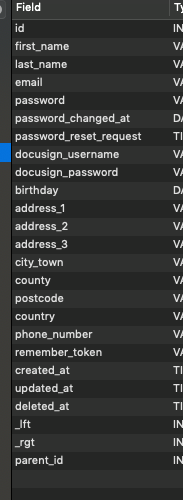
This is my schema for the
|
|
Hi @jkhamler are you using a subdomain for Twill? If you do you'll need to use |
|
You will also definitely need to replicate fields like role and change the |
|
Hi @ifox Ok that sounds like a good start - I will try and tackle this today. When you say this, what exactly do you mean? Is there an update coming shortly?
|

|
I know this is an old topic, but i didn't find any new topics on this. |

|
Bumping this again as it's something I'd love to get working as well. Currently trying to Ralph Wiggam my way through it and will follow up with any progress that I make. |


Uh oh!
There was an error while loading. Please reload this page.
Hi guys,
Not an 'issue' per say but I'm very new to Vue.js and front end development in general (I have worked exclusively in server side PHP for the past 8-9 years) and would greatly appreciate a bit of guidance.
I'm trying to integrate Twill within a module within a fairly standard Laravel application. I already have authentication implemented so I want to side-step the Twill user/authentication stuff. Essentially I want to drop the Twill admin UI into an existing view/controller action with the minimum of fuss.
Could you offer some steps of how I can achieve this? For examples sake, my controller lives here:
Modules\Cms\Http\Controllers\PageController (indexAction)
How exactly can I drop in the pre-setup Twill admin view to my own custom action? Do I need to copy the relevant code over from the vendor folder to my module or is it possible to just extend/reference the classes?
Many thanks
Jon
All reactions