
Plugin.Maui.Health provides the ability to access personal health data in your .NET MAUI application.


Available on NuGet.
Install with the dotnet CLI: dotnet add package Plugin.Maui.Health, or through the NuGet Package Manager in Visual Studio.
| Platform | Minimum Version | Health Backend |
|---|---|---|
| iOS | 15.0+ | Apple HealthKit |
| Android | API 30+ (Android 11+) | Health Connect |
Android note: Health Connect is pre-installed on Android 14+ and available as a standalone app from the Play Store on Android 11–13.
IsSupportedreturnsfalseif Health Connect is not installed.
HealthKit is a restricted capability. Before your app can access any health data you must explicitly enable it for your App ID in the Apple Developer Portal, otherwise entitlements signing will fail at build time and HealthKit will be unavailable at runtime.
- Sign in to developer.apple.com and go to Certificates, Identifiers & Profiles → Identifiers.
- Select (or create) the App ID for your app.
- In the Capabilities list, enable HealthKit.
- Save the changes and regenerate any provisioning profiles that use this App ID (Xcode or the portal will prompt you).
HealthKit is not available in the iOS Simulator — all HealthKit calls will throw
"HealthKit not available on your device". Use a physical iPhone or iPad for testing.
<PropertyGroup>
  <TargetFrameworks>net10.0-ios;net10.0-android</TargetFrameworks>
</PropertyGroup>

<PropertyGroup Condition="'$(TargetFramework)' == 'net10.0-ios'">
  <!-- HealthKit features used by this plugin require iOS 15 at minimum -->
  <SupportedOSPlatformVersion>15.0</SupportedOSPlatformVersion>
</PropertyGroup>Create Platforms/iOS/Entitlements.plist in your project. The com.apple.developer.healthkit key is required — without it the app will be rejected during code signing.
<?xml version="1.0" encoding="UTF-8"?>
<!DOCTYPE plist PUBLIC "-//Apple//DTD PLIST 1.0//EN" "http://www.apple.com/DTDs/PropertyList-1.0.dtd">
<plist version="1.0">
<dict>
    <key>com.apple.developer.healthkit</key>
    <true/>
</dict>
</plist>
.NET MAUI automatically picks up Platforms/iOS/Entitlements.plist during the iOS build. If you store the file elsewhere, point to it explicitly in your .csproj:
<PropertyGroup Condition="'$(TargetFramework)' == 'net10.0-ios'">
  <CodesignEntitlements>path\to\Entitlements.plist</CodesignEntitlements>
</PropertyGroup>iOS requires a human-readable explanation for every HealthKit access type. Without these keys the app will crash on the first HealthKit call.
Add the following to Platforms/iOS/Info.plist:
<!-- Required if you read any health data -->
<key>NSHealthShareUsageDescription</key>
<string>This app reads your health data to display your activity and body metrics.</string>

<!-- Required if you write any health data -->
<key>NSHealthUpdateUsageDescription</key>
<string>This app writes health data such as steps and body measurements on your behalf.</string>
Use clear, specific descriptions — Apple reviewers reject vague strings.
In MauiProgram.cs, register HealthDataProvider.Default with the DI container:
builder.Services.AddSingleton(HealthDataProvider.Default);Android uses Health Connect as the health data backend. The setup involves .csproj settings, a manifest change, a NuGet conflict fix, and integrating the Health Connect consent flow into your MainActivity.
| Android version | Health Connect |
|---|---|
| Android 14+ (API 34+) | Pre-installed as a system component |
| Android 11–13 (API 30–33) | Must be installed by the user from the Play Store |
| Below Android 11 (API < 30) | Not supported — IsSupported returns false |
Your app should check HealthDataProvider.Default.IsSupported before making any calls and guide users to install Health Connect when it is missing:
if (!healthDataProvider.IsSupported)
{
    // Direct the user to install Health Connect from the Play Store.
    var intent = new Android.Content.Intent(
        Android.Content.Intent.ActionView,
        Android.Net.Uri.Parse("market://details?id=com.google.android.apps.healthdata"));
    Platform.CurrentActivity?.StartActivity(intent);
    return;
}<PropertyGroup Condition="'$(TargetFramework)' == 'net10.0-android'">
<!-- Health Connect requires API 30 minimum -->
<AndroidMinSdkVersion>30</AndroidMinSdkVersion>
<!-- Target API 35 for Google Play compliance -->
<AndroidTargetSdkVersion>35</AndroidTargetSdkVersion>
<SupportedOSPlatformVersion>30.0</SupportedOSPlatformVersion>
</PropertyGroup>
<ItemGroup Condition="$(TargetFramework.Contains('-android'))">
<!-- Health Connect pulls a newer Lifecycle.LiveData.Core than MAUI bundles.
Pin it here to resolve the NU1107 version conflict at restore time. -->
<PackageReference Include="Xamarin.AndroidX.Lifecycle.LiveData.Core" Version="2.10.0.2" />
</ItemGroup>Edit Platforms/Android/AndroidManifest.xml. Three things are required:
a) <queries> block — tells Android that your app intends to interact with the Health Connect app. Without this the OS will not route Health Connect intents to your app on Android 11+.
b) Intent filter on MainActivity — registers your activity as the screen shown when users tap "See all apps that can access this data" inside Health Connect. android:exported="true" is required on Android 12+ for any activity with an intent filter.
c) <uses-permission> declarations — declare every health permission your app needs. Only declare what you actually use; superfluous permissions slow down the consent sheet and may trigger Play Store review.
<?xml version="1.0" encoding="utf-8"?>
<manifest xmlns:android="http://schemas.android.com/apk/res/android">
  <application
    android:allowBackup="true"
    android:icon="@mipmap/appicon"
    android:roundIcon="@mipmap/appicon_round"
    android:supportsRtl="true">

    <!-- b) Register the rationale screen shown inside Health Connect -->
    <activity android:name=".MainActivity" android:exported="true">
      <intent-filter>
        <action android:name="androidx.health.ACTION_SHOW_PERMISSIONS_RATIONALE" />
      </intent-filter>
    </activity>
  </application>

  <!-- a) Allow the OS to discover the Health Connect app -->
  <queries>
    <package android:name="com.google.android.apps.healthdata" />
  </queries>

  <!-- c) Health Connect permissions — add only what your app uses -->
  <uses-permission android:name="android.permission.health.READ_STEPS" />
  <uses-permission android:name="android.permission.health.WRITE_STEPS" />
  <uses-permission android:name="android.permission.health.READ_HEART_RATE" />
  <uses-permission android:name="android.permission.health.WRITE_HEART_RATE" />
  <!-- ... see the feature matrix below for all available permission strings -->
</manifest>Health Connect does not auto-launch its permission sheet. You must register an ActivityResultLauncher in MainActivity and call it when CheckPermissionAsync returns false.
The launcher uses PermissionController.CreateRequestPermissionResultContract() — the official Health Connect contract — and returns a Task so ViewModels can await it directly.
using Android.App;
using Android.Content.PM;
using Android.OS;
using AndroidX.Activity.Result;
using AndroidX.Activity.Result.Contract;
using AndroidX.Health.Connect.Client;
using Plugin.Maui.Health.Enums;

namespace YourApp;

[Activity(Theme = "@style/Maui.SplashTheme", MainLauncher = true,
    ConfigurationChanges = ConfigChanges.ScreenSize | ConfigChanges.Orientation |
                           ConfigChanges.UiMode | ConfigChanges.ScreenLayout |
                           ConfigChanges.SmallestScreenSize | ConfigChanges.Density)]
public class MainActivity : MauiAppCompatActivity
{
    // Exposed so ViewModels can reach the launcher without DI.
    public static MainActivity? Current { get; private set; }

    ActivityResultLauncher? _permissionLauncher;
    TaskCompletionSource? _pendingRequest;

    protected override void OnCreate(Bundle? savedInstanceState)
    {
        Current = this;
        base.OnCreate(savedInstanceState);

        _permissionLauncher = RegisterForActivityResult(
            PermissionController.CreateRequestPermissionResultContract(),
            new PermissionResultCallback(() =>
            {
                _pendingRequest?.TrySetResult();
                _pendingRequest = null;
            }));
    }

    protected override void OnDestroy()
    {
        if (Current == this) Current = null;
        base.OnDestroy();
    }

    /// <summary>
    /// Opens the Health Connect consent sheet for the given permission strings.
    /// Returns after the user has granted or denied the request.
    /// </summary>
    public Task RequestHealthPermissionsAsync(IEnumerable<string> permissions)
    {
        if (_permissionLauncher is null) return Task.CompletedTask;

        var javaSet = new Java.Util.HashSet();
        foreach (var p in permissions)
            javaSet.Add(new Java.Lang.String(p));

        if (javaSet.IsEmpty) return Task.CompletedTask;

        _pendingRequest = new TaskCompletionSource();
        _permissionLauncher.Launch(javaSet);
        return _pendingRequest.Task;
    }

    // Bridges the Java IActivityResultCallback interface to a C# Action.
    sealed class PermissionResultCallback : Java.Lang.Object, IActivityResultCallback
    {
        readonly Action _onResult;
        public PermissionResultCallback(Action onResult) => _onResult = onResult;
        public void OnActivityResult(Java.Lang.Object? result) => _onResult();
    }
}
Pattern for ViewModels: Call
CheckPermissionAsyncfirst. If it returnsfalse, callMainActivity.Current?.RequestHealthPermissionsAsync(permissionStrings)andawaitit, then callCheckPermissionAsyncagain to get the updated result.
In MauiProgram.cs, register HealthDataProvider.Default with the DI container:
builder.Services.AddSingleton(HealthDataProvider.Default);Apps that access Health Connect data must comply with Google's Health Connect permissions policy:
- Your app's Privacy Policy must disclose which health data types you access and how they are used.
- In the Play Console, go to App content → Health Connect and complete the declaration form.
- The
ACTION_SHOW_PERMISSIONS_RATIONALEactivity you registered in Step 3 must display a clear rationale screen explaining why the app needs each permission.
Apps that skip these steps will be rejected during Play Store review.
Register the plugin with the MauiAppBuilder:
builder.Services.AddSingleton(Health.Default);You can then depend on IHealth in your ViewModels:
public class HealthViewModel
{
    readonly IHealth health;

    public HealthViewModel(IHealth health)
    {
        this.health = health;
    }
}Alternatively, use Health.Default directly without DI:
var stepsCount = await Health.Default.ReadCountAsync(
    HealthParameter.StepCount,
    DateTimeOffset.Now.AddDays(-1),
DateTimeOffset.Now);| Member | Description |
|---|---|
IsSupported |
Returns true if the platform health backend is available on this device. |
| Method | Description |
|---|---|
CheckPermissionAsync(param, type) |
Checks whether the specified read/write permission is currently granted. |
ReadCountAsync(param, from, until) |
Returns the cumulative sum for count-based parameters (e.g. steps, flights climbed). |
ReadLatestAsync(param, from, until, unit) |
Returns the most recent single value within the date range. |
ReadLatestAvailableAsync(param, unit) |
Returns the most recent value ever recorded, as a Sample. |
ReadAverageAsync(param, from, until, unit) |
Returns the average over the date range. |
ReadMinAsync(param, from, until, unit) |
Returns the minimum value over the date range. |
ReadMaxAsync(param, from, until, unit) |
Returns the maximum value over the date range. |
ReadAllAsync(param, from, until, unit) |
Returns all samples in the date range as IEnumerable<Sample>. |
WriteAsync(param, date, value, unit) |
Writes a single value to the health store. |
ReadWorkoutsAsync(type, from, until) |
Returns all workout sessions in the date range, including GPS routes if available. |
ReadLatestWorkoutAsync(type, from, until) |
Returns the most recent workout session. |
WriteWorkoutAsync(session) |
Writes a workout session (with optional GPS route) to the health store. |
All async methods accept an optional CancellationToken as the last parameter.
Sample — returned by read methods:
| Property | Type | Description |
|---|---|---|
From |
DateTimeOffset? |
Sample start time |
Until |
DateTimeOffset? |
Sample end time |
Value |
double? |
The numeric value |
Unit |
string? |
Unit string (e.g. "kg", "count/min") |
Source |
string? |
App or device that recorded the sample |
Description |
string |
Human-readable label |
WorkoutSession — returned by workout read methods:
| Property | Type | Description |
|---|---|---|
WorkoutType |
WorkoutType |
Activity type (Running, Cycling, …) |
From |
DateTimeOffset |
Start time |
Until |
DateTimeOffset |
End time |
TotalDistanceInMeters |
double? |
Total distance |
EnergyBurnedInCalories |
double? |
Active calories burned |
Title |
string? |
Display name (Android only; always null on iOS) |
Route |
IReadOnlyList<RoutePoint> |
GPS track points |
Use the Constants.Units static class to avoid typos in unit strings:
Units.Mass.Kilograms          // "kg"
Units.Mass.Pounds             // "lb"
Units.Length.Meters           // "m"
Units.Length.Centimeters      // "cm"
Units.Energy.Kilocalories     // "kcal"
Units.Concentration.MillilitersPerKilogramPerMinute  // for VO2Max
Units.Concentration.MillimolesPerLiter // for BloodGlucosevar hasPermission = await health.CheckPermissionAsync(
HealthParameter.StepCount,
PermissionType.Read | PermissionType.Write);
if (!hasPermission)
{
// iOS: HealthKit shows its own consent sheet automatically.
// Android: launch the Health Connect consent UI via your ActivityResultLauncher.
#if ANDROID
(Platform.CurrentActivity as MainActivity)?.RequestHealthPermissions(
new[] { "android.permission.health.READ_STEPS", "android.permission.health.WRITE_STEPS" });
#endif
}var hasPermission = await health.CheckPermissionAsync(HealthParameter.StepCount, PermissionType.Read);
if (hasPermission)
{
var steps = await health.ReadCountAsync(
HealthParameter.StepCount,
DateTimeOffset.Now.AddDays(-1),
DateTimeOffset.Now);
}var sample = await health.ReadLatestAvailableAsync(HealthParameter.BodyMass, Units.Mass.Kilograms);
double kg = sample?.Value ?? 0;var hasPermission = await health.CheckPermissionAsync(HealthParameter.BodyMass, PermissionType.Write);
if (hasPermission)
{
await health.WriteAsync(HealthParameter.BodyMass, DateTimeOffset.Now, 75.5, Units.Mass.Kilograms);
}var samples = await health.ReadAllAsync(
HealthParameter.HeartRate,
DateTimeOffset.Now.AddHours(-6),
DateTimeOffset.Now,
Units.Others.CountPerMinute);var workouts = await health.ReadWorkoutsAsync(
WorkoutType.Running,
DateTimeOffset.Now.AddDays(-7),
DateTimeOffset.Now);
foreach (var w in workouts)
{
Console.WriteLine($"{w.WorkoutType}: {w.TotalDistanceInMeters:F0} m, {w.Route.Count} GPS points");
}Legend: Y = supported, — = not supported on this platform
| HealthParameter | iOS | Android | Android Permission |
|---|---|---|---|
BodyMassIndex |
Y | — | — |
BodyMass |
Y | Y | health.READ_WEIGHT / WRITE_WEIGHT |
Height |
Y | Y | health.READ_HEIGHT / WRITE_HEIGHT |
BodyFatPercentage |
Y | Y | health.READ_BODY_FAT / WRITE_BODY_FAT |
LeanBodyMass |
Y | Y | health.READ_LEAN_BODY_MASS / WRITE_LEAN_BODY_MASS |
WaistCircumference |
Y | — | — |
| HealthParameter | iOS | Android | Android Permission |
|---|---|---|---|
HeartRate |
Y | Y | health.READ_HEART_RATE / WRITE_HEART_RATE |
RestingHeartRate |
Y | Y | health.READ_RESTING_HEART_RATE / WRITE_RESTING_HEART_RATE |
WalkingHeartRateAverage |
Y | — | — |
HeartRateVariabilitySdnn |
Y | Y | health.READ_HEART_RATE_VARIABILITY / WRITE_HEART_RATE_VARIABILITY |
HeartRateRecoveryOneMinute |
Y | — | — |
AtrialFibrillationBurden |
Y | — | — |
| HealthParameter | iOS | Android | Android Permission |
|---|---|---|---|
StepCount |
Y | Y | health.READ_STEPS / WRITE_STEPS |
DistanceWalkingRunning |
Y | Y | health.READ_DISTANCE / WRITE_DISTANCE |
DistanceCycling |
Y | Y | health.READ_DISTANCE / WRITE_DISTANCE |
DistanceSwimming |
Y | — | — |
DistanceWheelchair |
Y | — | — |
DistanceDownhillSnowSports |
Y | — | — |
ActiveEnergyBurned |
Y | Y | health.READ_ACTIVE_CALORIES_BURNED / WRITE_ACTIVE_CALORIES_BURNED |
BasalEnergyBurned |
Y | Y | health.READ_BASAL_METABOLIC_RATE / WRITE_BASAL_METABOLIC_RATE |
FlightsClimbed |
Y | Y | health.READ_FLOORS_CLIMBED / WRITE_FLOORS_CLIMBED |
ExerciseTime |
Y | Y | health.READ_EXERCISE / WRITE_EXERCISE |
StandTime |
Y | — | — |
MoveTime |
Y | — | — |
PushCount |
Y | — | — |
SwimmingStrokeCount |
Y | — | — |
NikeFuel |
Y | — | — |
| HealthParameter | iOS | Android | Android Permission |
|---|---|---|---|
BloodGlucose |
Y | Y | health.READ_BLOOD_GLUCOSE / WRITE_BLOOD_GLUCOSE |
BloodPressureSystolic |
Y | Y | health.READ_BLOOD_PRESSURE / WRITE_BLOOD_PRESSURE |
BloodPressureDiastolic |
Y | Y | health.READ_BLOOD_PRESSURE / WRITE_BLOOD_PRESSURE |
OxygenSaturation |
Y | Y | health.READ_OXYGEN_SATURATION / WRITE_OXYGEN_SATURATION |
BodyTemperature |
Y | Y | health.READ_BODY_TEMPERATURE / WRITE_BODY_TEMPERATURE |
BasalBodyTemperature |
Y | Y | health.READ_BASAL_BODY_TEMPERATURE / WRITE_BASAL_BODY_TEMPERATURE |
RespiratoryRate |
Y | Y | health.READ_RESPIRATORY_RATE / WRITE_RESPIRATORY_RATE |
VO2Max |
Y | Y | health.READ_VO2_MAX / WRITE_VO2_MAX |
InsulinDelivery |
Y | — | — |
BloodAlcoholContent |
Y | — | — |
PeripheralPerfusionIndex |
Y | — | — |
| HealthParameter | iOS | Android | Android Permission |
|---|---|---|---|
ForcedVitalCapacity |
Y | — | — |
ForcedExpiratoryVolume1 |
Y | — | — |
PeakExpiratoryFlowRate |
Y | — | — |
InhalerUsage |
Y | — | — |
| HealthParameter | iOS | Android | Android Permission |
|---|---|---|---|
WalkingSpeed |
Y | Y | health.READ_SPEED / WRITE_SPEED |
RunningSpeed |
Y | Y | health.READ_SPEED / WRITE_SPEED |
RunningPower |
Y | Y | health.READ_POWER / WRITE_POWER |
WalkingStepLength |
Y | — | — |
WalkingAsymmetryPercentage |
Y | — | — |
WalkingDoubleSupportPercentage |
Y | — | — |
WalkingSteadiness |
Y | — | — |
SixMinuteWalkTestDistance |
Y | — | — |
StairAscentSpeed |
Y | — | — |
StairDescentSpeed |
Y | — | — |
RunningGroundContactTime |
Y | — | — |
RunningStrideLength |
Y | — | — |
RunningVerticalOscillation |
Y | — | — |
| Feature | iOS | Android | Android Permission |
|---|---|---|---|
| Read workouts | Y | Y | health.READ_EXERCISE |
| Write workouts | Y | Y | health.WRITE_EXERCISE |
| GPS route (read) | Y | Y | health.READ_EXERCISE_ROUTES |
| GPS route (write) | Y | Y | health.WRITE_EXERCISE_ROUTE |
All nutrition parameters use health.READ_NUTRITION / WRITE_NUTRITION on Android. Water uses health.READ_HYDRATION / WRITE_HYDRATION.
| HealthParameter | iOS | Android |
|---|---|---|
DietaryWater |
Y | Y |
DietaryEnergyConsumed |
Y | Y |
DietaryProtein |
Y | Y |
DietaryCarbohydrates |
Y | Y |
DietaryFatTotal |
Y | Y |
DietaryFatSaturated |
Y | Y |
DietaryFatMonounsaturated |
Y | Y |
DietaryFatPolyunsaturated |
Y | Y |
DietaryFiber |
Y | Y |
DietarySugar |
Y | Y |
DietaryCholesterol |
Y | Y |
DietarySodium |
Y | Y |
DietaryCalcium |
Y | Y |
DietaryIron |
Y | Y |
DietaryPotassium |
Y | Y |
DietaryVitaminA |
Y | Y |
DietaryVitaminB6 |
Y | Y |
DietaryVitaminB12 |
Y | Y |
DietaryVitaminC |
Y | Y |
DietaryVitaminD |
Y | Y |
DietaryVitaminE |
Y | Y |
DietaryVitaminK |
Y | Y |
DietaryBiotin |
Y | Y |
DietaryCaffeine |
Y | Y |
DietaryChloride |
Y | Y |
DietaryChromium |
Y | Y |
DietaryCopper |
Y | Y |
DietaryFolate |
Y | Y |
DietaryIodine |
Y | Y |
DietaryMagnesium |
Y | Y |
DietaryManganese |
Y | Y |
DietaryMolybdenum |
Y | Y |
DietaryNiacin |
Y | Y |
DietaryPantothenicAcid |
Y | Y |
DietaryPhosphorus |
Y | Y |
DietaryRiboflavin |
Y | Y |
DietarySelenium |
Y | Y |
DietaryThiamin |
Y | Y |
DietaryZinc |
Y | Y |
| HealthParameter | iOS | Android |
|---|---|---|
UVExposure |
Y | — |
ElectrodermalActivity |
Y | — |
EnvironmentalAudioExposure |
Y | — |
HeadphoneAudioExposure |
Y | — |
NumberOfTimesFallen |
Y | — |
NumberOfAlcoholicBeverages |
Y | — |
SleepingWristTemperature |
Y | — |
UnderwaterDepth |
Y | — |
WaterTemperature |
Y | — |


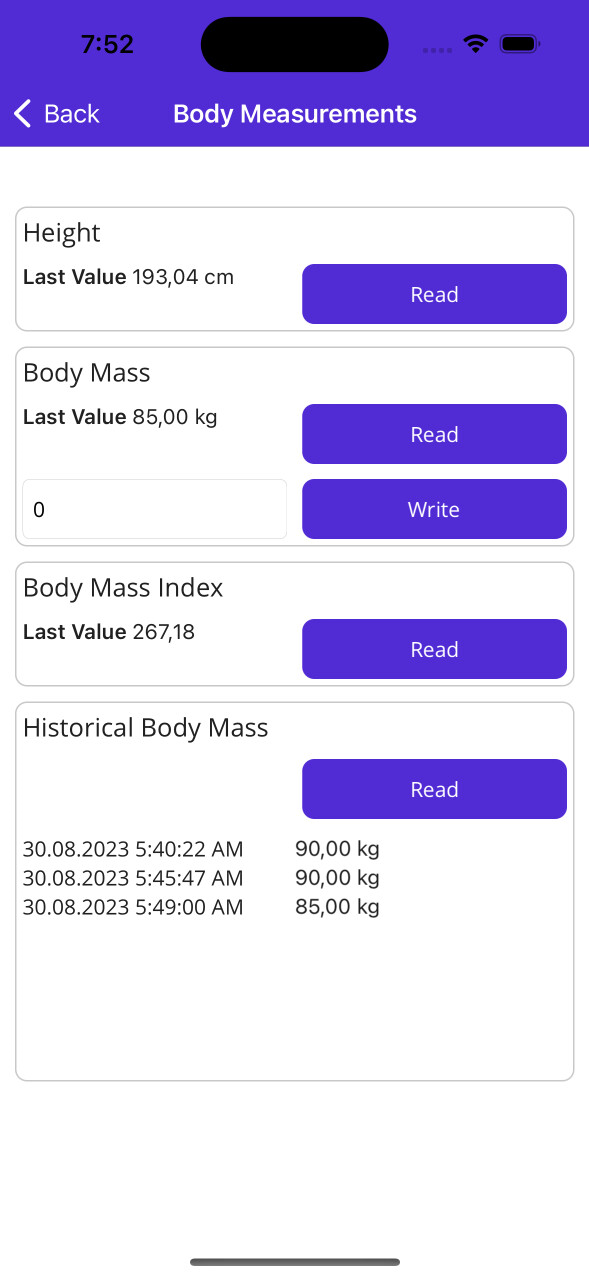

Try the sample app to test the plugin on your own device.
- Always pass the correct
HealthParametertogether with its matching unit string. Use theConstants.Unitshelper class to avoid typos. - On Android,
ReadAllAsyncreturns at most 1,000 records per call. For high-frequency sensors (heart rate, speed) over long time ranges, split your query into smaller intervals. - On iOS,
CheckPermissionAsyncfor read permission always returnstrueafter the user has seen the consent sheet — HealthKit does not reveal whether read access was actually granted. Only write permission denials are detectable. - On Android,
CheckPermissionAsyncreturnsfalsefor parameters that are not supported by Health Connect (see matrix above). These parameters will also throwHealthExceptionif passed to any read/write method.
This project could not have came to be without these projects and people, thank you! <3
- We thank Gerald Versluis (@jfversluis) for his excellent template Plugin.Maui.Template