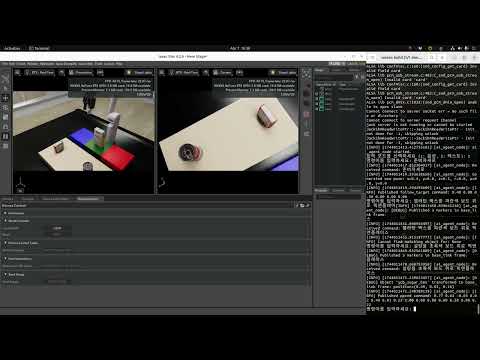
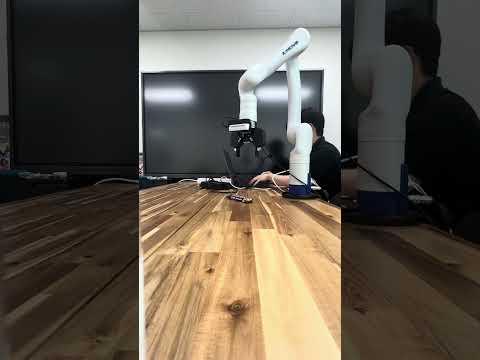
✅ Tested on Ubuntu 22.04 with NVIDIA RTX 4090
Lang2Pose is a modular robot control framework that interprets natural language commands for end-effector control and pick-and-place tasks. Built on ROS 2, the system integrates:
- Large Language Model (LLM): Converts natural language into structured robot actions.
- Perception Module: Uses FoundationPose for 6D object pose estimation from RGB-D input and segmentation masks.
- Motion Planning: Employs Lula IK for simulation in Isaac Sim and MoveIt 2 for real-world execution.
We validate Lang2Pose with both simulated and real robots — a Kinova Gen3 arm and a Robotiq 2F-85 gripper. Simulations leverage high-fidelity physics in Isaac Sim, while real-world experiments use fine-tuned YOLO/YOLO-seg models and Realsense RGB-D data. Lang2Pose enables intuitive language-driven manipulation and demonstrates robustness even under partial occlusion.
Please set up and run Isaac Sim using NVIDIA’s official container guide:
👉 Isaac Sim 4.2 — Container Installation & Run Guide
Checklist (quick sanity):
- NVIDIA Driver installed & GPU accessible from Docker
nvidia-container-toolkitconfigured- Run with GPU runtime and X11 forwarding (GUI)
- Accept EULA and privacy consent env vars set (as required by the doc)
- Adequate shared memory (
/dev/shm) and proper volume mounts
Follow the exact steps and environment variables from the official doc for your OS/driver setup.
-
Download the robot USD file: 👉 Download Robot USD
-
Place the file at:
resources/assets/robot.usd
robot.usd!
- Create a
.envfile inside the following directory:
resources/llmagent/.env
- Add your OpenAI API Key in the following format (replace with your actual key):
OPENAI_API_KEY=sk-xxxxxxx...
- Make sure the file is named exactly .env and located in the resources/llmagent folder. This file will be automatically loaded inside the container at runtime.
-
Start the containers
docker compose up -d
-
Enter the LLM agent container (for natural language input)
docker exec -it llmagent bash -
Wait for Isaac Sim to launch, then inside the simulator:

- Go to Window > Extensions > 3rd party > User
- Find
aisl.robrain.extensionunder 3rd party - Disable it once, then re-enable it
- Finally, open:
- Isaac Examples → lang2pose
- Start the demo 🎉
- Vision-based Pick & Place: Integration with the perception module for language-guided pick-and-place tasks will be released soon.
- Real-World Demonstrations: Experiments with the physical robot setup will be provided shortly.