We present Y-MAP-Net, a Y-shaped neural network architecture designed for real-time multi-task learning on RGB images. Y-MAP-Net simultaneously predicts depth, surface normals, human pose, semantic segmentation, and generates multi-label captions in a single forward pass. To achieve this, we adopt a multi-teacher, single-student training paradigm, where task-specific foundation models supervise the learning of the network, allowing it to distill their capabilities into a unified real-time inference architecture. Y-MAP-Net exhibits strong generalization, architectural simplicity, and computational efficiency, making it well-suited for resource-constrained robotic platforms. By providing rich 3D, semantic, and contextual scene understanding from low-cost RGB cameras, Y-MAP-Net supports key robotic capabilities such as object manipulation and human–robot interaction.

One click deployment in Google Collab :

- Real-time inference from webcam, video files, image folders or screen capture
- Multi-task outputs: 2D pose (17 COCO joints), depth, surface normals, segmentation, and text token embeddings
- Multiple backends: TensorFlow, TFLite, JAX and ONNX
- Interactive web UI via Gradio
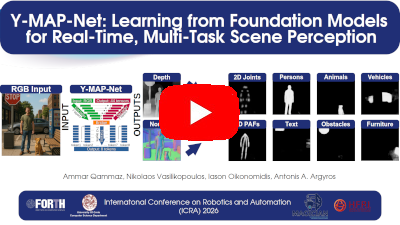
Youtube Supplementary Video of Y-MAP-Net
# Automated setup (creates a virtual environment and installs dependencies)
scripts/setup.sh
source venv/bin/activate
Or using Docker:
docker/build_and_deploy.sh
docker run ymapnet-container
docker attach ymapnet-container
cd workspace
scripts/setup.sh
source venv/bin/activatescripts/downloadPretrained.sh
./runYMAPNet.shThis starts real-time pose estimation from your default webcam.
To perform vehicle counting (supplementary example)
wget http://ammar.gr/datasets/car.mp4
./runYMAPNet.sh --from car.mp4 --fast --monitor Vehicle 100 128 right --monitor Vehicle 190 128 left
The "left" and "right" windows will contain the detection results graph
# Webcam (default)
./runYMAPNet.sh

# Video file
./runYMAPNet.sh --from /path/to/video.mp4

# Image directory / sequence
./runYMAPNet.sh --from /path/to/images/

# Screen capture
./runYMAPNet.sh --from screen

# Specific video device
./runYMAPNet.sh --from /dev/video0| Flag | Description |
|---|---|
--size W H |
Set input resolution (e.g. --size 640 480) |
--cpu |
Force CPU-only inference (slower) |
--fast |
Disable depth refinement, person ID, and skeleton resolution for speed |
--save |
Save output frames to disk |
--headless |
Run without any display window |
--illustrate |
Enable enhanced visualization overlay |
--collab |
Headless mode with save + illustrate (useful for Colab/remote) |
--profiling |
Enable performance profiling |
python3 gradioServer.py
# Open http://localhost:7860 in your browser- Python 3.x
- TensorFlow 2.16.1+ (with CUDA 12.3+ and cuDNN 8.9.6+ for GPU support)
- Keras 3+
- NumPy, OpenCV
- See
requirements.txtfor the full list
Install all dependencies:
pip install -r requirements.txt
# or run the setup script:
python3 scripts/setup.sh| Format | Model | Size | Download | Engine |
|---|---|---|---|---|
| Keras (ICRA26) | Full | 2.1GB | GDrive Link2 | --engine tf |
| Keras (dev) | Full | 1.8GB | Link | --engine tf |
| TFLite FP32 | Lite | ~268 MB | Link | --engine tflite |
| TFLite FP16 | Lite | ~210 MB | Link | --engine tflite |
| ONNX FP32 | Lite | ~268 MB | Link | --engine onnx |
| ONNX FP16 | Lite | ~209 MB | Link | --engine onnx |
| JAX (npz) | Lite | ~268 MB | Link | --engine jax |
To use a different engine you need to invoke it in the following way :
./runYMAPNet.sh --engine onnxTo evaluate the model against COCO17 follow the following commands from the root directory of the project :
wget http://ammar.gr/ymapnet/archive/ymapnet_coco_validation_dataset.zip
unzip ymapnet_coco_validation_dataset.zip
python3 evaluateYMAPNet.py
If you find our work useful or use it in your projects please cite :
@inproceedings{qammaz2026ymapnet,
  author = {Qammaz, Ammar and Vasilikopoulos, Nikos and Oikonomidis, Iason and Argyros, Antonis A},
  title = {Y-MAP-Net: Learning from Foundation Models for Real-Time, Multi-Task Scene Perception},
  booktitle = {IEEE International Conference on Robotics and Automation (ICRA 2026), (to appear)},
  year = {2026},
  month = {June},
  projects =  {MAGICIAN}
}
FORTH License — see LICENSE for details.