






Expertly crafted by Roy Dawson IV
Web Scraper Toolkit is a production-grade scraping and browser automation platform for:
- Engineers and analysts who need repeatable, scriptable web extraction.
- Red/blue team workflows that need transparent anti-bot diagnostics and safe automation controls.
- Agent builders who need MCP tools for autonomous URL ingestion, crawling, extraction, and post-processing.
You can run it as:
- A CLI tool (
web-scraper) - An MCP server (
web-scraper-server) - A Python library (typed config + async APIs)
- Single-page scrape, batch scrape, and domain crawling.
- Sitemap ingestion and tree extraction.
- Markdown, text, HTML, JSON, XML, CSV, screenshot, and PDF outputs.
- Contact extraction (emails, phones, socials).
- Playwright-first automation with stealth profile controls.
- Native browser fallback routing (
chrome,msedge,chromium) when blocked. - Interactive browser MCP tools for navigate/click/type/wait/key/scroll/hover/evaluate/screenshot.
- Compact interaction-map MCP output for LLM-friendly clickable-element discovery.
- Optional accessibility-tree MCP output for role/name-first autonomous navigation.
- Script-level diagnostics for detection analysis and route optimization.
- Per-domain host profiles in
host_profiles.json. - Safe-subset auto-learning of routing strategy.
- Promotion only after clean incognito successes (default threshold: 2).
- Deterministic precedence: explicit override > host profile > global config > defaults.
Default behavior is tuned for safety + resilience:
- Playwright Chromium is the default primary browser path.
- Incognito-style contexts by default.
- Native fallback policy defaults to
on_blocked. - Host profile learning is enabled by default.
- Host profile read-only mode is available (
host_profiles_read_only=true) to apply-only with no writes. - Host profile store is auto-created when needed.
- If host profile persistence cannot initialize, toolkit continues with clear diagnostic metadata.
- OS-level anti-bot interaction is blocked in headless mode.
- Before OS mouse takeover, toolkit warns the operator and verifies active foreground window.
- Cloudflare Turnstile challenges are handled autonomously by dynamically disabling detection-vulnerable stealth scripts to allow native auto-validation.
- Google Search (SERP) requests are automatically detected and routed through a specialized Native Chrome Hardware Spoofing bypass block to prevent
429 Too Many Requests (sorry/index)bans. - If Google enforces a persistent soft-ban, the toolkit transparently falls back to the resilient DuckDuckGo HTML endpoint to guarantee unblockable organic search extraction.
pip install web-scraper-toolkit
playwright install
Optional desktop solver support:
pip install web-scraper-toolkit[desktop]
playwright install
Run a first scrape:
web-scraper --url https://example.com --format markdown --export
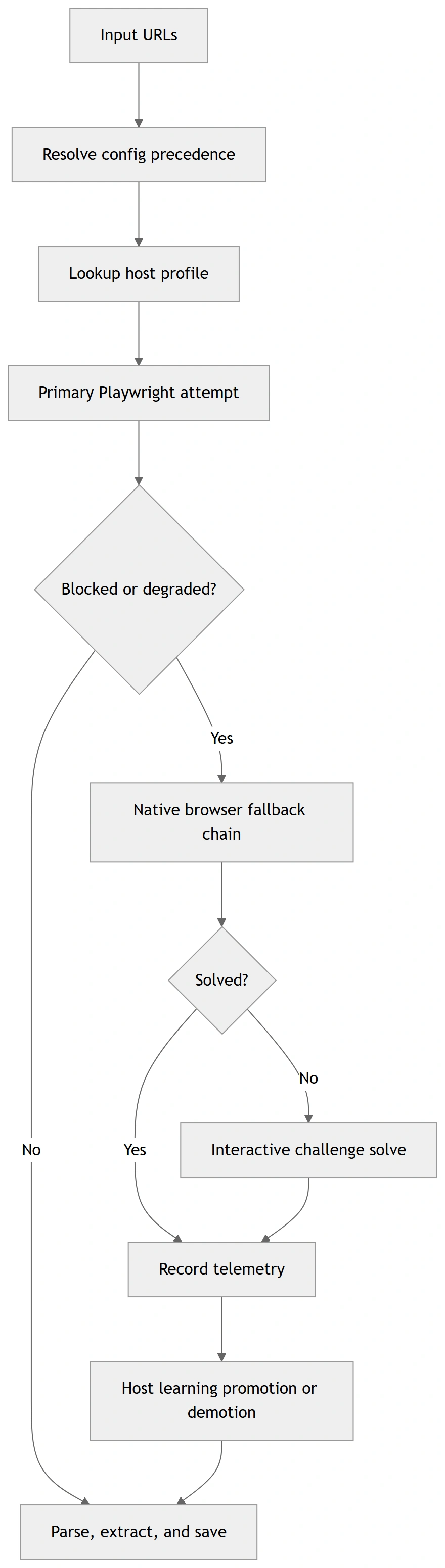
These diagrams are rendered from Mermaid source files for GitHub/PyPI compatibility. Sources:
docs/diagrams/*.mmd
Minimal:
web-scraper --url https://example.com --format markdown --exportBatch + merge:
web-scraper --input urls.txt --workers auto --format text --merge --output-name merged.txtDiagnostics wrapper:
web-scraper --run-diagnostic challenge_matrix --diagnostic-url https://target-site.tld/resource --diagnostic-runs-per-variant 2Optional toolkit auto-commit (off by default):
web-scraper --run-diagnostic toolkit_route --diagnostic-url https://target-site.tld/resource --diagnostic-auto-commit-host-profileStrict progression gating + artifact capture:
web-scraper \
  --run-diagnostic toolkit_route \
  --diagnostic-url https://target-site.tld/resource \
  --diagnostic-require-2xx \
  --diagnostic-save-artifacts \
  --diagnostic-artifacts-dir ./scripts/out/artifacts
Deterministic fixture replay / recording for regression analysis:
python scripts/diag_toolkit_route.py --fixture-replay ./tests/fixtures/challenge/cloudflare_blocked.json
python scripts/diag_toolkit_route.py --url https://target-site.tld/resource --fixture-record ./tests/fixtures/challenge/latest_toolkit_fixture.json
python scripts/diag_challenge_matrix.py --fixture-replay ./tests/fixtures/challenge/zoominfo_px_then_cf_loop.json
Cloudflare stealth-strategy matrix testing:
python scripts/diag_cloudflare_matrix.py --url https://target-site.tld/challengeLocal stdio:
web-scraper-server --stdioRemote transport:
web-scraper-server --transport streamable-http --host 127.0.0.1 --port 8000 --path /mcpimport asyncio
from web_scraper_toolkit.browser.config import BrowserConfig
from web_scraper_toolkit.browser.playwright_handler import PlaywrightManager
async def main() -> None:
cfg = BrowserConfig.from_dict({
"headless": True,
"browser_type": "chromium",
"native_fallback_policy": "on_blocked",
"host_profiles_enabled": True,
"host_profiles_path": "./host_profiles.json",
"host_profiles_read_only": False,
})
async with PlaywrightManager(cfg) as manager:
content, final_url, status = await manager.smart_fetch("https://example.com")
print({"status": status, "url": final_url, "has_content": bool(content)})
asyncio.run(main())When toolkit enters OS-level mouse challenge solving:
- It warns the operator before input takeover.
- It validates that the browser is foreground/active.
- It verifies click/hold coordinates are inside active window bounds.
- It refuses OS interaction in headless mode.
pyautoguifailsafe remains active (move cursor to a screen corner to abort).
Optional env override:
WST_OS_INPUT_WARNING_SECONDS(default:3)
Precedence order:
- Explicit CLI/MCP arguments
- Environment variables (
WST_*) settings.local.cfg/settings.cfgconfig.json- Built-in defaults
Key files:
config.example.jsonsettings.example.cfghost_profiles.example.jsonINSTRUCTIONS.md(full operations runbook)
For exhaustive setup, deployment, troubleshooting, CLI/MCP option coverage, and diagnostics workflows, read:
INSTRUCTIONS.mddocs/config_schema.md(config + host profile schema contract)docs/api_stability.md(API/deprecation policy)docs/support_matrix.md(platform/browser support matrix)docs/release_checklist.md(ship checklist)
Canonical script diagnostics now use scripts/diag_*.py names.
Truthfulness note:
- challenge diagnostics now classify pages from visible text + structure, not raw HTML noise
- fixture replay is browserless and safe for deterministic regression checks
- live smoke results may still fail when a target changes, but the toolkit now reports those failures more accurately
The following output blocks are copied from deterministic command runs in this repository.
Command:
python scripts/diag_toolkit_zoominfo.py --helpExpected output:
usage: diag_toolkit_zoominfo.py [-h] [--url URL] [--timeout-ms TIMEOUT_MS]
                                [--skip-interactive]
                                [--include-headless-stage]
                                [--log-level {DEBUG,INFO,WARNING,ERROR}]
                                [--auto-commit-host-profile]
                                [--host-profiles-path HOST_PROFILES_PATH]
                                [--read-only] [--require-2xx]
                                [--save-artifacts]
                                [--artifacts-dir ARTIFACTS_DIR]
Command:
python -m web_scraper_toolkit.cli --helpExpected excerpt:
  --diagnostic-require-2xx
                        Require final HTTP 2xx status for toolkit diagnostic
                        stage success.
  --diagnostic-save-artifacts
                        Persist per-stage diagnostic artifacts for toolkit
                        route diagnostics.
  --diagnostic-artifacts-dir DIAGNOSTIC_ARTIFACTS_DIR
                        Optional artifacts directory override for toolkit
                        route diagnostics.
File/fixture expectation used in tests/test_script_diagnostics.py:
{
  "summary": {
    "progressed_stages": 1
  }
}Before release tags, execute and verify:
ruff format --check .
ruff check src
mypy
pytest -q -m "not integration"
python -m build
python -m twine check dist/*
python scripts/clean_workspace.py --dry-run
For full release/security gates, see docs/release_checklist.md.
- Python: 3.10–3.13
- OS: Windows, Linux, macOS
- Native fallback channels: chrome, msedge, chromium
- Interactive OS-level challenge solving: headed desktop sessions only
Details and limitations: docs/support_matrix.md.
Created by: Roy Dawson IV
GitHub: https://github.com/imyourboyroy
PyPi: https://pypi.org/user/ImYourBoyRoy/
Host-learning now has an explicit operator CLI so you can inspect, diff, and manage learned routing without digging through JSON manually.
web-scraper-hosts --path ./host_profiles.json summary
web-scraper-hosts --path ./host_profiles.json inspect zoominfo.com
web-scraper-hosts --path ./host_profiles.json diff zoominfo.com
web-scraper-hosts --path ./host_profiles.json promote zoominfo.com
web-scraper-hosts --path ./host_profiles.json demote zoominfo.com
web-scraper-hosts --path ./host_profiles.json reset zoominfo.com
JSON output is available for automation:
web-scraper-hosts --path ./host_profiles.json --json inspect zoominfo.comThis keeps host-learning mutations explicit:
inspect/diff/summaryare read-onlypromote/demote/resetmutate the store intentionally