Batcontrol controls your PV battery inverter based on dynamic electricity prices, solar production forecasts, and consumption patterns. When grid electricity is cheap and solar output is insufficient, it charges the battery from the grid. When prices are high, it holds the stored energy and avoids unnecessary discharge.


Documentation — Home Assistant Add-on
Inverters / batteries
- Fronius Gen24 (HTTP API and Modbus TCP)
- Any inverter or battery system via MQTT bridge
Dynamic tariff providers
- Tibber, aWATTar, evcc, EnergyForecast.de, static zone tariffs (e.g. Octopus)
Solar forecast sources
- Forecast.Solar, Solar-Prognose.de, evcc, Home Assistant Solar Forecast ML
- A PV installation with a supported inverter — Fronius Gen24 with a BYD battery, or any system reachable via an MQTT bridge.
- Inverter login credentials (customer or technician access).
- A dynamic electricity tariff (Tibber, aWATTar, or another supported provider) for price-based charging. A static tariff is sufficient if you only want peak shaving.
Batcontrol runs as a Docker container, a Home Assistant add-on, or directly from a local Python environment. See the Installation Guide for step-by-step instructions.
Quick start with Docker:
mkdir -p ./config ./logs

docker run -d \
  --name batcontrol \
  -v "$PWD/config:/app/config" \
  -v "$PWD/logs:/app/logs" \
  mastr950/batcontrol:latest
On the first start, if no configuration file is found, batcontrol copies a sample config with a dummy inverter into ./config/batcontrol_config.yaml. The dummy inverter simulates responses without touching real hardware, so you can explore the setup safely. Edit the file to configure your actual inverter and tariff provider before pointing batcontrol at real hardware.
The sample configuration file documents all available options. The documentation covers each section in detail:
Batcontrol independently fetches and refreshes electricity price forecasts, expected solar production, and consumption predictions. These are managed in the background on their own schedules depending on the data source.
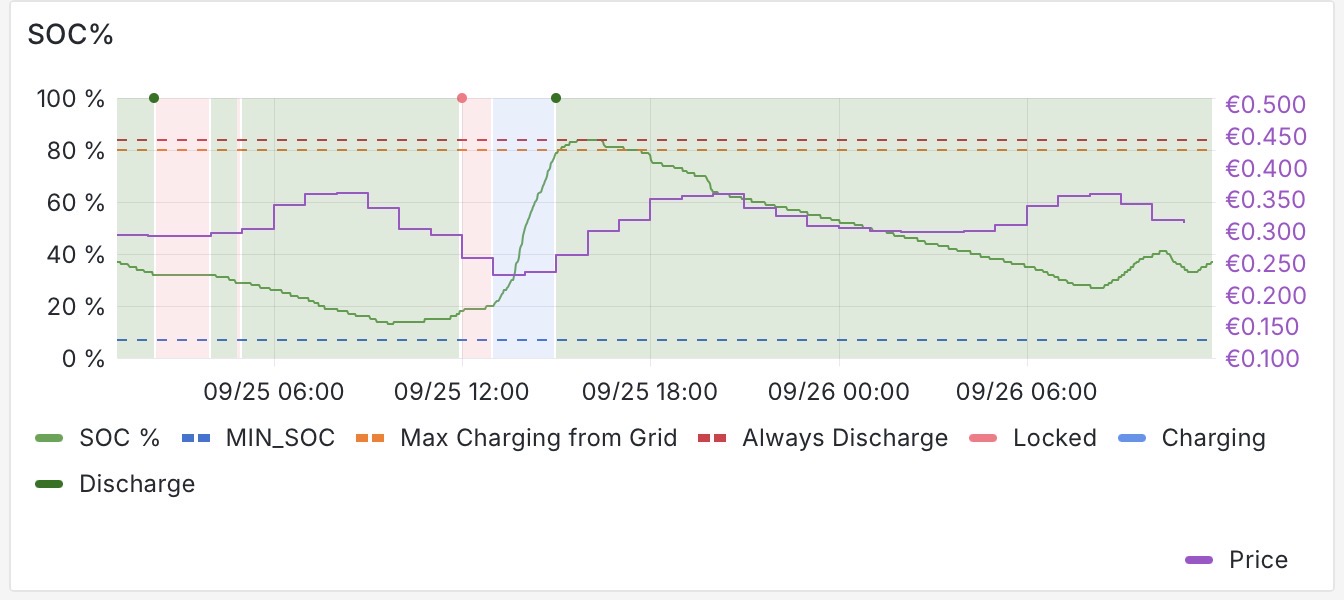
A 3-minute control loop evaluates the current battery state against those forecasts and sets the inverter to one of four modes: discharge allowed, avoid discharge, force charge from grid, or rate-limited PV charging (peak shaving).
Peak shaving works with or without a dynamic tariff: even on a flat rate, batcontrol uses the PV and consumption forecasts to spread battery charging across the day, so the battery is available to absorb the most solar energy possible rather than filling up early.
A detailed description of the decision logic is in How Batcontrol Works.
What inverter settings does batcontrol change?
On first run it enables the Solar.API (local network only) and saves your current battery and usage schedule configuration. It restores those saved settings on a clean shutdown. During operation it adjusts the battery control mode on every cycle.
Can I run other software that controls the inverter at the same time?
No. Concurrent inverter control software will cause conflicts. If you have previously used Modbus-based tools, disable Modbus and restart the inverter before starting batcontrol.
What if I need to change inverter settings while batcontrol is running?
Shut down batcontrol first, make your changes, then restart it. Changes made through the inverter's local web interface while batcontrol is running may be overwritten on the next cycle.