рџЊђ Language: рџ‡·рџ‡є Р СѓСЃСЃРєРёР№ В· 🇺🇦 Українська В· 🇩🇪 Deutsch В· 🇫🇷 FranГ§ais В· рџ‡Єрџ‡ё EspaГ±ol В· 🇵🇱 Polski В· рџ‡Ёрџ‡і дёж–‡ В· 🇯🇵 ж—Ґжњ¬иЄћ
Browser-based tool for designing microservice systems, simulating traffic, and generating documentation. No build step, no npm — open
index.htmland start.


Working as a systems analyst, I came to a clear conclusion: a significant portion of the time goes not into designing the system, but into preparing and maintaining its documentation.
A single task required juggling multiple tools at once — designing the architecture in one place, describing databases in another, building Sequence diagrams in a third, and then assembling everything into a final document. More often than not, preparing the documentation took longer than designing the system itself.
The rise of large language models sped up the creation of individual artifacts, but didn't solve the problem of combining them or keeping them in sync manually.
So I started building RAPTOR.
RAPTOR is a tool that lets you design a system in one place and derive consistent artifacts from that single model: scenarios, diagrams, and documentation. Instead of manually transferring information between tools, the analyst works with one unified system model.
I built RAPTOR as the tool I wished I had on my first day as a systems analyst.
Describe your system in one message — RAPTOR AI generates the full architecture: blocks, connections, DB schemas, and scenarios. The analyst's job is to edit and refine, not draw arrows from scratch.
npx serve . # → http://localhost:5500Open index.html directly in your browser — or use npx serve for full functionality.
Free В· No credit card В· 30 seconds
в‘  console.groq.com в†’ Sign up в†’ API Keys в†’ Create API Key
② Copy the key  →  gsk_••••••••••••••••••••••••
в‘ў RAPTOR  в†’  рџ¤– AI  в†’  paste key  в†’  Enter  вњ“
Key is saved in localStorage — enter once per browser. Done.
Don't use Groq? Generate the JSON with any model and drop it in:
в‘  Open  RAPTOR_FORMAT.md  в†ђ full JSON schema + examples
②   ↓
   Paste into ChatGPT / Claude / Gemini:
   "Generate RAPTOR JSON for [your system]. Schema: …"
③   ↓
   Copy JSON from response
в‘Ј RAPTOR  в†’  File в†’ Import JSON  в†’  paste  в†’  OK
   ↓
   вњ¦ Canvas fills instantly with blocks, connections, DB schemas, scenarios
Tip: attach
RAPTOR_FORMAT.mdas a file — most models read it in one shot.
- One message в†’ full microservice system: blocks, connections, DB schemas, scenarios
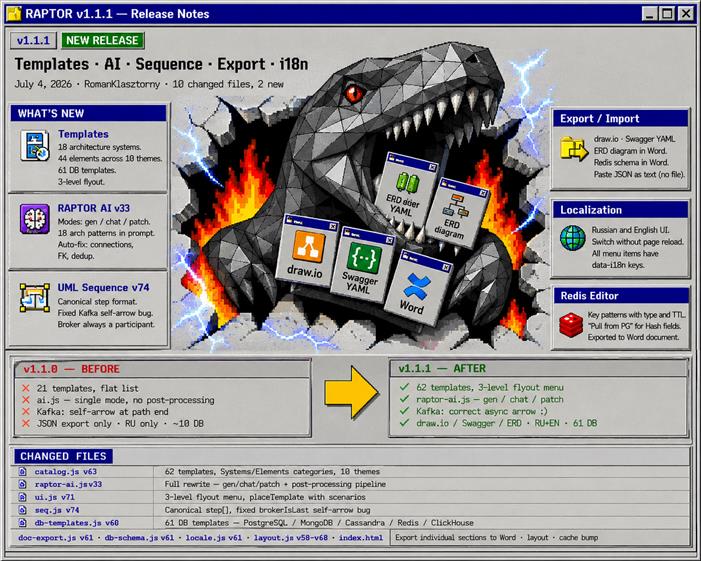
- Three modes: gen (generate from scratch), chat (plan + Q&A), patch (add/edit without full regeneration)
- 18 architectural patterns in prompt: Saga, Outbox, CQRS, Cache-aside, Circuit Breaker and more
- Auto-fix: connection direction, cross-DB FK, deduplication
- Powered by Groq (llama-3.3-70b, free plan) — get your key at console.groq.com
- Blocks: Actor, Client, API Gateway, Load Balancer, CDN, WebSocket GW, BFF, Service, Auth, PostgreSQL, MySQL, MongoDB, Redis, Cassandra, ClickHouse, Elasticsearch, S3, Kafka, RabbitMQ, NATS, Queue, External
- Drag & drop with collision detection, bidirectional arrows
- Auto-layout by layers
- C4 notation levels in toolbar
- 18 Systems: Bank, Messenger, Marketplace, YouTube, Search Engine, Taxi, Social Feed, Food Delivery, Carsharing, Spotify, Netflix, Tinder, Crypto Exchange, EdTech, Fitness, Booking, Cloud Storage, Todo
- 44 Elements across 10 themes: payments, logging, storage, communications, search, analytics, media, security and more
- 61 DB templates: PostgreSQL, MongoDB, Cassandra, Redis, ClickHouse
- 3-level flyout menu
- Request paths through the system with
verb + uri + respper step - Autofill builds steps from schema respecting Gateway
auth_mode - Each scenario has volume (rps), color, and actor
- Animated balls travel scenario paths
- Kafka / RabbitMQ / NATS / Queue receive live traffic
- Click a ball в†’ hop-trace with latencies
- Chaos mode: node failures, degradation, cache reset, overload
- Live panel: SVG topology, published / processed / lag / DLQ counters (500ms)
- Consumer groups with per-partition offsets, Replay button
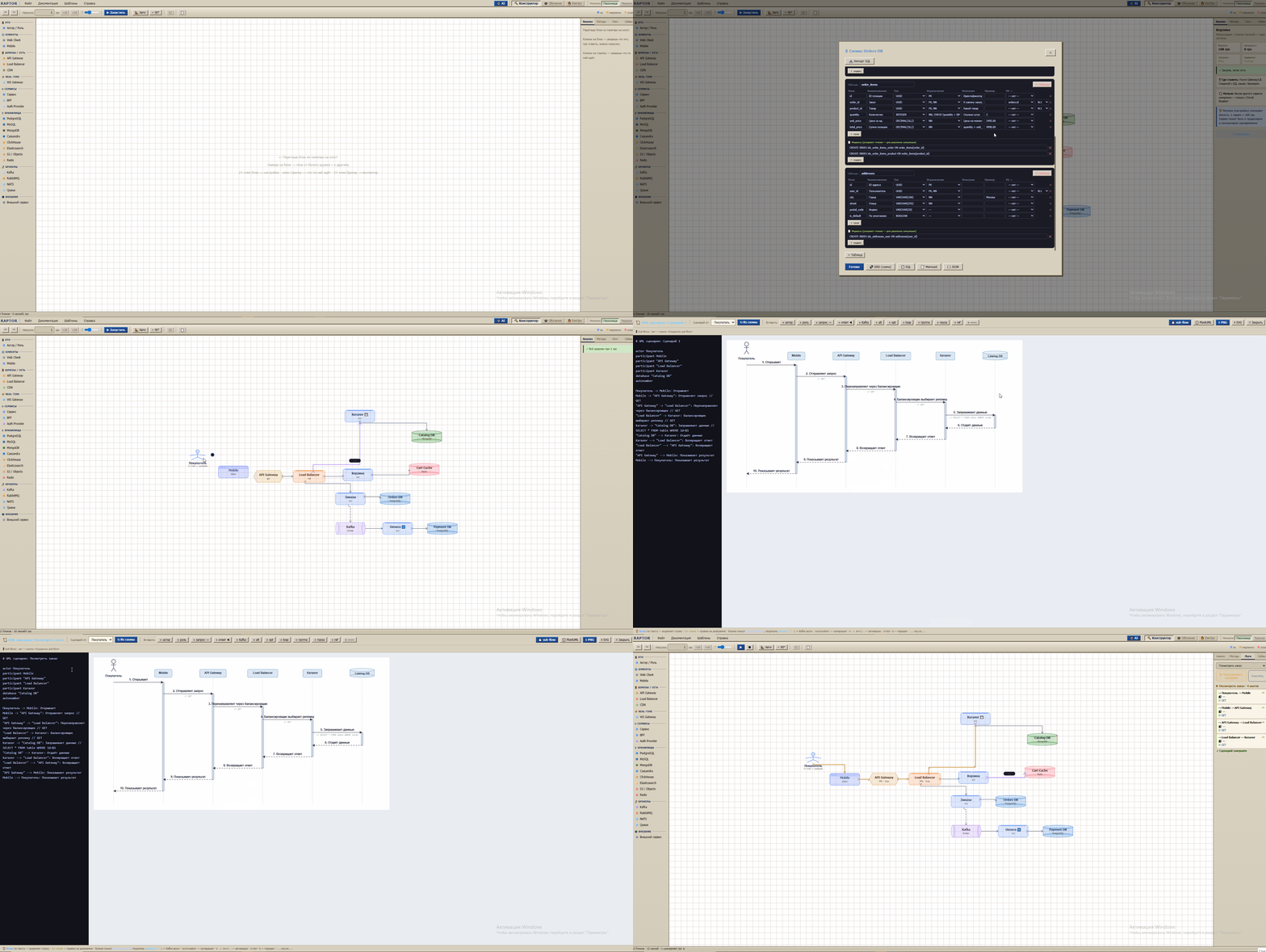
- Auto-generated from scenario in PlantUML standard
- Kafka в†’
-)· sync returns ·group alt/else - 📋 PlantUML button — copy for Confluence
Code-to-diagram→ Click-to-diagram: click blocks on the canvas — RAPTOR finds the path through connections automatically, highlighting available next nodes. After each click a popup appears to describe the step (method, URI, response). Press Enter — sequence diagram is ready- Actively in development; simple CRUD flows already work in two clicks — edit your process at high and low level directly on the canvas
- PostgreSQL schema editor with visual ERD (crow's foot notation)
- Redis editor: key patterns with type, TTL, "Pull from PG" for Hash fields
- SQL DDL import, 61 ready-made templates
- Types:
jwt_only/oauth2_jwt/session_based/api_key/oidc_sso - Type affects DB schema and Auth load in simulation
- Word (.docx) — universal format every stakeholder already has. Before export you choose what to include: C4 diagram, API tables, DB schema, ERD — take what you need, skip the rest
- draw.io XML, Swagger / OpenAPI YAML
- Fully offline via built-in
docx.min.js
- Russian and English UI, switch without page reload
Everything lives in global S (blocks, connections, scenarios, metadata).
Save в†’ JSON file. Load в†’ File в†’ Import JSON в†’ paste text в†’ OK.