jquery.core.upload a plugin for image upload Demo
npm i jquery.core.image.upload --save-dev<script src="./node_modules/jquery.core.image.upload/dist/jquery.core.image.upload.min.js"></script>git clone https://github.com/Vanthink-UED/jquery.core.image.upload.git<script src="./dist/jquery.core.image.upload.min.js"></script>
$(".js-btn-upload").coreImageUpload ({
url: "./upload.php",
inputOfFile: 'image',
uploadedCallback: function (result) {
alert(result);
}
});-
urlyour server url@stringrg:./src/upload.php;required; -
uploadedCallback:after finish your uploading your callback@function;required; -
inputOfFile:upload file form name@string;required -
extensions:limit the file type@arrayeg:[jpg,png]; -
onSubmit:when you uploading your file your function callback@function -
isAjax: we support two upload:ajaxAnd 'iframe'.@boolean,default:true
If you crop a image , your crop will send a request to your server with some crop arguments;
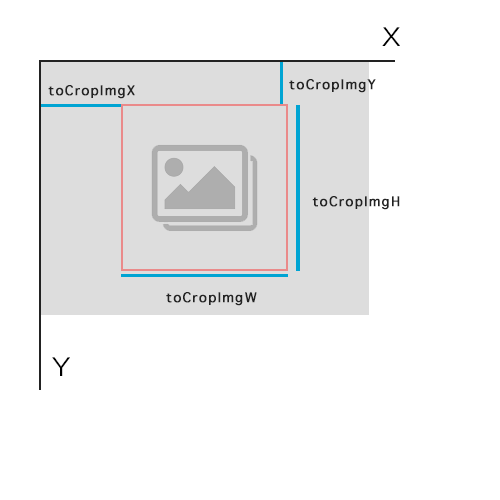
toCropImgX: the distance of cropbox to the image left;toCropImgY: the distance of cropbox to the image toptoCropImgW: the width of cropboxtoCropImgH: the height of cropboxmaxWidth: the maxium width of your target imagemaxHeight: the maxium height of your target image
<script src="./dist/jquery-ui.min.js"></script>
// if you want ot support mobile touch
<script src="./dist/jquery-ui.touch-pounch.min.js"></script>
$(".js-btn-crop").coreImageUpload ({
    url: "./crop.php",
    inputOfFile: 'image',
    enableCrop: true,
    cropRatio: '1:1',
    uploadedCallback: function (result) {
        alert( 'Success!:' + result.data['toCropImgW'] + result.data['toCropImgH']);
    }
});
Also We concat a single file with full scripts in dist/jquery.core.image.upload.full.min.js