Bussiness Case ‐ MS‐Word with List of Customers
Compnay ACME SA requires the capability to generate standardized customer reports in the Microsoft Word format. This is the Business Requirement for a Standardized Customer Report Generation.
This exersise addresses the critical need for a system capable of reliably generating Microsoft Word reports that are compliant, professional, and consistent. The solution must integrate dynamic, variable customer data and present it in a clear, tabular format.
The system will leverage a single, defined template for its structure, ensuring all reports share the same professional layout. Crucially, it will automatically incorporate the latest, approved corporate copyright message from a central source into the document's footer, guaranteeing legal compliance and brand consistency without manual intervention. This automation eliminates human error and drastically reduces the time and effort currently spent on manual document creation, enabling employees to focus on high-value tasks.
This solution is essential for maintaining high professional standards, ensuring legal adherence, and driving operational efficiency across the organization.
Especially:
- Content: The report must dynamically include customer data in a tabular format. The exact number of customers is variable and unknown at the time the document template is created.
- Structure: The final document must adhere to a specific, pre-defined layout that includes distinct sections at both the beginning and the end.
- Standardization: The template for the document layout will be provided.
- Legal/Compliance: A mandatory, standardized copyright message must be automatically appended at the end of the document. This message resides in a separate, company-approved source document to ensure consistency and compliance with current ACME SA corporate standards.
This solution is critical for maintaining brand consistency, ensuring legal compliance in all external/internal reports, and streamlining the process of generating detailed customer documentation.
CustomerList.docx is the following document containing the template of the business report.

Elements on the template document:
| Element | Example | Explanation |
|---|---|---|
| Placeholders | {Cust.Name} | Placeholders with fields of the collection/array Cust |
| Marker | [<Row>] | A marker that marks the table and the row in the document that needs to append the data |
| Block Marker | [<DeleteBegin...End>] | A block marker that marks a block. In this example this block should removed from the final document |
| end of doc | At the end of the final document, a copyright text will appened at position that the table ends. |
The document StandardText.docx acts as the official repository for all standardized and approved textual content across the company. This centralization guarantees that every corporate document produced utilizes the mandated paragraphs, thereby ensuring consistent quality, professional branding, and full legal compliance.
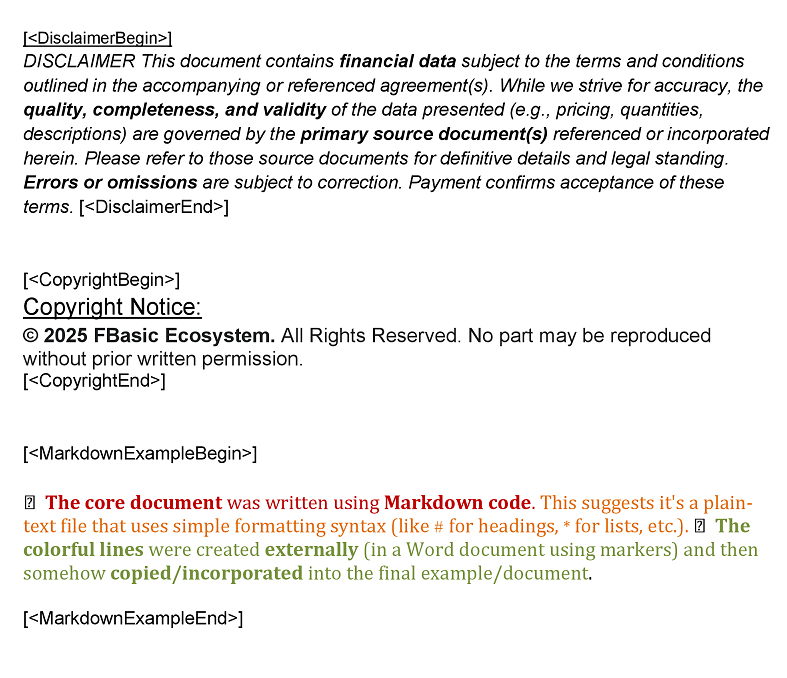
The block that have to apprear on the final document is between the markers [<CopyrightBegin>] and [<CopyrightEnd>]
The final document will produced by the following FBasic code:
REM Word Templating - example3

rem (v) Declare and prepare
FILESTREAM CustList, INMEMORY, "", "other", "CustomerList.docx"
FILESTREAM dst, out, "", "Output", "example3.docx"
WORDEXTRACTBODY CustList, text  ' Templating Library
PHVSDATA Placeholders text ' TextReplacer Library

rem (v) Retrieve data
print "Adding customers:"
print "......................................"

CURSOR Cust, "select CustomerID,Name,VatNumber,Email,Address,City from Customers where CustomerID<'34'"   ' SQLData Adapter
foreach Cust
    print [Cust.Name]
    WORDAPPENDROW CustList, "Row"
    WORDREPALCEBODY CustList, FIRST, Placeholders
endforeach Cust

WORDDELETEROW CustList, "Row"

rem (v) Add the Copyright message at the end of the document
FILESTREAM Templates, in, "", "other", "StandardText.docx"
MEMSTREAM part
WORDEXTRACTPART Templates, part, "CopyrightBegin", "CopyrightEnd"
WORDAPPEND part, CustList

rem (v) Remove a part of the document
WORDDELETEPART CustList, "DeleteBegin", "DeleteEnd"

rem (v) Create the output document
scopy CustList, dst

Halt
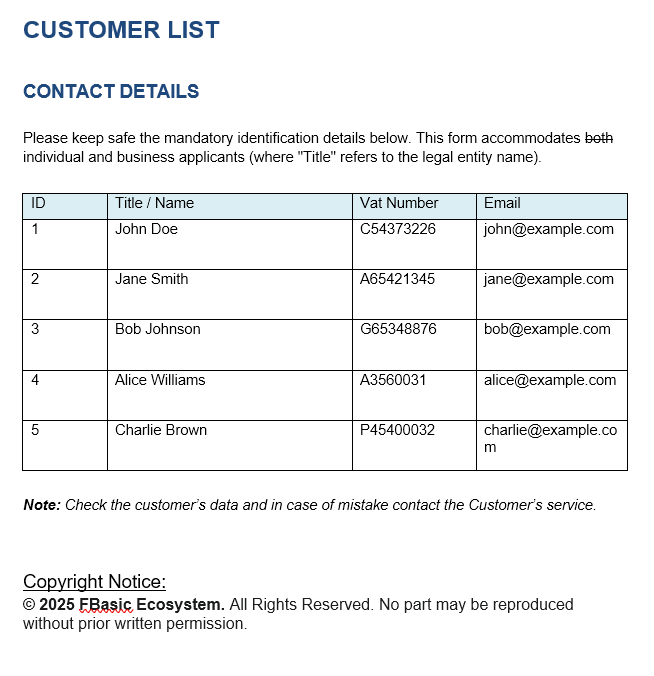
example3.docx is the final document that is the requested business report.
| Statement | Library | Explanation |
|---|---|---|
| FILESTREAM CustList, INMEMORY.... | Streams | Defines an in-memroy stream based on the contents of the file CustomerList.docx (in the folder other) |
| FILESTREAM dst, out, ..... | Streams | Defines the output file name in the folder Output |
| WORDEXTRACTBODY CustList, text | Templating | Extract the text from the document |
| PHVSDATA Placeholders text | Text Replacer | Create an array with the placeholders are in the document |
| CURSOR Cust, "select ..... | SQLData Adapter | Declares a cursor over an SQL Select customers statement |
| FOREACH Cust .... | Loops the cursor row by row | |
| WORDAPPENDROW CustList, "Row" | Templating | Clone the row that the marker [<Row>] is on any cell of a table |
| WORDREPALCEBODY CustList, FIRST... | Templating | Replace the FIRST only unique placeholder in the document |
| WORDDELETEROW CustList, "Row" | Templating | Delete the row that the marker [<Row>] is on any cell of a table |
| WORDDELETEPART CustList,"DeleteBegin"... | templating | Delete the part of document that it is in the begin and end markers |
| scopy CustList, dst | Streams | Copy the document stream on the destination (dst) output stream |