Convertir du markdown en HTML et inversément / Convert markdown to HTML and vice versa
MarkFlow ↔
Convertisseur bidirectionnel Markdown ↔ HTML avec aperçu en temps réel, 100% statique et sans dépendances



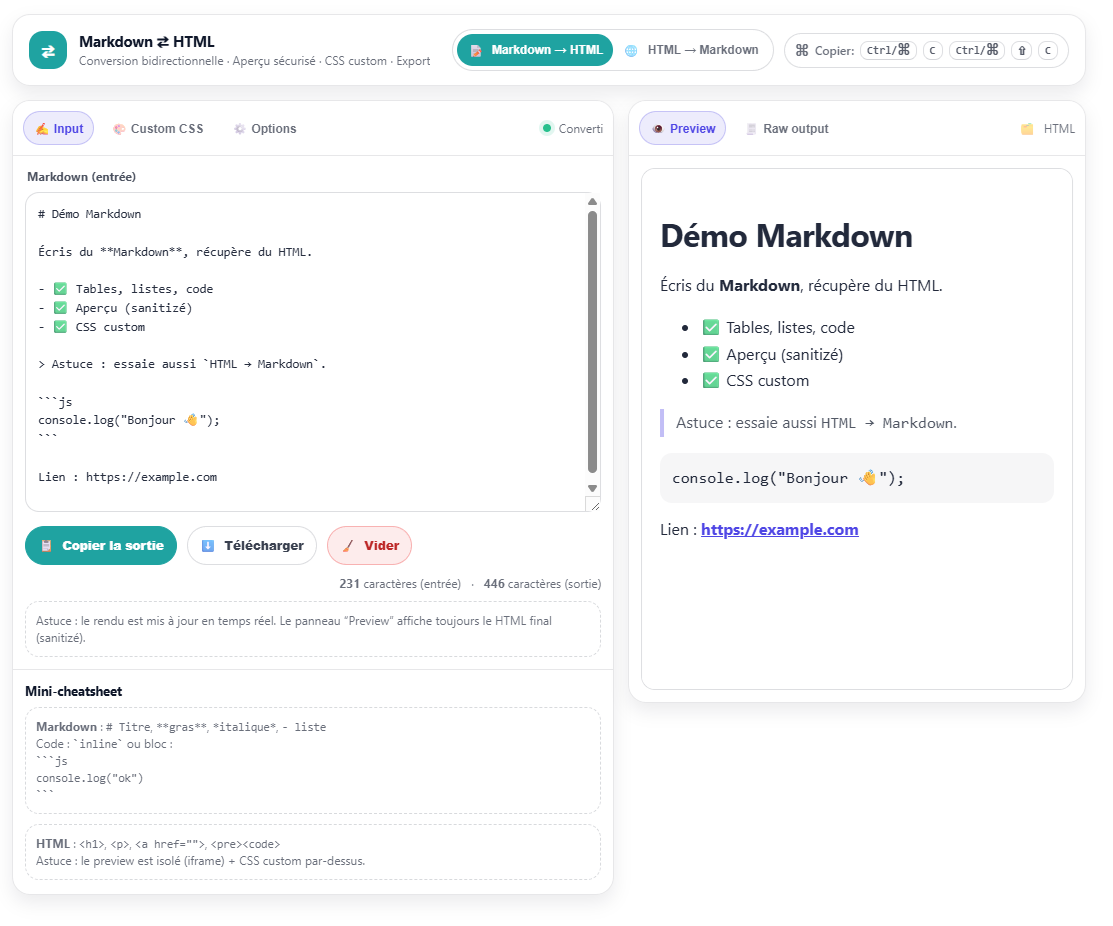

MarkFlow est une application web monopage entièrement statique qui permet de convertir du Markdown vers HTML et inversement, directement dans votre navigateur. Aucun serveur, aucune installation, aucun build — ouvrez simplement le fichier HTML et c'est prêt.
Conçue pour les développeurs, rédacteurs techniques, blogueurs et créateurs de contenu, MarkFlow offre une expérience fluide avec aperçu en temps réel, CSS personnalisable, et persistance automatique de votre travail.
A tester sur : CONVERTISSEUR MARKDOWN EN HTML)
- Markdown → HTML : Support complet de GitHub Flavored Markdown (GFM)
- Tables, listes de tâches, strikethrough
- Blocs de code avec coloration syntaxique
- Liens, images, citations
- Titres, listes ordonnées/non ordonnées
- HTML → Markdown : Conversion intelligente préservant la structure
- Détection des balises
<code class="language-*">→ fences avec language tag - Tables HTML → tables Markdown
- Listes de tâches, citations, formatage
- Détection des balises
- Design moderne et sombre : Interface épurée avec thème dark amber/gold
- Layout double-panel : Entrée à gauche, sortie à droite (vertical sur mobile)
- Navigation par onglets :
- Panel gauche : Input · Custom CSS · Options
- Panel droit : Raw Output · Preview
- Accessibilité : Navigation clavier (Tab, flèches), focus visible, ARIA labels
- Responsive : S'adapte aux écrans desktop, tablette et mobile
- Preview isolée : Rendu dans une iframe sécurisée (sandboxed)
- CSS personnalisable : Base typographique professionnelle + CSS custom par-dessus
- Sanitization XSS : DOMPurify intégré pour éviter les injections malveillantes
- Mise à jour en temps réel : Debounce de 250ms pour performances optimales
Pour Markdown → HTML :
- Sanitize HTML output (protection XSS)
- Ouvrir les liens dans un nouvel onglet (
target="_blank") - GitHub Flavored Markdown (tables, strikethrough, task lists)
- Conversion des sauts de ligne simples en
<br>
Pour HTML → Markdown :
- Style de titres : ATX (
#) ou Setext (soulignement) - Marqueur de liste :
-,*, ou+ - Style de blocs de code : fenced (```) ou indenté (4 espaces)
- Style de liens : inline ou referenced
- LocalStorage automatique : Mode, contenu, CSS et options sauvegardés
- Compteurs de caractères : Input et output en temps réel
- Actions rapides :
- Copier le résultat (clipboard API + fallback)
- Télécharger
.htmlou.md(Blob + ObjectURL) - Clear et Reset to defaults
- Gestion d'erreurs : Messages non bloquants (toasts + bannière)
- Markdown Cheatsheet : Référence rapide en pied de page (accordéon)
- Exemples pré-chargés : Contenu sample pour démarrer rapidement
- Support Tab dans textarea : Indentation à 2 espaces
Zero framework, Zero build, Zero backend
- Vanilla JavaScript (ES6+) : ~600 lignes de code métier
- Bibliothèques CDN :
- Polices Google Fonts :
- Outfit (UI, display)
- JetBrains Mono (code, monospace)
- CSS pur : Variables CSS, flexbox, grid, responsive
# Cloner le dépôt
git clone https://github.com/yourusername/markflow.git
cd markflow

# Ouvrir dans le navigateur
open markflow.html  # macOS
start markflow.html # Windows
xdg-open markflow.html # Linux# Python 3
python3 -m http.server 8000
# Node.js
npx http-server
# Puis ouvrir http://localhost:8000/markflow.html- Fork ce dépôt
- Activer GitHub Pages dans Settings → Pages
- Choisir la branche
mainet le dossier/(root) - Accéder à
https://yourusername.github.io/markflow/markflow.html
Aucune compilation, aucune installation npm/yarn requise !
markflow/
├── markflow.html       # Application complète (HTML + CSS + JS)
├── README.md          # Ce fichier
└── LICENSE            # Licence MIT (à ajouter)
Tout est contenu dans un seul fichier HTML (~1600 lignes) pour une portabilité maximale.
- Sanitization XSS : DOMPurify nettoie tout le HTML avant rendu dans la preview
- Iframe sandboxée :
sandbox="allow-same-origin"pour isoler le contenu - Pas de
eval(): Aucune exécution de code arbitraire - localStorage uniquement : Pas de requêtes réseau, pas de tracking
- HTTPS recommandé : Pour Clipboard API (fallback
execCommanddisponible)
Le fichier est structuré en sections clairement commentées :
:root {
  --bg: #0d0d10;
  --accent: #f0a500;
  /* ... */
}


// Fonctions principales :
// - convertMarkdownToHtml()
// - convertHtmlToMarkdown()
// - updatePreview()
// - persistState()
Modifiez les Design Tokens CSS pour changer le thème, ou ajustez la Base Preview CSS (ligne ~420) pour personnaliser le rendu par défaut.
- Pas de support pour :
- Diagrammes Mermaid (prévu pour v2.0)
- Export PDF direct (contournement : Print to PDF dans le navigateur)
- Import/export de fichiers (drag & drop prévu)
- LocalStorage limité : ~5-10MB selon navigateur (suffisant pour documents longs)
- Preview iframe : Certains contenus complexes (iframes imbriqués, scripts) ne rendront pas
- Support drag & drop pour fichiers
.mdet.html - Export PDF via jsPDF
- Diagrammes Mermaid dans la preview
- Thèmes multiples (light/dark/auto)
- Mode diff pour comparer versions
- Raccourcis clavier globaux (Ctrl+S pour download, etc.)
- Templates Markdown prédéfinis
- Support d'extensions Markdown (footnotes, definition lists)
Les contributions sont les bienvenues ! Pour contribuer :
- Fork le projet
- Créez une branche feature (
git checkout -b feature/AmazingFeature) - Commitez vos changements (
git commit -m 'Add some AmazingFeature') - Push vers la branche (
git push origin feature/AmazingFeature) - Ouvrez une Pull Request
Guidelines :
- Gardez le fichier unique (pas de split en multiples fichiers)
- Maintenez la compatibilité navigateurs modernes (ES6+, derniers 2 ans)
- Commentez le code en anglais
- Testez sur Chrome, Firefox, Safari et Edge
Distribué sous licence MIT. Voir LICENSE pour plus d'informations.
- Marked.js — Parser Markdown rapide et extensible
- Turndown — Convertisseur HTML→Markdown fiable
- DOMPurify — Sanitizer XSS de référence
- Google Fonts — Outfit & JetBrains Mono
MarkFlow is a fully static single-page web application that converts Markdown to HTML and vice versa, directly in your browser. No server, no installation, no build — just open the HTML file and you're ready to go.
Designed for developers, technical writers, bloggers, and content creators, MarkFlow offers a seamless experience with real-time preview, customizable CSS, and automatic persistence of your work.
- Markdown → HTML: Full GitHub Flavored Markdown (GFM) support
- Tables, task lists, strikethrough
- Fenced code blocks with syntax highlighting
- Links, images, blockquotes
- Headings, ordered/unordered lists
- HTML → Markdown: Intelligent conversion preserving structure
- Detection of
<code class="language-*">→ fenced blocks with language tags - HTML tables → Markdown tables
- Task lists, blockquotes, formatting
- Detection of
- Modern dark design: Clean interface with dark amber/gold theme
- Dual-panel layout: Input on left, output on right (vertical on mobile)
- Tab navigation:
- Left panel: Input · Custom CSS · Options
- Right panel: Raw Output · Preview
- Accessibility: Keyboard navigation (Tab, arrows), visible focus, ARIA labels
- Responsive: Adapts to desktop, tablet, and mobile screens
- Isolated preview: Rendered in a secure sandboxed iframe
- Customizable CSS: Professional typographic base + custom CSS on top
- XSS sanitization: DOMPurify integrated to prevent malicious injections
- Real-time updates: 250ms debounce for optimal performance
For Markdown → HTML:
- Sanitize HTML output (XSS protection)
- Open links in new tab (
target="_blank") - GitHub Flavored Markdown (tables, strikethrough, task lists)
- Convert single line breaks to
<br>
For HTML → Markdown:
- Heading style: ATX (
#) or Setext (underline) - List marker:
-,*, or+ - Code block style: fenced (```) or indented (4 spaces)
- Link style: inline or referenced
- Automatic localStorage: Mode, content, CSS and options saved
- Character counters: Input and output in real-time
- Quick actions:
- Copy result (clipboard API + fallback)
- Download
.htmlor.md(Blob + ObjectURL) - Clear and Reset to defaults
- Error handling: Non-blocking messages (toasts + banner)
- Markdown Cheatsheet: Quick reference in footer (accordion)
- Pre-loaded samples: Sample content to get started quickly
- Tab support in textarea: 2-space indentation
Zero framework, Zero build, Zero backend
- Vanilla JavaScript (ES6+): ~600 lines of business logic
- CDN Libraries:
- Google Fonts:
- Outfit (UI, display)
- JetBrains Mono (code, monospace)
- Pure CSS: CSS variables, flexbox, grid, responsive
# Clone the repository
git clone https://github.com/yourusername/markflow.git
cd markflow

# Open in browser
open markflow.html  # macOS
start markflow.html # Windows
xdg-open markflow.html # Linux# Python 3
python3 -m http.server 8000
# Node.js
npx http-server
# Then open http://localhost:8000/markflow.html- Fork this repository
- Enable GitHub Pages in Settings → Pages
- Choose
mainbranch and/(root) folder - Access at
https://yourusername.github.io/markflow/markflow.html
No compilation, no npm/yarn installation required!
markflow/
├── markflow.html       # Complete application (HTML + CSS + JS)
├── README.md          # This file
└── LICENSE            # MIT License (to be added)
Everything is contained in a single HTML file (~1600 lines) for maximum portability.
- XSS sanitization: DOMPurify cleans all HTML before rendering in preview
- Sandboxed iframe:
sandbox="allow-same-origin"to isolate content - No
eval(): No arbitrary code execution - localStorage only: No network requests, no tracking
- HTTPS recommended: For Clipboard API (fallback
execCommandavailable)
The file is structured in clearly commented sections:
:root {
  --bg: #0d0d10;
  --accent: #f0a500;
  /* ... */
}


// Main functions:
// - convertMarkdownToHtml()
// - convertHtmlToMarkdown()
// - updatePreview()
// - persistState()
Modify CSS Design Tokens to change the theme, or adjust the Base Preview CSS (line ~420) to customize default rendering.
- No support for:
- Mermaid diagrams (planned for v2.0)
- Direct PDF export (workaround: Print to PDF in browser)
- File import/export (drag & drop planned)
- Limited localStorage: ~5-10MB depending on browser (sufficient for long documents)
- Preview iframe: Some complex content (nested iframes, scripts) may not render
- Drag & drop support for
.mdand.htmlfiles - PDF export via jsPDF
- Mermaid diagrams in preview
- Multiple themes (light/dark/auto)
- Diff mode to compare versions
- Global keyboard shortcuts (Ctrl+S for download, etc.)
- Predefined Markdown templates
- Markdown extensions support (footnotes, definition lists)
Contributions are welcome! To contribute:
- Fork the project
- Create a feature branch (
git checkout -b feature/AmazingFeature) - Commit your changes (
git commit -m 'Add some AmazingFeature') - Push to the branch (
git push origin feature/AmazingFeature) - Open a Pull Request
Guidelines:
- Keep the single-file approach (no split into multiple files)
- Maintain modern browser compatibility (ES6+, last 2 years)
- Comment code in English
- Test on Chrome, Firefox, Safari, and Edge
Distributed under the MIT License. See LICENSE for more information.
- Marked.js — Fast and extensible Markdown parser
- Turndown — Reliable HTML→Markdown converter
- DOMPurify — Reference XSS sanitizer
- Google Fonts — Outfit & JetBrains Mono
Made with ❤️ for developers and content creators