English | 中文版
A Swift-based multiplayer game server framework that adopts the design philosophy of Single StateTree + Sync Rules + Land DSL.
StateTree is a product that combines state management concepts from frontend frameworks with backend data filtering experience. By expressing server state through a state tree, data can be synchronized to clients in a reactive manner, allowing clients to automatically respond to state changes.
Note StateTree itself is a programming model (semantic model) used to describe how server-side state, behavior, and synchronization are organized. This project is a Swift reference implementation of that model.
For detailed architectural concepts, please refer to Architecture Overview.
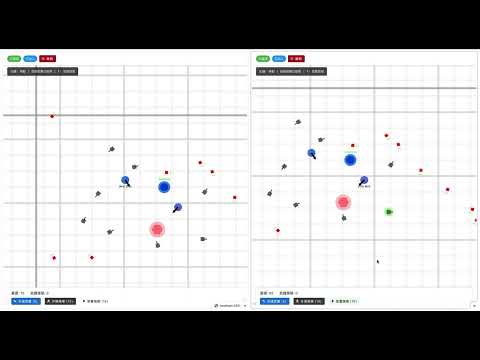
Watch the demo game in action:
Because Swift (🐦 swift bird) stays on tree... so it's Swift + Stay + Tree = SwiftStateTree! 😄
What about other animals?
- 🐍 Python: Doesn't seem to stay on trees
- 🦀 Rust: Doesn't climb trees either
- 🐹 Go: Probably doesn't like trees
- 🐘 PHP: Are you kidding me?
Conclusion: Only Swift stays on the StateTree.
(This is a humorous naming explanation. In reality, I didn't think of this pun when I first named it, but discovered it later...XD. Swift was chosen because its language features (DSL, Macro, Struct, Actor) are very suitable for implementing the StateTree design philosophy.)
This is a personal hobby project aimed at exploring and experimenting with multiplayer game server architecture design.
The initial idea was to create a schema synchronization framework similar to Colyseus. After organizing the ideas, we decided to express the network synchronization model through StateTree, allowing developers to control what different users observe through different synchronization strategies.
While learning Swift, we discovered several Swift features that are very suitable for implementing this idea:
- DSL (Domain-Specific Language): Can create clear domain-specific syntax
- Macro: Compile-time code generation, providing type safety and automation
- Struct (value types): Suitable for state snapshots and immutability
- Actor: Provides concurrency safety and state isolation
While discussions and suggestions are welcome, the main purpose is technical exploration and learning.
SwiftStateTree adopts the following core design:
- 🌳 Single Authoritative State Tree: Use one
StateTreeto represent the entire domain state - 🔄 Sync Rules DSL: Use
@Syncrules to control which data the server synchronizes to whom - 🏛️ Land DSL: Define domain logic, Action/Event handling, and Tick settings
- 💻 UI Computation on Client: Server only sends "logical data", UI rendering is handled by the client
- 🔧 Automatic Schema Generation: Automatically generate JSON Schema from server definitions, supporting TypeScript client SDK generation for type safety
| Module | Description |
|---|---|
| SwiftStateTree | Core module (StateTree, Land DSL, Sync, Runtime, SchemaGen) |
| SwiftStateTreeTransport | Transport layer (WebSocketTransport, TransportAdapter, Land management) |
| SwiftStateTreeNIO | NIO-based server hosting (NIOLandHost, NIOLandServer, WebSocket) |
| SwiftStateTreeBenchmarks | Benchmark executable |
SwiftStateTree supports three transport encoding combinations. The recommended default is MessagePack, which combines an opcode array protocol with PathHash + runtime dynamic-key (slot) compression for small packets.
| Mode | Message encoding | State update encoding | Notes |
|---|---|---|---|
| JSON (debug) | json |
jsonObject |
Most readable, easiest to debug |
| Opcode JSON (compact) | opcodeJsonArray |
opcodeJsonArray |
Compact JSON arrays; good transition path |
| MessagePack (default) | messagepack |
opcodeMessagePack |
Smallest packets + fastest parsing |
For details and performance results, see: Transport Evolution.
- Swift 6.0+
- macOS (native development, supports Apple Silicon)
- Windows: Supported via VSCode/Cursor Dev Containers (configuration file:
.devcontainer/devcontainer.json)
git clone https://github.com/your-username/SwiftStateTree.git
cd SwiftStateTree

# Note: The sdk directory uses lowercase to match other directories
# (Examples, Notes, Sources, Tests, Tools, docs)

swift buildStart the DemoServer (includes Cookie game and Counter example):
cd Examples/Demo
swift run DemoServer
The server runs on http://localhost:8080 by default.
In another terminal, generate client code and start WebClient:
cd Examples/Demo/WebClient
npm install  # Install dependencies on first run
npm run codegen  # Generate client code
npm run dev
WebClient will run on another port (usually http://localhost:5173), accessible in the browser and navigate to the Counter Demo page.
Other available examples:
- 🍪 Cookie Clicker Example - A complete multiplayer game example with private state, upgrade system, periodic Tick handling, and other advanced features
The following is a simplified counter example demonstrating core concepts. For complete runnable source code, please refer to:
- Server-side definition:
Examples/Demo/Sources/DemoContent/CounterDemoDefinitions.swift - Server main program:
Examples/Demo/Sources/DemoServer/main.swift - Client Vue component:
Examples/Demo/WebClient/src/views/CounterPage.vue
import SwiftStateTree
import SwiftStateTreeNIO

// 1. Define state
@StateNodeBuilder
struct CounterState: StateNodeProtocol {
    @Sync(.broadcast)
    var count: Int = 0
}

// 2. Define Action
@Payload
struct IncrementAction: ActionPayload {
    typealias Response = IncrementResponse
}

@Payload
struct IncrementResponse: ResponsePayload {
    let newCount: Int
}

// 3. Define Land
let counterLand = Land("counter", using: CounterState.self) {
    AccessControl {
        AllowPublic(true)
        MaxPlayers(10)
    }

    Lifetime {
        Tick(every: .milliseconds(100)) { (_: inout CounterState, _: LandContext) in
            // Empty tick handler
        }
    }

    Rules {
        HandleAction(IncrementAction.self) { state, action, ctx in
            state.count += 1
            return IncrementResponse(newCount: state.count)
        }
    }
}

// 4. Start server (simplified version, see source code for full version)
@main
struct DemoServer {
    static func main() async throws {
        // Create NIOLandHost to manage HTTP server and game logic
        let host = NIOLandHost(configuration: NIOLandHostConfiguration(
            host: "localhost",
            port: 8080,
            adminAPIKey: "demo-admin-key"
        ))

        // Register land type
        try await host.register(
            landType: "counter",
            land: counterLand,
            initialState: CounterState(),
            webSocketPath: "/game/counter",
            configuration: NIOLandServerConfiguration(
                allowAutoCreateOnJoin: true
            )
        )
        await host.registerAdminRoutes()

        // Run unified server
        try await host.run()
    }
}All client code is automatically generated from the server's schema, making integration very simple:
# Generate client code from schema.json
npm run codegen

# Or get schema directly from running server
npm run codegen:server
Generated file structure:
src/generated/
├── counter/
│   ├── useCounter.ts      # Vue composable (auto-generated)
│   ├── index.ts           # StateTree class
│   ├── bindings.ts        # Type bindings
│   └── testHelpers.ts     # Test helpers
├── defs.ts                # Shared type definitions (State, Action, Response)
└── schema.ts              # Schema metadata
Codegen auto-generated content:
-
State type definitions: Automatically generate corresponding TypeScript types from server's
CounterState// Auto-generated: src/generated/defs.ts export interface CounterState { count: number // Corresponds to server's @Sync(.broadcast) var count: Int }
-
Action functions: Each server Action generates a corresponding client function
// Auto-generated: src/generated/counter/useCounter.ts
export function useCounter() {
  return {
    state: Ref<CounterState | null>,      // Reactive state
    increment: (payload: IncrementAction) => Promise<IncrementResponse>,
    // ... other action functions
  }
}
-
Complete type safety: All Action payloads and responses have complete TypeScript types
Advantages:
- ✅ Type safety: TypeScript types fully correspond to server definitions
- ✅ Zero configuration: One command generates all needed code
- ✅ Auto-sync: Re-run codegen after server changes to update
- ✅ Ready to use: Generated composables can be used directly in Vue components
Using codegen-generated composables, integration is very simple:
<script setup lang="ts">
import { onMounted, onUnmounted } from 'vue'
import { useCounter } from './generated/counter/useCounter'

// Use generated composable, automatically includes state and all action functions
const { state, isJoined, connect, disconnect, increment } = useCounter()

onMounted(async () => {
  await connect({ wsUrl: 'ws://localhost:8080/game' })
})

onUnmounted(async () => {
  await disconnect()
})
</script>

<template>
  <div v-if="!isJoined || !state">Connecting...</div>
  <div v-else>
    <!-- Directly use generated state, fully type-safe -->
    <h2>Count: {{ state.count ?? 0 }}</h2>
    <!-- Use generated action functions -->
    <button @click="increment({})" :disabled="!isJoined">+1</button>
  </div>
</template>1. Start the server:
cd Examples/Demo
swift run DemoServer
The server will start on http://localhost:8080, providing two game endpoints:
- Cookie game:
ws://localhost:8080/game/cookie - Counter example:
ws://localhost:8080/game/counter
2. Generate client code:
cd WebClient
npm run codegen
3. Start the client:
npm run devThen open http://localhost:5173 in your browser and navigate to the Counter Demo page.
Key points:
- Server uses
@StateNodeBuilderto define state tree,@Sync(.broadcast)controls sync strategy - Client uses generated composables (like
useCounter), auto-generated from schema - Directly use
state.countin template, Vue automatically handles reactive updates - Use composable-provided action methods (like
increment) to send operations
SwiftStateTree/
├── Sources/
│   ├── SwiftStateTree/              # Core module
│   ├── SwiftStateTreeTransport/     # Transport layer
│   ├── SwiftStateTreeNIO/           # NIO-based server hosting
│   └── SwiftStateTreeBenchmarks/    # Benchmarks
├── Archive/
│   └── SwiftStateTreeHummingbird/   # Archived Hummingbird integration (reference only)
├── Tests/                           # Unit tests
├── Examples/                        # Example projects
│   └── Demo/
├── docs/                            # Official documentation
└── Notes/                           # Design and development notes
Note: The
Notes/directory contains development notes and design documents, primarily in Traditional Chinese. These are internal materials that will be archived todocs/after review and organization.
For detailed module descriptions, please refer to docs/overview.md.
Use @StateNodeBuilder to define the state tree, control sync strategy through @Sync attributes:
@StateNodeBuilder
struct GameStateTree: StateNodeProtocol {
    @Sync(.broadcast)
    var players: [PlayerID: PlayerState] = [:]

    @Sync(.perPlayerSlice())
    var hands: [PlayerID: HandState] = [:]
}.broadcast: Broadcast to all clients.perPlayerSlice(): Dictionary-specific, automatically slices[PlayerID: Element]to sync only that player's slice (high frequency use).perPlayer(...): Requires manual filter function, filter by player (applicable to any type, use when custom logic is needed).masked(...): Same-type masking (all players see the same masked value).serverOnly: Server internal use, not synced to clients.custom(...): Fully customized filter logic
Define domain logic, Action/Event handling, Tick settings:
let gameLand = Land("game-room", using: GameStateTree.self) {
    AccessControl { MaxPlayers(4) }
    Lifetime { Tick(every: .milliseconds(100)) { ... } }
    Rules { HandleAction(...) { ... } }
}
For detailed information, please refer to:
Complete documentation is available at docs/index.md, including:
- 🚀 Quick Start - Minimal viable example
- 📐 Architecture Overview - System design and module descriptions
- 🏛️ Land DSL - Domain definition guide
- 🔄 Sync Rules - State synchronization details
- 🌐 Transport - Network transport layer
- 🌐 Server hosting (NIO) - NIOLandHost, NIOLandServer
Design and development notes are available in the Notes/ directory.
This project uses Swift Testing (Swift 6's new testing framework) for unit tests.
# Run all unit tests
swift test

# Run E2E and Protocol tests (requires DemoServer running)
cd Tools/CLI && npm test
E2E Test Coverage:
- ✅ Core Features: Actions, Events, State Sync, Error Handling, Multi-Encoding
- ✅ Lifecycle: Tick Handler, OnJoin Handler
⚠️ Partial: Per-Player State, Broadcast State (single client)- ❌ Not Covered: Multi-Player Scenarios, OnLeave Handler
See Tools/CLI/README.md for detailed E2E testing documentation.
Use @Test attribute and #expect() for assertions:
import Testing
@testable import SwiftStateTree

@Test("Description of what is being tested")
func testYourFeature() throws {
    let state = YourStateTree()
    let result = state.someMethod()
    #expect(result == expectedValue)
}This is a personal hobby project, and discussions and suggestions are welcome! If you have ideas or questions, please submit them via Issue or Pull Request.
If you want to submit code, please follow these steps:
- Fork this repository
- Create a feature branch (
git checkout -b feature/AmazingFeature) - Commit your changes (
git commit -m 'Add some AmazingFeature') - Push to the branch (
git push origin feature/AmazingFeature) - Open a Pull Request
- Follow Swift API Design Guidelines
- Use Swift 6 concurrency features (Actor, async/await)
- Ensure all public APIs conform to
Sendable - Add test cases for new features
- All code comments must be in English (including
///documentation comments and//inline comments)
For detailed development guidelines, please refer to AGENTS.md.
This project is licensed under the MIT License.
Note: This project is under active development, and APIs may change. Please test carefully before using in production.