Code-first DAG orchestration for .NET. Runs on Hangfire, in-process, or Azure Service Bus.










📖 Documentation · NuGet · GitHub
What's new in v1.29 — Stuck runs now recover. Dashboard Retry used to be a permanent no-op once a run's timeout deadline had lapsed;
RetryStepAsyncnow refreshes the run's execution window via the newIFlowRunControlStore.ExtendDeadlineAsync(un-latching a timeout while preserving a genuine user cancel). A newFlowTimeoutEnforcementHostedService(FlowRunControlOptions.TimeoutEnforcementInterval, default 30 s) proactively finalizes runs that are past their deadline with no in-flight work, so a step that threw and left nothing scheduled no longer leaves the runRunningforever. Run completion is now idempotent throughIFlowRunStore.CompleteRunIfActiveAsync, an atomic guardedRunning → terminaltransition, so lifecycle events fire exactly once even when the graph continuation and the timeout sweep race. Both new store members ship as default interface methods — custom store implementations compile unchanged.v1.28 —
AddFlowDashboard(IConfiguration, Action<FlowDashboardOptions>)overload (config-bound then delegate, closing a footgun that silently dropped Basic Auth); large correctness pass across Service Bus cron, signal delivery,ForEachrun termination, and concurrent SQL/PostgreSQL writes; webhookX-Forwarded-Forspoofing fix. v1.27 — Faster dashboard RUN search: PostgreSQL deep search now actually hits thepg_trgmtrigram GIN indexes (~462 ms → ~151 ms on 100k runs / 500k steps) and in-memory deep search is no longer quadratic. Full deep-search investigation.v1.25 — Enterprise webhook hardening pipeline: opt-in HMAC signature verifier covering 17 partner dialects, replay protection, token-bucket rate limiting, IP allow/deny lists, body-size cap, DLQ + recent-deliveries log, and a "Webhooks" dashboard tab. Full hardening cookbook. v1.24 — Realtime SSE push for the dashboard (replaces 5-second polling with
EventSource). v1.22 — Third runtime adapterFlowOrchestrator.ServiceBus; engine rejects triggers for disabled flows across all runtimes. v1.21 shipped server-side timeseries; v1.19 added health checks; v1.18 shippedWaitForSignal; v1.17 shippedWhenconditions. Full CHANGELOG.
✅ Choose FlowOrchestrator if:
- You want multi-step DAGs in .NET without standing up a separate workflow server
- Your team writes C# and wants flows defined as plain code, not JSON or a designer
- You need conditional branching (
When), polling, fan-out (ForEach), human-in-loop (WaitForSignal), and cron in one library - You want a built-in dashboard with Timeline, DAG, and Gantt views
- You want flows that are unit-testable in-process (
FlowTestHost) and renderable as Mermaid diagrams in a PR - You already use Hangfire — or want Azure Service Bus for cloud-native multi-replica scale-out — or want zero infrastructure at all (in-process runtime works without Hangfire or a database)
❌ Choose something else if:
- You need multi-language workflows (Python + Go + .NET) → Temporal
- You want replay-based deterministic execution → Temporal
- You're running a service mesh and want workflow as one of several building blocks → Dapr Workflows
- Non-developers need to author workflows in a visual designer → Elsa Workflows
- You only need fire-and-forget background jobs with no DAG → Hangfire alone
FlowOrchestrator is intentionally narrow. It is the DAG layer Hangfire is missing — nothing more, nothing less.
| Hangfire | FlowOrchestrator | Elsa v3 | Temporal .NET | Dapr Workflows | |
|---|---|---|---|---|---|
| Background job execution | ✓ | ✓ (via Hangfire) | ✓ | ✓ | ✓ |
Multi-step DAG with runAfter |
Manual | ✓ | ✓ | Implicit (code) | Implicit (code) |
| Polling pattern (no thread block) | Manual | ✓ built-in | ✓ | ✓ durable timers | ✓ durable timers |
| Code-first C# definitions | ✓ | ✓ | ✓ | ✓ | ✓ |
| JSON / YAML workflow files | ✗ | ✗ by design | ✓ | ✗ | ✗ |
| Visual designer | ✗ | ✗ by design | ✓ Studio | ✗ | ✗ |
| Built-in DAG / Gantt / Timeline UI | ✗ | ✓ | ✓ Studio | ✓ Web UI | ✗ |
| Polyglot SDK | .NET only | .NET only | .NET only | Go, Java, TS, Python, .NET | .NET, Python, JS, Java, Go |
| Separate server / sidecar required | ✗ | ✗ | Optional | ✓ Required | ✓ Sidecar |
| Storage you already have | SQL Server, PG, Redis | SQL Server, PG, in-memory | SQL Server, PG, MongoDB | Cassandra, MySQL, PG | State store of choice |
| Runtime / dispatcher options | n/a | Hangfire, in-process, Azure Service Bus | Hangfire, Quartz | Built-in cluster | Built-in actor system |
| Deterministic replay | ✗ | ✗ | ✗ | ✓ | ✓ |
| External signals / human-in-loop | ✗ | ✓ WaitForSignal |
✓ | ✓ | ✓ |
| Operational complexity | Low | Low | Low–Medium | High | Medium |
| Learning curve (.NET dev) | Low | Low | Medium | Medium–High | Medium |
FlowOrchestrator deliberately ships fewer features than Temporal or Dapr Workflows. It does not replay. It does not run a separate server. It is for teams that want DAG orchestration inside their existing ASP.NET Core app — alongside Hangfire if they have it, or fully in-process if they do not.
Comparison verified 2026-04-30 against Elsa v3, Temporal .NET SDK v1, Dapr .NET SDK v1. PRs welcome to keep it current.
// Before — recurring job with manual chaining, no DAG, no run history
RecurringJob.AddOrUpdate<NightlyOrdersJob>("nightly-orders",
    job => job.RunAsync(), "0 2 * * *");
// Inside RunAsync: call FetchOrders, then SubmitToWms, then NotifySlack.
// Error branching, retry-per-step, run history, Gantt view — all on you.

// After — FlowOrchestrator declarative manifest
public sealed class NightlyOrdersFlow : IFlowDefinition
{
    public Guid Id { get; } = new("a1b2c3d4-0000-0000-0000-000000000001");
    public string Version => "1.0";
    public FlowManifest Manifest { get; set; } = new()
    {
        Triggers = { ["cron"] = new() { Type = TriggerType.Cron,
            Inputs = { ["cronExpression"] = "0 2 * * *" } } },
        Steps = {
            ["fetch"]  = new() { Type = "FetchOrders" },
            ["submit"] = new() { Type = "SubmitToWms",
                RunAfter = { ["fetch"]  = [StepStatus.Succeeded] } },
            ["notify"] = new() { Type = "NotifySlack",
                RunAfter = { ["submit"] = [StepStatus.Succeeded] } }
        }
    };
}
// Dashboard, per-step retry, full run history, DAG view — included.
And yes — your flows are testable. See FlowOrchestrator.Testing for a one-liner test host that runs flows in-process without Hangfire or ASP.NET.
If you don't need replay-based determinism and a separate cluster, here is the simpler model:
// Temporal .NET — deterministic replay; requires Temporal Server cluster
[Workflow]
public class OrderWorkflow
{
    [WorkflowRun]
    public async Task RunAsync(string orderId)
    {
        await Workflow.ExecuteActivityAsync(
            (Activities a) => a.FetchOrderAsync(orderId),
            new() { ScheduleToCloseTimeout = TimeSpan.FromMinutes(5) });
        await Workflow.ExecuteActivityAsync(
            (Activities a) => a.SubmitToWmsAsync(orderId),
            new() { ScheduleToCloseTimeout = TimeSpan.FromMinutes(5) });
    }
}
// Requires: Temporal Server (Cassandra / MySQL / PG + Elasticsearch + server cluster)

// FlowOrchestrator — same outcome, runs inside your existing ASP.NET Core app
public sealed class OrderFlow : IFlowDefinition
{
    public Guid Id { get; } = new("a1b2c3d4-0000-0000-0000-000000000002");
    public string Version => "1.0";
    public FlowManifest Manifest { get; set; } = new()
    {
        Triggers = { ["manual"] = new() { Type = TriggerType.Manual } },
        Steps = {
            ["fetch"]  = new() { Type = "FetchOrder" },
            ["submit"] = new() { Type = "SubmitToWms",
                RunAfter = { ["fetch"] = [StepStatus.Succeeded] } }
        }
    };
}
// Requires: SQL Server or PostgreSQL you already have, plus Hangfire.- Zero new infrastructure (or your choice) — runs inside your existing Hangfire app on SQL Server / PostgreSQL, in-process with a
Channel<T>and zero deps, or on Azure Service Bus for cloud-native scale-out. - Code-first, always — flows are plain C# classes; no YAML, no JSON files, no designer to learn.
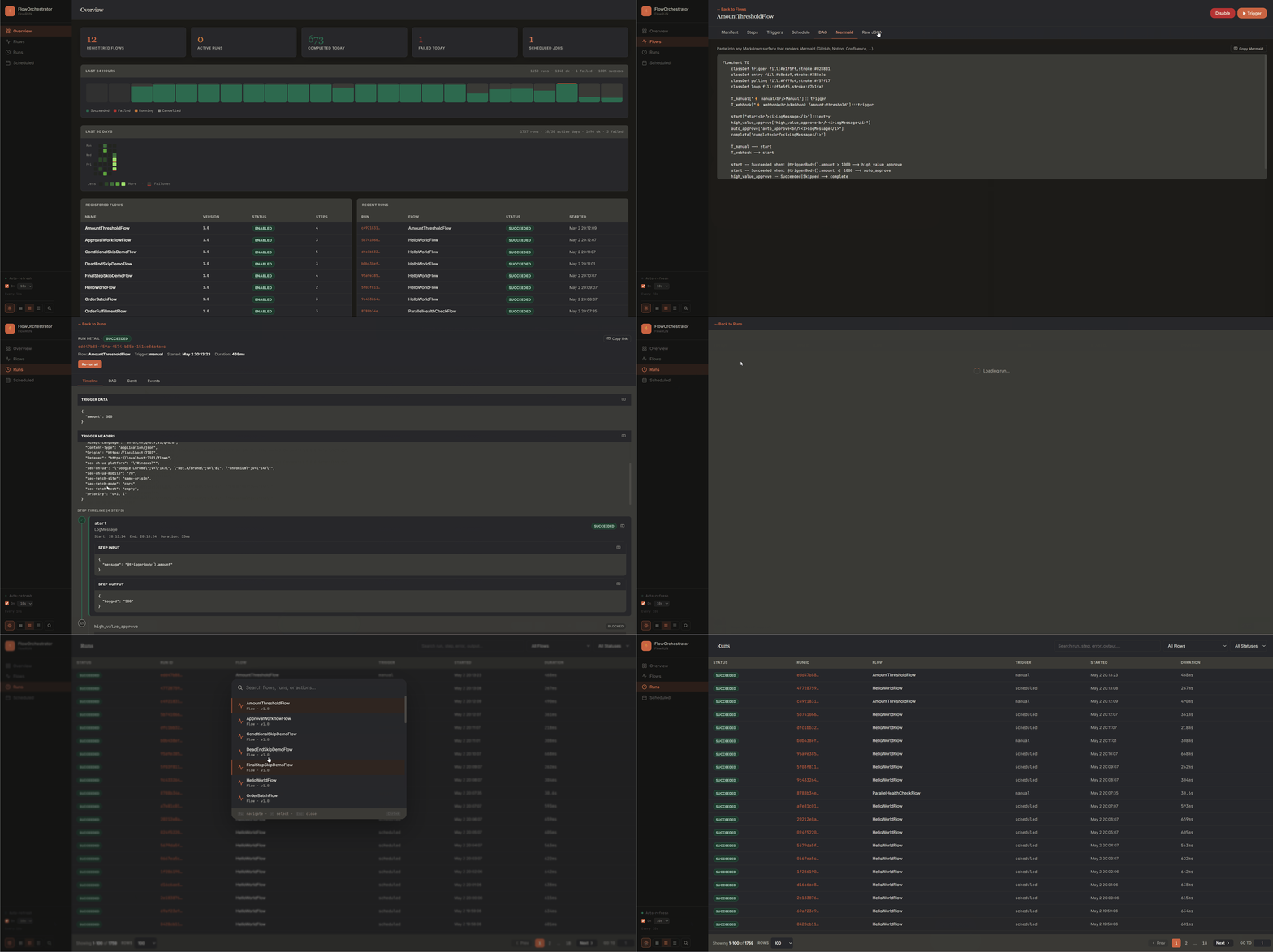
- Built-in dashboard with realtime updates — Timeline, DAG, and Gantt views with retry, cancel, and re-run controls; state changes stream over Server-Sent Events the moment they happen, polling only kicks in if the stream stalls.
- Runtime-agnostic core — three runtimes ship today (Hangfire, in-process, Azure Service Bus); add your own without touching flow definitions.
FlowOrchestrator separates storage (where flow definitions and run history live) from the runtime adapter (which dispatches and executes steps).
| Hangfire runtime | InMemory runtime | ServiceBus runtime | |
|---|---|---|---|
| Step dispatcher | IBackgroundJobClient |
Channel<T> inside the host process |
Azure Service Bus topic + per-flow subscription |
| Cron triggers | IRecurringJobManager (multi-instance safe) |
PeriodicTimer (single-instance only) |
Self-perpetuating scheduled messages on a queue (multi-instance safe) |
| Survives process restart | ✓ (jobs in Hangfire storage) | ✗ (in-memory queue) | ✓ (messages survive in the SB namespace) |
| Multi-instance horizontal scale | ✓ | ✗ | ✓ (workers compete on the subscription) |
| Extra infrastructure | Hangfire + SQL Server / PostgreSQL | None | Azure Service Bus namespace (or local emulator) |
| Best for | Production workloads on .NET infra | Local dev, integration tests, single-node side projects | Cloud-native deployments, multi-region scale-out |
Storage is independent — InMemory storage works only for dev / tests, while SQL Server and PostgreSQL are production-ready under any of the three runtimes.
dotnet add package FlowOrchestrator.Core
dotnet add package FlowOrchestrator.Hangfire     # always required — see note below

# Runtime adapter — pick one
#   Hangfire   → already installed above; call options.UseHangfire()
dotnet add package FlowOrchestrator.InMemory     # In-process Channel<T> (dev / testing / single-node)
dotnet add package FlowOrchestrator.ServiceBus   # Azure Service Bus (cloud-native multi-instance)

# Storage backend — pick one
dotnet add package FlowOrchestrator.SqlServer    # or FlowOrchestrator.PostgreSQL
                                                  # FlowOrchestrator.InMemory ships its own storage too

# Optional
dotnet add package FlowOrchestrator.Dashboard    # REST API + SPA dashboard
dotnet add package FlowOrchestrator.Testing      # FlowTestHost — in-process integration test helper
FlowOrchestrator.Hangfireis required for every runtime. TheAddFlowOrchestrator(...)DI entry point ships in that package, so you reference it even for the InMemory and Service Bus runtimes. What is optional is Hangfire itself — unless you calloptions.UseHangfire(), you never callAddHangfire/AddHangfireServer, and no Hangfire server, storage, or dashboard runs. The "zero infrastructure" claim is about deployed infrastructure, not about the package graph.
// Program.cs
builder.Services.AddHangfire(c => c
    .SetDataCompatibilityLevel(CompatibilityLevel.Version_170)
    .UseSimpleAssemblyNameTypeSerializer()
    .UseRecommendedSerializerSettings()
    .UseSqlServerStorage(connectionString));
builder.Services.AddHangfireServer();

builder.Services.AddFlowOrchestrator(options =>
{
    options.UseSqlServer(connectionString);       // persist + auto-migrate tables
    options.UseHangfire();                        // Hangfire step dispatcher
    options.AddFlow<OrderFulfillmentFlow>();
});

builder.Services.AddStepHandler<FetchOrdersStep>("FetchOrders");
builder.Services.AddStepHandler<SubmitToWmsStep>("SubmitToWms");
builder.Services.AddFlowDashboard(builder.Configuration); // optional

app.UseHangfireDashboard("/hangfire");
app.MapFlowDashboard("/flows");
Define a flow:
public sealed class OrderFulfillmentFlow : IFlowDefinition
{
    // Always use a fixed GUID literal — never Guid.NewGuid()
    public Guid Id { get; } = new("a1b2c3d4-0000-0000-0000-000000000003");
    public string Version => "1.0";
    public FlowManifest Manifest { get; set; } = new()
    {
        Triggers = {
            ["manual"]  = new() { Type = TriggerType.Manual },
            ["webhook"] = new() { Type = TriggerType.Webhook,
                Inputs = { ["webhookSlug"] = "order-fulfillment" } }
        },
        Steps = {
            ["fetch"]  = new() { Type = "FetchOrders" },
            ["submit"] = new() { Type = "SubmitToWms",
                RunAfter = { ["fetch"] = [StepStatus.Succeeded] } }
        }
    };
}
Open http://localhost:5000/flows — trigger the flow, watch steps execute in the DAG view, retry any failure.
For local development, prototypes, and single-node side projects — no Hangfire server, no database:
// Program.cs — needs the FlowOrchestrator.Hangfire package for AddFlowOrchestrator,
// but no AddHangfire / AddHangfireServer call and no Hangfire storage.
builder.Services.AddFlowOrchestrator(options =>
{
    options.UseInMemory();           // storage in-process
    options.UseInMemoryRuntime();    // Channel<T> dispatcher + PeriodicTimer cron
    options.AddFlow<OrderFulfillmentFlow>();
});

builder.Services.AddStepHandler<FetchOrdersStep>("FetchOrders");
builder.Services.AddStepHandler<SubmitToWmsStep>("SubmitToWms");
builder.Services.AddFlowDashboard(builder.Configuration);

app.MapFlowDashboard("/flows");
All run data is lost on restart — see Storage Backends for the full picture, and Production Checklist for why this combo is unsuitable for production.
For PostgreSQL, see 📖 Getting Started.
For cloud-native deployments where workers scale horizontally across replicas/regions:
// Program.cs — runtime is Azure Service Bus, storage stays in your existing DB.
builder.Services.AddFlowOrchestrator(options =>
{
    options.UseSqlServer(connectionString);              // (or UsePostgreSql / UseInMemory)
    options.UseAzureServiceBusRuntime(sb =>
    {
        sb.ConnectionString   = builder.Configuration.GetConnectionString("ServiceBus")!;
        sb.AutoCreateTopology = true;                    // creates topic + sub-per-flow at startup
    });
    options.AddFlow<OrderFulfillmentFlow>();
});

builder.Services.AddStepHandler<FetchOrdersStep>("FetchOrders");
builder.Services.AddFlowDashboard(builder.Configuration);

app.MapFlowDashboard("/flows");
Topology — one topic (flow-steps) with one subscription per registered flow (SQL filter on FlowId); plus one queue (flow-cron-triggers) for self-perpetuating cron schedules. The engine's Dispatch many, Execute once invariant (dispatch ledger + claim guard) handles Service Bus's at-least-once delivery model — duplicate messages cannot run a step twice.
Local development uses the official Microsoft Service Bus emulator. The included Aspire AppHost wires it via AddAzureServiceBus("servicebus").RunAsEmulator(); run with dotnet run --project ./FlowOrchestrator.AppHost and the flow-servicebus instance comes up on port 5104.
| Topic | Link |
|---|---|
| Getting started (all runtimes) | getting-started |
| Core concepts — Flow, Step, RunId | core-concepts |
| Step handlers | step-handlers |
| Trigger types | triggers |
| Webhook hardening (HMAC, replay, rate limit, IP lists) | webhook-hardening |
Expression reference (@triggerBody()) |
expressions |
| Polling pattern | polling |
| ForEach / fan-out | foreach |
| Dashboard & REST API | dashboard |
| Storage backends | storage |
| Configuration reference | configuration |
| Architecture | architecture |
| Observability | observability |
| Mermaid export | mermaid-export |
Conditional execution (When) |
conditional-execution |
Human-in-loop (WaitForSignal) |
wait-for-signal |
Testing flows (FlowTestHost) |
testing |
| Versioning flows in production | versioning |
| Production deployment checklist | production-checklist |
Before changing any deployed flow, read Versioning Flows — it explains which manifest changes are safe and which need a maintenance window. Before go-live, walk through the Production Checklist for storage, multi-instance, monitoring, secrets, capacity, and upgrade guidance. Wire AddFlowOrchestratorHealthChecks() into /health so your load balancer can drop traffic when the flow store is unreachable.
flow.ToMermaid() returns a Mermaid flowchart string that renders in GitHub
READMEs, Notion, Confluence, and any modern Markdown surface — no running app
required. Here is the sample OrderFulfillmentFlow:
flowchart TD
    classDef trigger fill:#e1f5ff,stroke:#0288d1
    classDef entry fill:#c8e6c9,stroke:#388e3c
    classDef polling fill:#fff9c4,stroke:#f57f17
    classDef loop fill:#f3e5f5,stroke:#7b1fa2

    T_manual["⚡ manual<br/>Manual"]:::trigger
    T_webhook["⚡ webhook<br/>Webhook /order-fulfillment"]:::trigger

    fetch_orders["fetch_orders<br/><i>QueryDatabase</i>"]:::entry
    submit_to_wms["submit_to_wms<br/><i>CallExternalApi</i>"]:::polling
    save_result["save_result<br/><i>SaveResult</i>"]

    T_manual --> fetch_orders
    T_webhook --> fetch_orders
    fetch_orders -- Succeeded --> submit_to_wms
    submit_to_wms -- Succeeded --> save_result
The dashboard ships a Copy Mermaid button on every flow detail page, and the
sample app exposes --export-mermaid <flowId> for CI integrations.
| Package | Target frameworks |
|---|---|
FlowOrchestrator.Core |
net8.0 · net9.0 · net10.0 |
FlowOrchestrator.Hangfire |
net8.0 · net9.0 · net10.0 |
FlowOrchestrator.InMemory |
net8.0 · net9.0 · net10.0 |
FlowOrchestrator.ServiceBus |
net8.0 · net9.0 · net10.0 |
FlowOrchestrator.SqlServer |
net8.0 · net9.0 · net10.0 |
FlowOrchestrator.PostgreSQL |
net8.0 · net9.0 · net10.0 |
FlowOrchestrator.Dashboard |
net8.0 · net9.0 · net10.0 |
FlowOrchestrator.Testing |
net8.0 · net9.0 · net10.0 |
MIT — see the LICENSE file.