Helm is an AI-native platform for managing your AI agents and integrating them into your team's workflows, where they can leverage your entire team's context.
The first feature will be a task management app that humans and AIs can share to create, assign, and keep track of their progress on tasks. This will be made available to AI agents via Model Context Protocol (MCP).
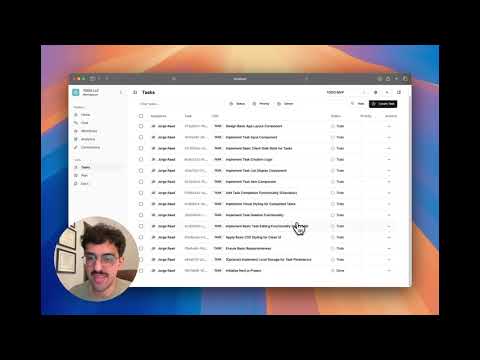
- Helm
Helm is a comprehensive platform designed to bridge the gap between human teams and AI agents. At its core, Helm provides:
- Task Management - A collaborative workspace for tracking tasks, projects, and workflows
- AI Agent Integration - Seamless incorporation of AI agents into your team's everyday processes
- Context Sharing - Allowing AI agents to access and leverage your team's shared knowledge
- Real-time Communication - Chat interfaces to communicate with AI agents for assistance
- Secure Authentication - OAuth 2.0-based authentication and session management
Built with a modern TypeScript stack, Helm follows a modular architecture with clear separation of concerns. The system is divided into several packages, each with specific responsibilities, allowing for independent development, testing, and scaling.
Helm is built as a monorepo consisting of multiple packages that work together to provide a cohesive system.
graph TD
    CLIENT[Web Client] --> |HTTP/GraphQL| SERVER["GraphQL Server"];
    CLIENT --> |SSE| AGENT_GW["Agent Gateway"];
    CLIENT --> |OAuth| AUTH["Auth Service"];

    SERVER --> |Database Access| CORE["Core Services"];
    SERVER --> |Agent Requests| AGENT_GW;

    CORE --> DB[(PostgreSQL Database)];

    AGENT_GW --> LANGGRAPH["LangGraph Cloud"];

    subgraph "Frontend (@helm/client)"
        CLIENT
    end

    subgraph "Backend Services"
        SERVER
        AGENT_GW
        AUTH
        CORE
    end
Flow of Operations:
- Users authenticate via the Auth Service using OAuth 2.0
- The Web Client communicates with the GraphQL Server for data operations
- Real-time agent interactions are streamed through the Agent Gateway
- Core services provide business logic and data persistence
- LangGraph Cloud powers the AI agent runtime
The foundation of Helm, providing core business logic, domain models, and data persistence.
Key Features:
- Domain-driven design with clear entity models (User, Workspace, Project, Task, etc.)
- Repository pattern for data access abstraction
- Service layer implementing business rules
- Database operations via Drizzle ORM
GraphQL API server providing the primary interface for data operations.
Key Features:
- Apollo Server for GraphQL processing
- Pothos for code-first schema generation
- JWT authentication via JWKS
- Integration with core services
- Real-time agent communication
Next.js-based web application for the user interface.
Key Features:
- Modern React with Next.js App Router
- Apollo Client for GraphQL data fetching
- shadcn/ui components with Tailwind CSS
- Server-sent events for real-time updates
- Backend for Frontend (BFF) pattern for security
Authentication service providing OAuth 2.0 capabilities.
Key Features:
- OAuth 2.0 authorization flows
- Google authentication integration
- JWT token issuance and validation
- User identity management
- Integration with core user services
Communication layer for real-time interaction with AI agents.
Key Features:
- Server-sent events (SSE) for streaming responses
- LangGraph SDK integration
- Stream management for persistent connections
- Integration with GraphQL server for persistence
- Agent message handling
Learn more about @helm/agent-gateway
LangGraph-based AI agent for task management through natural language.
Key Features:
- Natural language interface for task management
- GraphQL tool integration via Model Context Protocol (MCP)
- Structured reasoning with LangGraph
- Tool-augmented language model interaction
- Autonomous task creation and management
- Node.js (v18 or later)
- npm (v8 or later)
- PostgreSQL (v14 or later)
- Docker and Docker Compose (recommended for local development)
- Google OAuth credentials (for authentication)
-
Clone the repository
git clone https://github.com/yourusername/helm.git cd helm -
Install dependencies
npm install
-
Set up environment variables Create a
.envfile in the root directory with the required variables (see Configuration section). -
Set up the database
# Start PostgreSQL using Docker
docker-compose up -d

# Run migrations
npm run db:migrate --workspace=@helm/core
Create a .env file in the root directory with the following variables:
# General
NODE_ENV=development

# Database Configuration
DB_HOST=localhost
DB_PORT=5432
DB_USER=yourdbuser
DB_PASSWORD=yourdbpassword
DB_NAME=helm_db
DB_SSL=false

# Server Configuration
GRAPHQL_PORT=4000
LOG_LEVEL=info
SESSION_SECRET=your_strong_session_secret
INTERNAL_GRAPHQL_API_SECRET=your_internal_api_secret

# Auth Service Configuration
AUTH_PORT=3001
AUTH_SERVER_BASE_URL=http://localhost:3001
FRONTEND_URL=http://localhost:3002
CLIENT_ID=your_oauth_client_id
GOOGLE_CLIENT_ID=your_google_client_id
GOOGLE_CLIENT_SECRET=your_google_client_secret

# Client Configuration
SERVER_URL=http://localhost:4000

# Agent Gateway Configuration
AGENT_GATEWAY_PORT=3003
AGENT_GATEWAY_INTERNAL_URL=http://localhost:3003
AGENT_GATEWAY_PUBLIC_URL=http://localhost:3003
AGENT_GATEWAY_INTERNAL_API_SECRET=your_agent_gateway_secret
LANGGRAPH_DEPLOYMENT_URL=your_langgraph_deployment_url
LANGSMITH_API_KEY=your_langsmith_api_key
DEFAULT_SYSTEM_AGENT_ID=00000000-0000-0000-0000-000000000000
DEFAULT_SYSTEM_AGENT_NAME="Helm Assistant"You can start the entire application using separate terminal sessions:
-
Start the core infrastructure
# Start PostgreSQL using Docker docker-compose up -d -
Start the Auth Service
# From the root directory npm run dev --workspace=@helm/auth -
Start the GraphQL Server
# From the root directory npm run dev --workspace=@helm/server -
Start the Agent Gateway
# From the root directory npm run dev --workspace=@helm/agent-gateway -
Start the Client Application
# From the root directory
npm run dev --workspace=@helm/client
The application should now be accessible at http://localhost:3002
helm/
├── .env                  # Environment variables (create this)
├── docker-compose.yml    # Docker Compose configuration
├── package.json          # Root package.json
├── schema.graphql        # Generated GraphQL schema
├── packages/
│   ├── core/             # @helm/core package
│   ├── server/           # @helm/server package
│   ├── client/           # @helm/client package
│   ├── auth/             # @helm/auth package
│   ├── agent-gateway/    # @helm/agent-gateway package
Building Packages:
# Build specific package
npm run build --workspace=@helm/core

# Build all packages
npm run build
Development Mode:
# Run specific package in dev mode
npm run dev --workspace=@helm/client

# Run specific package tests
npm test --workspace=@helm/core-
Code Generation After changes to GraphQL schema in
@helm/server, regenerate types:npm run codegen
-
Database Migrations After schema changes in
@helm/core:npm run db:generate --workspace=@helm/core npm run db:migrate --workspace=@helm/core
-
Component Development For UI components in
@helm/client:# Add shadcn/ui component npx shadcn-ui@latest add button --cwd packages/client
The GraphQL schema is defined in code using Pothos in the @helm/server package. To generate the schema file:
npm run generate:schema --workspace=@helm/serverThis creates schema.graphql at the root, which is then used by the client's code generation.
Contributions are welcome! Please feel free to submit a Pull Request.
MIT License