



A Salesforce CLI plugin that decomposes large metadata XML files into smaller, version-control–friendly files (XML, JSON, YAML, JSON5), and recomposes them back into deployment-ready metadata.
Table of Contents
-
Install the plugin
sf plugins install sf-decomposer@x.y.z
-
Retrieve metadata into your Salesforce DX project (e.g.
sf project retrieve start). -
Decompose the metadata types you need:
sf decomposer decompose -m "flow" -m "labels" --postpurge
-
Add decomposed paths to .forceignore
This is required so the Salesforce CLI does not treat decomposed files as source. Use the sample .forceignore and adjust extensions for your chosen format (.xml,.json,.yaml, etc.). -
Commit the decomposed files to version control.
-
Before deploy, recompose and then deploy:
sf decomposer recompose -m "flow" -m "labels"
sf project deploy start
The xml-disassembler NodeJS dependency, which depends on a Rust crate, ships with native binaries for these platforms:
| Platform | Architectures |
|---|---|
| macOS | x64 (Intel), arm64 (Apple Silicon) |
| Linux | x64, arm64, ia32 |
| Windows | x64 |
If other platforms or architectures require support, please open an issue in the Rust repository.
Salesforce’s built-in decomposition is limited. sf-decomposer gives admins and developers more control, flexibility, and better versioning.
- Broader metadata support – Works with most Metadata API types, not just the subset Salesforce decomposes.
- Selective decomposition – Decompose only what you need; use .sfdecomposerignore to skip specific files.
- Two strategies:
- unique-id (default): one file per nested element, named by content or hash.
- grouped-by-tag: one file per tag (e.g. all
fieldPermissionsin a permission set infieldPermissions.xml). Use--decompose-nested-permissionsfor deeper permission set and muting permission set decomposition.
- Full decomposition – Fully decompose types that Salesforce only partially supports (e.g. permission sets).
- Stable ordering – Elements are sorted consistently to reduce noisy diffs.
- Multiple formats – Output as XML, JSON, JSON5, or YAML.
- CI/CD hooks – Auto decompose after retrieve and recompose before deploy via .sfdecomposer.config.json.
- Better reviews – Smaller, structured files mean clearer pull requests and fewer merge conflicts.
| Command | Description |
|---|---|
sf decomposer decompose |
Decompose metadata in package directories into smaller files. |
sf decomposer recompose |
Recompose decomposed files back into deployment-ready metadata. |
Decomposes metadata in all local package directories (from sfdx-project.json) into smaller files.
USAGE
  $ sf decomposer decompose -m <value> -f <value> -i <value> -s <value> [--prepurge --postpurge -p --json]

FLAGS
  -m, --metadata-type=<value>             Metadata suffix to process (e.g. flow, labels). Repeatable.
  -f, --format=<value>                    Output format: xml | yaml | json | json5 [default: xml]
  -i, --ignore-package-directory=<value>  Package directory to skip (as in sfdx-project.json). Repeatable.
  -s, --strategy=<value>                  unique-id | grouped-by-tag [default: unique-id]
  --prepurge                              Remove existing decomposed files before decomposing [default: false]
  --postpurge                             Remove original metadata files after decomposing [default: false]
  -p, --decompose-nested-permissions      With grouped-by-tag, further decompose permission set and muting permission set object/field permissions

GLOBAL FLAGS
  --json  Output as JSON.
Examples
# Decompose flows (XML), purge before/after
sf decomposer decompose -m "flow" -f "xml" --prepurge --postpurge

# Decompose flows and labels in YAML
sf decomposer decompose -m "flow" -m "labels" -f "yaml" --prepurge --postpurge

# Decompose flows, excluding the force-app package
sf decomposer decompose -m "flow" -i "force-app"Recomposes decomposed files into deployment-compatible metadata.
USAGE
  $ sf decomposer recompose -m <value> -i <value> [--postpurge --json]

FLAGS
  -m, --metadata-type=<value>             Metadata suffix to process (e.g. flow, labels). Repeatable.
  -i, --ignore-package-directory=<value>  Package directory to skip. Repeatable.
  --postpurge                             Remove decomposed files after recomposing [default: false]

GLOBAL FLAGS
  --json  Output as JSON.
Examples
sf decomposer recompose -m "flow" --postpurge
sf decomposer recompose -m "flow" -i "force-app"Important: Use one strategy per metadata type. To switch from
unique-idtogrouped-by-tag, run decompose with--prepurgeand-s "grouped-by-tag"to regenerate.
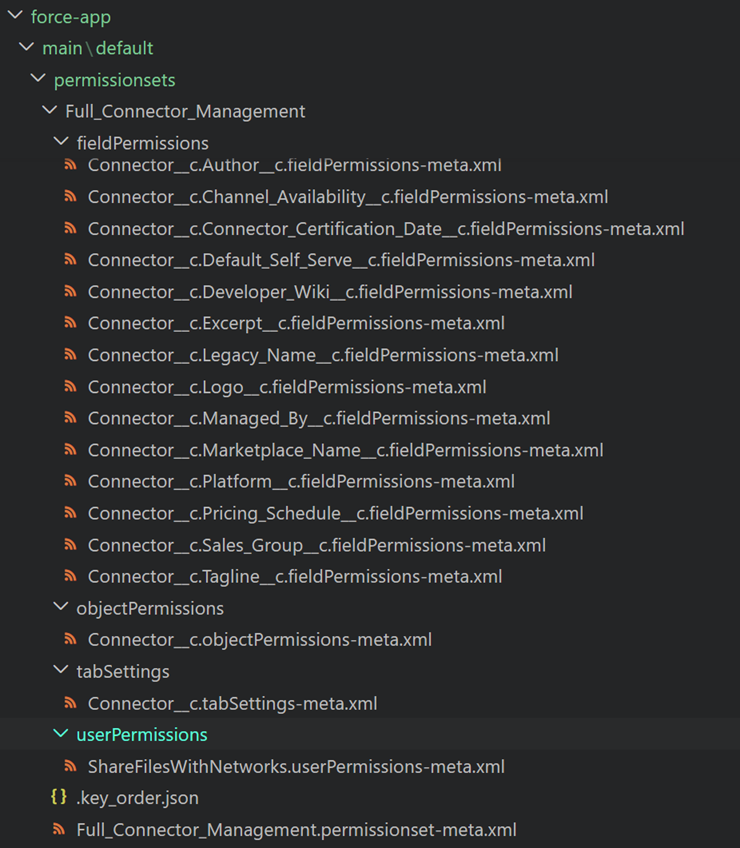
- unique-id (default): Each nested element goes to its own file, named by unique-id fields or content hash. Leaf elements stay in a file named like the original XML.
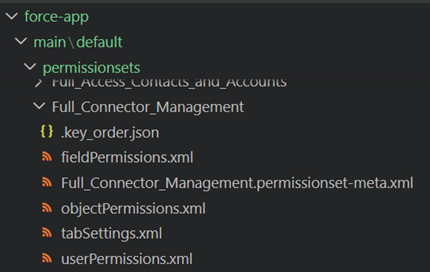
- grouped-by-tag: All elements with the same tag (e.g.
<fieldPermissions>) go into one file named after the tag (e.g.fieldPermissions.xml). Leaf elements are still grouped in the original-named file.
Permission set – unique-id
Permission set – grouped-by-tag
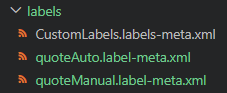
Custom labels use only the unique-id strategy. If you pass grouped-by-tag, the plugin overrides to unique-id and continues. Grouping labels by tag would produce no difference from the original file since all elements share the same tag. Each label is written to its own file.
With grouped-by-tag, use --decompose-nested-permissions (-p) to further decompose permission sets and muting permission sets:
- Write each
<objectPermissions>to its own file underobjectPermissions/. - Group
<fieldPermissions>by object underfieldPermissions/.
Similar to Salesforce’s decomposePermissionSetBeta2, with more control and format options. Muting permission sets extend the permission set metadata type and support the same decomposition.
sf decomposer decompose -m "permissionset" -s "grouped-by-tag" -p
sf decomposer decompose -m "mutingpermissionset" -s "grouped-by-tag" -p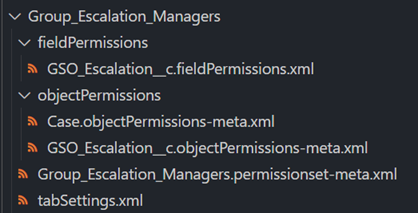
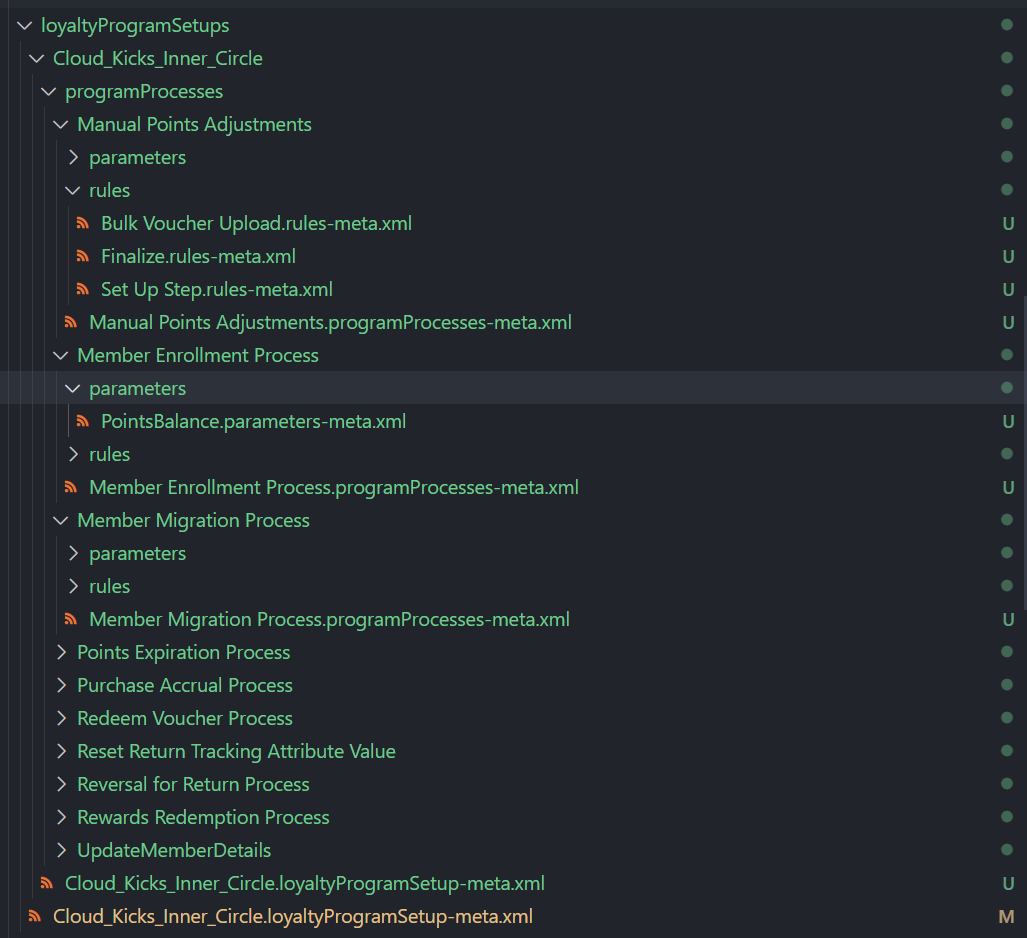
loyaltyProgramSetup supports only the unique-id strategy. If you pass grouped-by-tag, the plugin overrides to unique-id and continues. The metadata is automatically decomposed further under unique-id:
- Each
<programProcesses>element → its own file. - Each
<parameters>and<rules>child → its own file.
Recomposition for loyalty program setup removes decomposed files even without
--postpurge. Use version control or CI to keep them if needed.
All parent metadata types from this plugin’s version of @salesforce/source-deploy-retrieve (SDR) are supported, except where noted below.
Use the metadata suffix for -m / --metadata-type, as in SDR’s metadataRegistry.json, or infer from the file name: *.{suffix}-meta.xml.
| Metadata Type | CLI value | Notes |
|---|---|---|
| Custom Labels | labels |
Strategy overridden to unique-id if grouped-by-tag is provided (grouping labels by tag would be no different from the original file). |
| Workflows | workflow |
|
| Profiles | profile |
|
| Permission Sets | permissionset |
Supports --decompose-nested-permissions with grouped-by-tag. |
| Muting Permission Sets | mutingpermissionset |
Extends permission set metadata type. Supports --decompose-nested-permissions with grouped-by-tag. |
| AI Scoring Model Definition | aiScoringModelDefinition |
|
| Decision Matrix Definition | decisionMatrixDefinition |
|
| Bot | bot |
|
| Marketing App Extension | marketingappextension |
|
| Loyalty Program Setup | loyaltyProgramSetup |
Only unique-id strategy supported; grouped-by-tag is overridden. Automatically decomposed further (see Loyalty Program Setup). |
| Situation | Message |
|---|---|
botVersion used directly |
botVersion suffix should not be used. Please use bot to decompose/recompose bot and bot version files. |
| Custom Objects | Custom Objects are not supported by this plugin. |
| Unsupported SDR strategies (e.g. matchingContentFile, digitalExperience, mixedContent, bundle) | Metadata types with [matchingContentFile, digitalExperience, mixedContent, bundle] strategies are not supported by this plugin. |
| Child types (e.g. custom fields) or invalid suffix | Metadata type not found for the given suffix: field. |
The plugin looks for sfdx-project.json from the current directory up to the drive root. If it’s not found:
Error (1): sfdx-project.json not found in any parent directory.
This plugin relies on the @salesforce/source-deploy-retrieve metadata registry to map each metadata type to its expected directory name.
If you provide a metadata type whose corresponding directory does not exist in any of your package directories, the plugin will fail with the following error:
No directories named ${metadataTypeEntry.directoryName} were found in any package directory.
For example, if you attempt to decompose Custom Labels but none of your package directories contain a "labels" folder, the plugin will throw this error.
The xml-disassembler Node plugin uses a Rust crate for XML decomposing and recomposing. Disassemble errors and messages are shown in the terminal.
Control verbosity with the RUST_LOG environment variable (e.g. RUST_LOG=debug for detailed output).
Example output in the terminal (Rust log format):
[2026-02-11T22:52:32Z ERROR xml_disassembler::builders::build_disassembled_files] The XML file C:\Users\matthew.carvin\Documents\sf-decomposer\fixtures\package-dir-1\permissionsets\only_leafs.permissionset-meta.xml only has leaf elements. This file will not be disassembled.
If a metadata file has only leaf elements (primitives, no nested structure), there is nothing to decompose. The Rust crate skips the file and logs an ERROR like the example above.
Configure .forceignore so the Salesforce CLI ignores decomposed files; otherwise
sfcommands can fail.
Put .sfdecomposer.config.json in the project root to run:
- After
sf project retrieve start: decompose. - Before
sf project deploy start/sf project deploy validate: recompose.
Copy and customize the sample config.
| Option | Required | Description |
|---|---|---|
metadataSuffixes |
Yes | Comma-separated metadata suffixes to decompose/recompose. |
ignorePackageDirectories |
No | Comma-separated package directories to skip. |
prePurge |
No | Remove existing decomposed files before decomposing (default: false). |
postPurge |
No | After decompose: remove originals; after recompose: remove decomposed files (default: false). |
decomposedFormat |
No | xml, json, json5, or yaml (default: xml). |
strategy |
No | unique-id | grouped-by-tag (default: unique-id). |
decomposeNestedPermissions |
No | With grouped-by-tag, set true to further decompose permission set and muting permission set object/field permissions. |
The Salesforce CLI must ignore decomposed files and allow recomposed files. Use the sample .forceignore and set patterns for the extensions you use (.xml, .json, .yaml, etc.).
Optional. In the project root, list paths/patterns to skip when decomposing (same syntax as .gitignore 2.22.1). Ignored files are not recomposed from.
Optional. Ignore recomposed metadata so it aren’t committed. See the sample .gitignore.
Bugs and feature requests: open an issue.
- xml-disassembler – Disassemble XML into smaller, manageable files and reassemble when needed. Node.js + Rust (Neon). Includes prebuilt binaries for macOS (x64, arm64), Linux (x64, arm64, ia32), and Windows (x64).
- fs-extra – Node.js: extra methods for the
fsobject like copy(), remove(), mkdirs(). - @salesforce/source-deploy-retrieve – JavaScript toolkit for working with Salesforce metadata.
Contributions are welcome. See CONTRIBUTING.md.
MIT. See LICENSE.