





Kiri OCR is a lightweight OCR library for English and Khmer documents. It provides document-level text detection, recognition, and rendering capabilities.
🚀 Try the Live Demo | 📚 Full Documentation
- High Accuracy: Transformer model with hybrid CTC + attention decoder
- Bi-lingual: Native support for English and Khmer (and mixed text)
- Document Processing: Automatic text line and word detection
- Streaming: Real-time character-by-character output (like LLM streaming)
- Easy to Use: Simple Python API and CLI
pip install kiri-ocrkiri-ocr document.jpgfrom kiri_ocr import OCR
# Initialize (auto-downloads from Hugging Face)
ocr = OCR()
# Extract text from document
text, results = ocr.extract_text('document.jpg')
print(text)
# Get detailed box-by-box results
for line in results:
print(f"{line['text']} (confidence: {line['confidence']:.1%})")Choose the decoding method based on your speed/quality tradeoff:
# Fast (CTC) - Fastest, good for batch processing
ocr = OCR(decode_method="fast")

# Accurate (Decoder) - Balanced speed and quality (default)
ocr = OCR(decode_method="accurate")

# Beam Search - Best quality, slowest
ocr = OCR(decode_method="beam")Get character-by-character output like LLM streaming:
from kiri_ocr import OCR

ocr = OCR(decode_method="accurate")

# Stream characters as they're decoded
for chunk in ocr.extract_text_stream_chars('document.jpg'):
    print(chunk['token'], end='', flush=True)
    if chunk['document_finished']:
print() # Done!Full documentation is available on the Wiki:
- Installation
- Quick Start Guide
- Python API Reference
- CLI Reference
- Training Guide
- Detector API
- Architecture
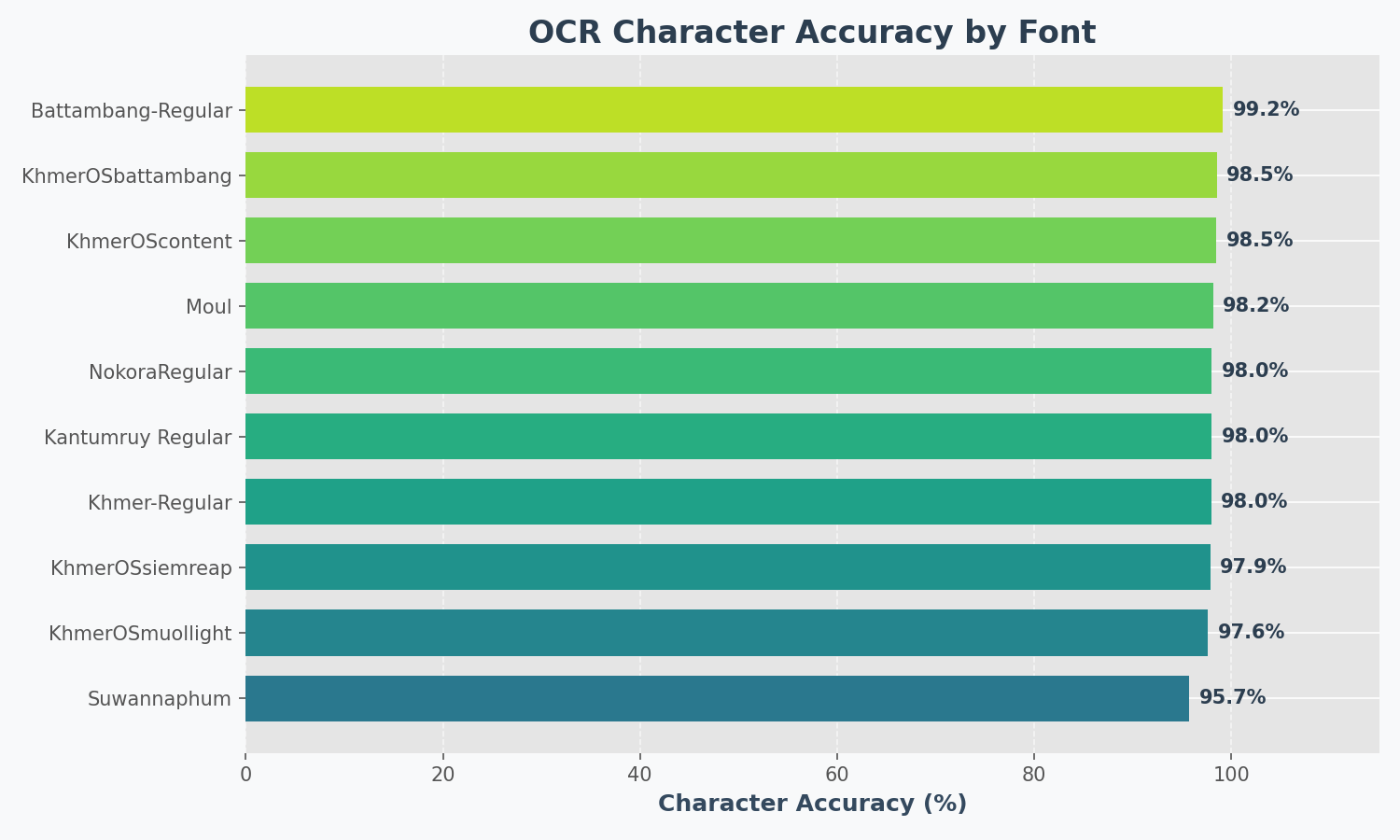
Results on synthetic test images (10 popular fonts):
kiri_ocr/
├── core.py               # OCR class
├── model.py              # Transformer model
├── training.py           # Training code
├── cli.py                # Command-line interface
└── detector/             # Text detection
    ├── db/               # DB detector
    └── craft/            # CRAFT detector
If you find this project useful:
- ⭐ Star this repository
- Buy Me a Coffee
- ABA Payway
Join our Discord Community](https://discord.gg/Vcrw274RVC)
