Python script to automate your session bookings in aimharder.com platform
Having docker installed you only need to do the following command:
docker run -e email=your.email@mail.com -e password=1234 -e booking-goals='{"0":{"time":"1815","name":"Provenza"}}' -e box-name=lahuellacrossfit -e box-id=3984 -e days-in-advance=3 pablobuenaposada/fitbotExplanation about the fields:
email: self-explanatory
password: self-explanatory
booking-goals: expects a json where as keys you would use the day of the week as integer from 0 to 6 (Monday to Friday) and the value should be the time (HHMM) of the class and the name of the class or part of it.
Unfortunately this structure needs to be crazy escaped, but here's an example:
Mondays at 18:15 class name should contain ARIBAU Wednesdays at 18:15 class name should contain ARIBAU
{
  "0": {"time":"1815", "name":"ARIBAU"},
  "2": {"time":"1815", "name":"ARIBAU"}
}
which should be sent in this form:
'{"0":{"time":"1815","name":"ARIBAU"},"2":{"time":"1815","name":"ARIBAU"}}'box-name: this is the sub-domain you will find in the url when accessing the booking list from a browser, something like https://lahuellacrossfit.aimharder.com/schedule
box-id: it's always the same one for your gym, you can find it inspecting the request made while booking a class from the browser:
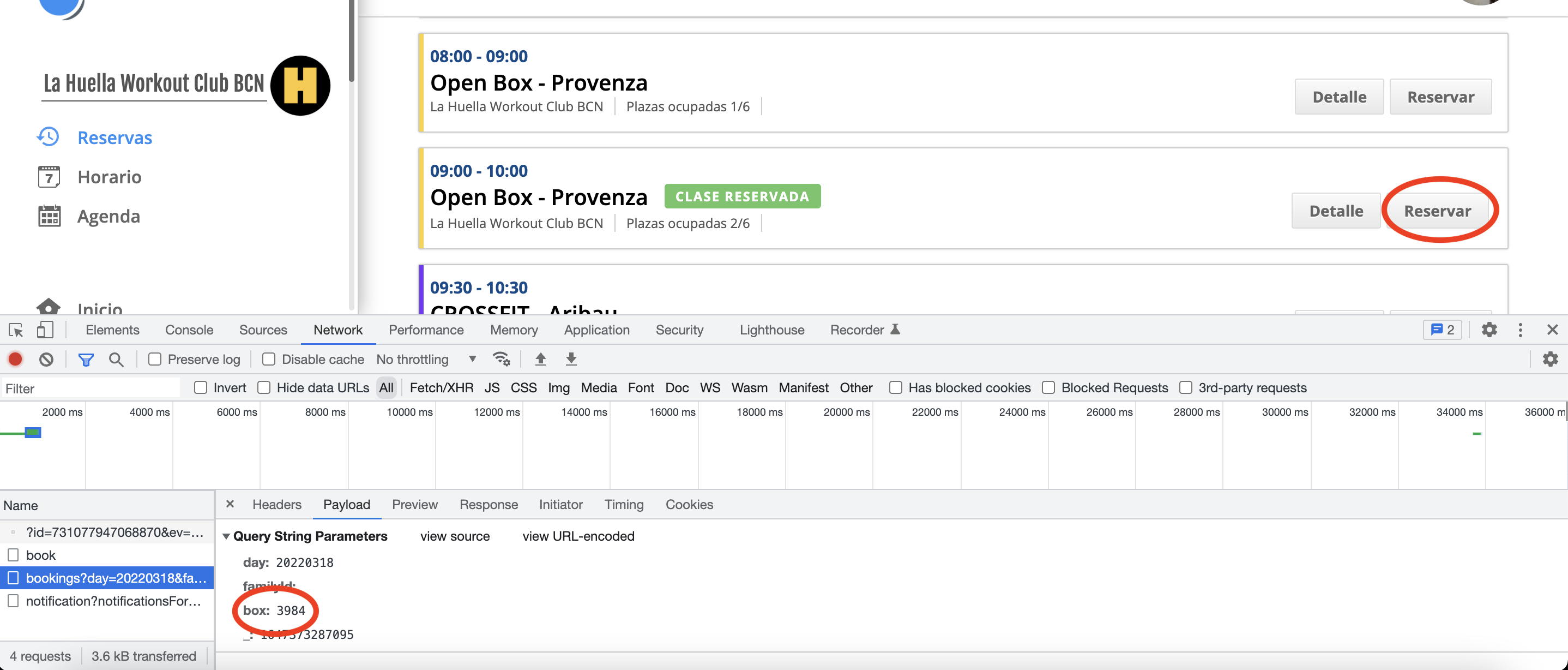

days-in-advance: this is how many days in advance the script should try to book classes from, so for example, if this script is being run on a Monday and this field is set to 3 it's going to try book Thursday class from booking_goals
family-id: Optional. This is the id for the person who wants to book a class in case the account has more than one member.
The value for this parameter can be found by inspecting the requests with the browser, as with the field box-id.
proxy: Optional. If you want to use a proxy, you can set it with the format socks5://ip:port.
You can use env files for configuration and credentials instead of passing them directly on the command line:
-
Copy the example files:
cp .env.example .env
cp .env.secrets.example .env.secrets
-
Edit
.envwith your gym configuration (box-name, box-id, booking-goals) -
Edit
.env.secretswith your credentials (email, password) -
Run:
docker run --env-file .env --env-file .env.secrets pablobuenaposada/fitbot
Security Note:
.env.secretsis gitignored to prevent accidentally committing credentials. Never commit this file.
It appears that AimHarder has started blocking connections by returning a 403 error based on the IP address location. If you are running this script from outside Spain, you may encounter these errors, which is why the proxy argument has been added.
The United States seems to be heavily blocked (possibly only Azure IPs), so running this script from GitHub Actions will likely fail without a proxy. While this is not confirmed, it seems AimHarder doesn't like the use of automated scripts, especially when run for free via GitHub Actions 😀. If you choose this approach, ensure you use a proxy that is not blocked by AimHarder.
Note: Use free proxies at your own risk, as your credentials will be transmitted through them. Additionally avoid sharing the proxy you are using in here since AimHarder may block it.
Yes, you can! By using GitHub Actions, you can run this script without needing your own infrastructure. It can also be configured to run automatically on a schedule. For details about potential connection blocks and proxy usage, refer to the previous section.
You can find an example of the GitHub Actions workflow in the .github/workflows/scheduled.yml file.
Clone this repo, get a proxy (https://www.freeproxy.world/), add your secrets, edit the file to your needs and it should be ready to go.
Enjoy!