Releases: sakalond/StableGen
3D Asset Generation, PBR Materials & Scene Queue

StableGen v0.3.0: Full 3D Asset Generation, PBR Materials & Scene Queue
Generate complete 3D assets from text or image prompts, decompose textures into PBR material stacks, and batch-process many assets overnight - all inside Blender. This release transforms StableGen from a texturing tool into an end-to-end 3D asset creation pipeline built on Microsoft's TRELLIS.2, SDXL and Qwen-Image-Edit.
Blender Compatibility: StableGen v0.3.0 supports Blender 4.2 - 4.5 (using OSL shaders) and Blender 5.1+ (using native Raycast nodes with GPU acceleration). Blender 5.0 is not supported.
✨ What's New in v0.3.0:
- TRELLIS.2: Image & Text to 3D
- PBR Material Decomposition
- Scene Queue
- FLUX.2 Klein Architecture (Experimental)
- Improvements & Fixes
🧊 TRELLIS.2: Image & Text to 3D
Generate fully textured 3D meshes from a single reference image or text prompt using Microsoft's TRELLIS.2 (4B-parameter model). Powered by ComfyUI-TRELLIS2.
- Two input modes:
- Image - provide a reference image directly.
- Prompt - StableGen first generates a reference image using any supported architecture (SDXL, FLUX.1, Qwen, Klein), then feeds it to TRELLIS.2.
- Multiple resolution modes: 512, 1024, 1024 Cascade (recommended), and 1536 Cascade for maximum geometric detail.
- Flexible texture pipeline: Use TRELLIS.2's native PBR textures, or automatically re-texture the generated mesh with SDXL, FLUX.1, Qwen Image Edit, or FLUX.2 Klein for higher-quality diffusion textures.
- Preview Gallery: Generate multiple candidate images with different seeds and pick the best before committing to 3D generation. GPU-rendered overlay with hover selection and seed labels.
- Separate texture prompt: Provide a dedicated prompt for the texturing cameras, independent of the image generation prompt - useful when the texturing needs different emphasis than the concept image.
- Source image as reference: Feed the TRELLIS.2 input image as an IPAdapter style reference or Qwen style reference during texturing, keeping the final texture faithful to the original concept.
- Mesh post-processing: Configurable decimation (up to 5M polys), optional remeshing, import scale, and shading modes (Flat, Smooth, Auto Smooth). Post-processing master toggle to import raw meshes for manual retopology.
- Automatic camera placement: 6 strategies (Orbit Ring, Sphere Coverage, Normal-Weighted K-means, PCA Axes, Greedy Coverage, Fan from Camera) with auto aspect ratio, occlusion handling, elevation clamping, and bottom-face exclusion.
- Auto view-direction prompts for hands-free camera-specific prompting.
- 3-tier progress tracking: Overall progress, phase progress, and per-step detail - all shown in the UI. Cancel via the Escape key at any point.
- 30+ built-in presets organized across 4 architecture groups, including TRELLIS.2 pipeline presets (DEFAULT / CHARACTERS / ARCHITECTURE / Mesh Only / Qwen variants). Preset diff preview shows which parameters a preset will change before applying it.
- Export-ready pipeline: Generate → Bake → Export. The built-in bake operator (now defaulting to Smart UV Project) flattens the multi-projection material into a single UV-mapped texture, ready for any game engine or DCC tool.
Installer: Option 8 - TRELLIS.2 (~0.1 GB, models auto-download on first use). The installer applies 10 post-clone patches to ComfyUI-TRELLIS2 including a DinoV3 VRAM leak fix (5-9 GB savings) and comfy-env model registry cleanup (~7 GB savings).
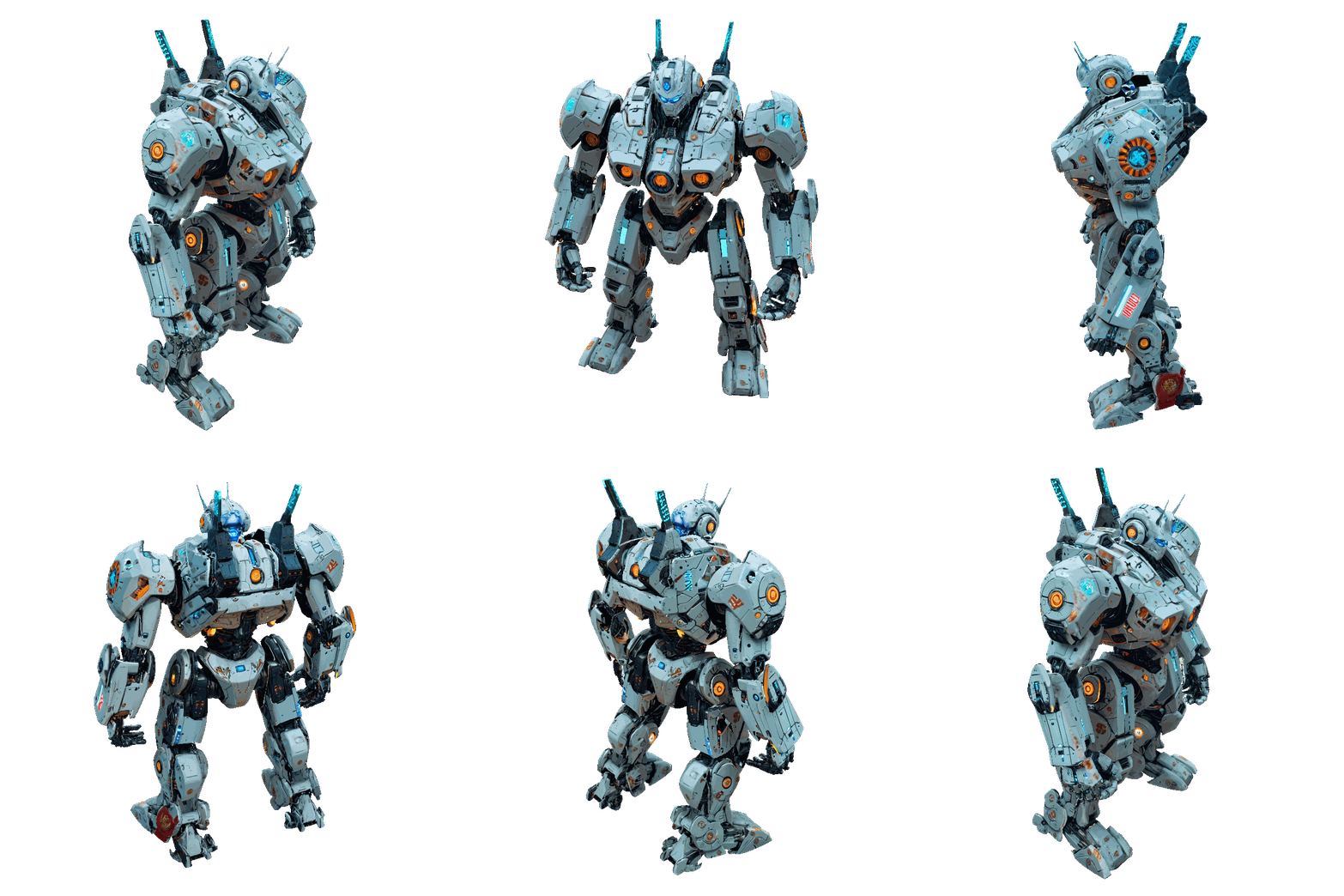
Examples (SDXL texturing):
| Dragon | Robot | Wizard |
|---|---|---|
 |
 |
 |
Prompts used
- Dragon: "fantasy dragon"
- Robot: "giant robot, mecha, cyberpunk style, sci-fi, white body, intricate details, neon accents"
- Wizard: "wizard character, intricate embroidered purple and gold robes, pointed hat, wooden staff with glowing crystal, leather belt with pouches, fantasy character concept art, 4k"
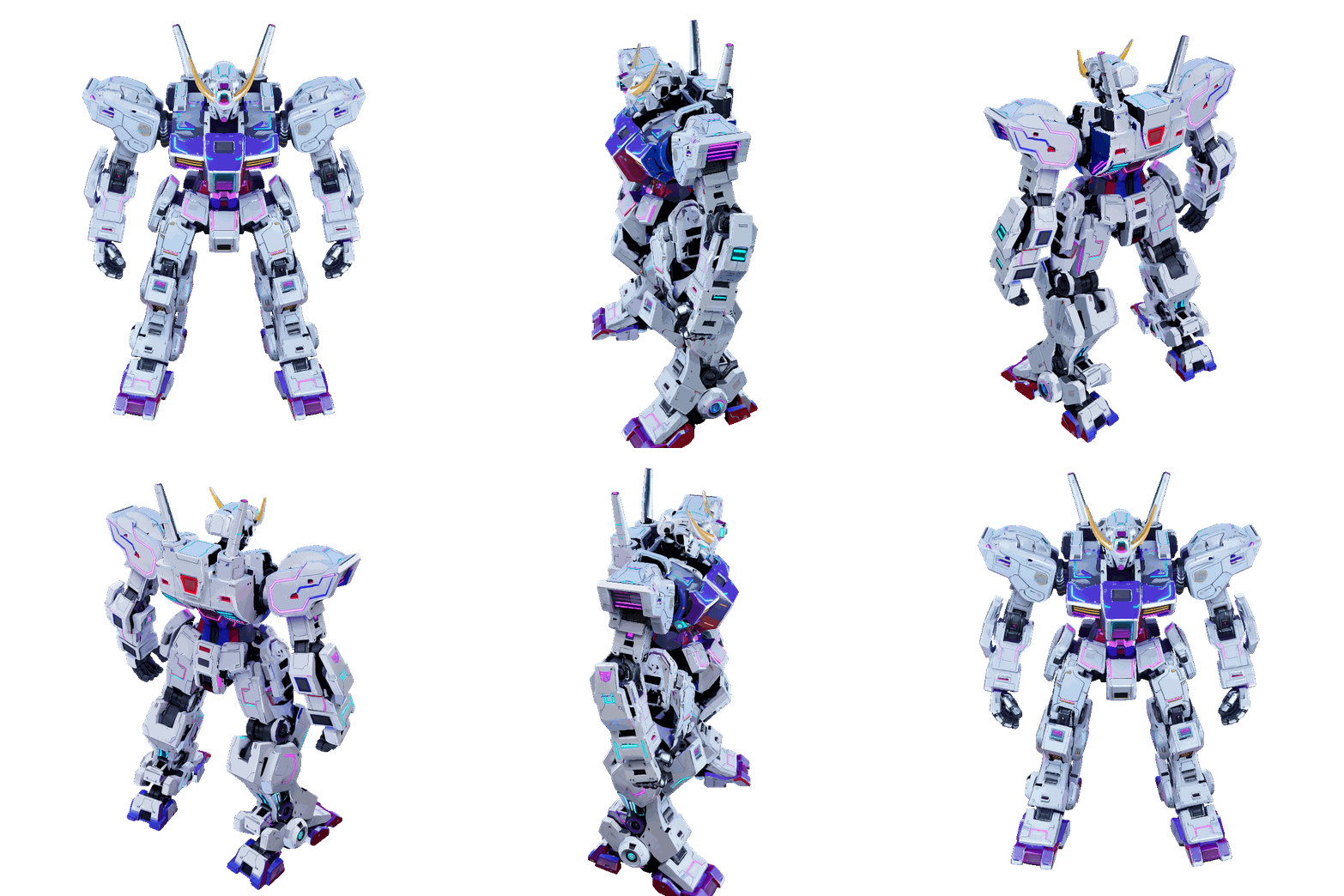
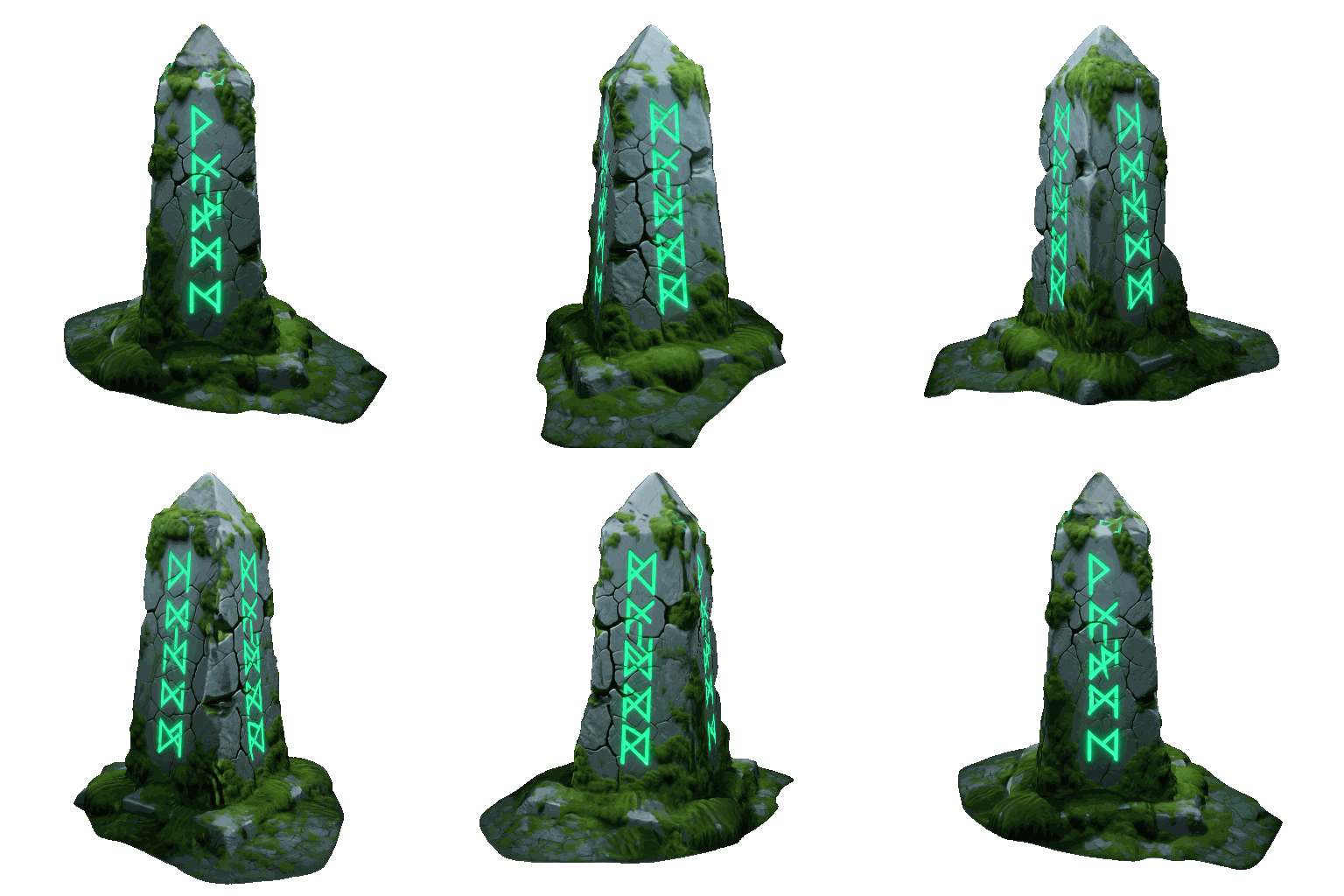
Examples (Qwen texturing):
| Chest | Robot | Obelisk |
|---|---|---|
 |
 |
 |
Prompts used
- Chest: "A highly detailed wooden treasure chest bound in heavy, dark iron. The chest is slightly open, revealing a pile of glowing gold coins inside. The wood is old and splintered, and the iron has patches of orange rust."
- Robot: "giant robot, mecha, cyberpunk style, sci-fi, white body, intricate details, neon accents"
- Obelisk: "An ancient, monolithic stone obelisk covered in glowing green runic carvings. The grey stone is deeply cracked from age and covered in patches of thick, fuzzy green moss."
🎨 PBR Material Decomposition
Decompose your generated textures into full PBR material stacks using Marigold IID and StableDelight - no external tools needed.
- 7 map types, each independently toggleable:
- Albedo with 3 source options: Marigold IID (flat), StableDelight (specular-free, configurable strength), Marigold IID-Lighting (vibrant).
- Roughness and Metallic from Marigold IID-Appearance.
- Normal with configurable strength.
- Height via Marigold depth estimation with configurable displacement scale.
- AO - Blender's built-in bake (configurable samples and distance, no ML model needed).
- Emission - two methods: IID-Lighting Residual (model-based) or HSV Threshold (fast, zero model cost).
- Selective regeneration: Per-map settings hashing via MD5. StableGen tracks each map's parameters in a sidecar JSON file and only regenerates maps whose settings have changed - no wasted compute when tweaking a single channel.
- Auto-detection: PBR UI sections are only shown when the required ComfyUI nodes (
MarigoldModelLoader,LoadStableDelightModel) are available on the server. - Tiled super-resolution: 4 tiling modes (Off, Selective, All, Custom) with cosine-fade blending masks for seamless tile boundaries.
- PBR projection clones the color blending node tree for each channel and wires into Principled BSDF inputs with correct colorspace handling.
- Replace Color with Albedo option for a clean, lighting-independent base.
- Bake-ready: The bake operator has been updated to handle PBR maps - all channels are baked alongside the color texture, producing a complete material ready for export.
Installer: Option 9 - Marigold IID (~0.01 GB). Option 10 - StableDelight (~3.3 GB).
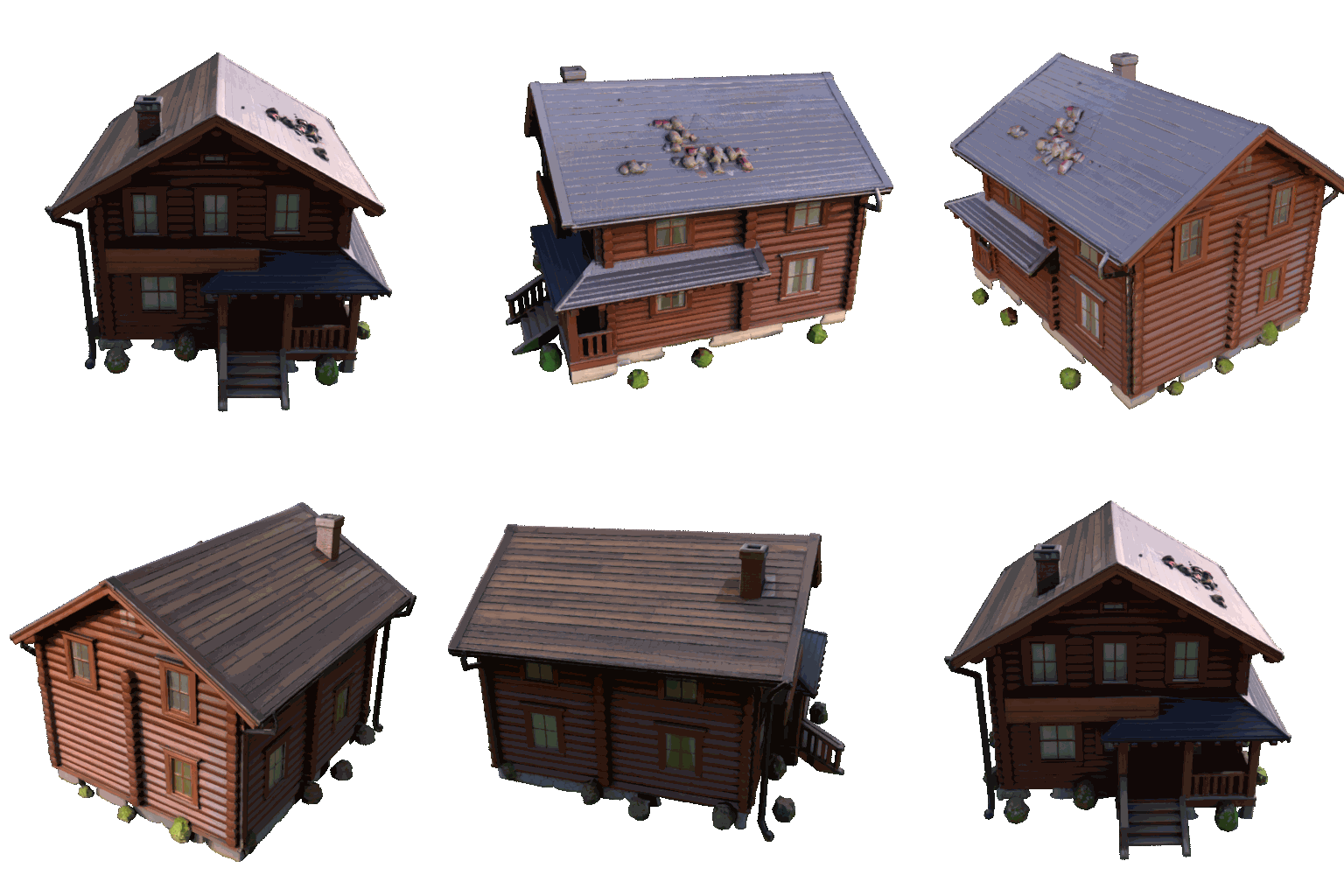
Before / After PBR:
| Non-PBR | PBR | Non-PBR | PBR |
|---|---|---|---|
 |
 |
|
 |
📋 Scene Queue
Queue multiple assets for unattended processing - perfect for overnight batch runs.
- Add to queue: Snapshots the current .blend file into a
queue_jobs/directory with a user label and prompt. - Queue operations: Add, remove, clear, reorder (move up/down), open result .blend, and invalidate (reset done/error items to pending).
- Automatic processing: Timer-based queue driver handles .blend file switching, operator invocation, and completion polling. Supports both standard texturing and TRELLIS.2 pipelines.
- Auto-retry on failure with configurable retry counter.
- Persistent state: Queue is saved to JSON and survives .blend reload.
- Queue UI list with status icons (checkmark/error/spinner), retry counts, and error reasons.
⚡ FLUX.2 Klein Architecture (Experimental)
⚠️ Experimental Feature: Klein is not yet fully stable. There are known issues with geometry guidance that can produce inconsistent results. Use with caution and expect improvements in future updates.
New texturing architecture from Black Forest Labs using multi-reference image editing.
- How it works: Reference images are encoded via
ReferenceLatentchains (positive + negative) and wired into aCFGGuider, producing edits that respect the spatial layout of the references. - Text-only CLIP: Uses Qwen 3 4B text encoder - no vision encoder needed, reducing VRAM overhead compared to Qwen Image Edit.
- 4B and 9B variants: The 9B model is auto-detected based on the selected CLIP model name.
- "Reskin" default prompts: Auto-generated prompts following BFL's Klein prompting guide, with
{main_prompt}and{camera_suffix}placeholders for multi-view consistency. - 4 presets: KLEIN PRECISE, KLEIN SAF...
Camera Overhaul, Local Edit Mode & Blender 5.1 Support
StableGen v0.2.0: Camera Overhaul, Local Edit Mode & Blender 5.1 Support
This is the biggest StableGen update yet - a ground-up rework of the camera system, a brand new Local Edit mode, Blender 5.1 support with GPU-accelerated projection, Apple Silicon support, and a suite of quality-of-life improvements across the board.
⚠️ Blender Compatibility: StableGen v0.2.0 supports Blender 4.2 – 4.5 (using OSL shaders) and Blender 5.1+ (using native Raycast nodes with GPU acceleration). Blender 5.0 is not supported - OSL is broken in 5.0 and the native Raycast node was not introduced until 5.1. Blender 5.1 is currently in beta but is expected to release soon.
✨ What's New in v0.2.0:
-
📷 Camera System Overhaul:
- The camera placement system has been completely rewritten with 7 placement strategies including fully automatic modes:
- Orbit Ring - the original circular arrangement.
- Fan Arc - cameras spread in an arc facing the subject.
- Hemisphere - even distribution across a hemisphere.
- PCA-Axis - cameras aligned to the mesh's principal axes.
- Normal-Weighted K-means - clusters camera directions based on surface normals, biasing toward faces that need coverage.
- Greedy Occlusion - iteratively picks directions that maximise visible, uncovered surface.
- Interactive Visibility - real-time scroll-to-adjust preview that lets you balance occlusion filtering live, with HUD and camera count preview.
- Per-Camera Optimal Aspect Ratios: Each camera now gets its own resolution computed from the mesh's silhouette extent in that viewing direction. No more wasted pixels on letterboxing - portraits get tall frames, landscapes get wide ones.
- No More 8-Camera Limit: The hardcoded limit has been removed - use as many cameras as you need. (Thanks to hickVieira for the suggestion!)
- Camera Generation Order: New reorder list in Viewpoint Blending Settings lets you control the exact order cameras are processed in Sequential mode. Includes 6 preset strategies: Alphabetical, Front→Back→Sides, Back→Front→Sides, Alternating Opposite, Top→Bottom, and Reverse.
- New camera operators:
- Clone Camera - duplicate a camera and immediately enter fly mode to reposition.
- Mirror Camera - mirror a camera across X/Y/Z axis through the mesh center.
- Toggle Camera Labels - show floating per-camera prompt text in the viewport.
Here are some of the automatic camera adding. As you can see, the process is now much simpler:
- The camera placement system has been completely rewritten with 7 placement strategies including fully automatic modes:


-
🖥️ Blender 5.1 Support (GPU-Accelerated Projection):
- StableGen now fully supports Blender 5.1, including all API changes to the compositor, UV selection, animation channels, and Eevee engine naming.
- On Blender 5.1+, projection uses native Raycast shader nodes instead of OSL scripts. This means projection and visibility rendering now run on GPU (CUDA/OptiX/Metal) instead of being locked to CPU - a major speed boost on complex scenes.
- Blender 4.2 – 4.5 remain fully supported using the original OSL pipeline.
-
🎯 Local Edit Mode:
- A brand new generation mode that replaces the old "Preserve Original Texture" toggle. Point cameras at specific areas you want to modify - the new generation blends seamlessly over the original using angle-based and vignette-based feathering, leaving untouched areas pristine. (Based on the refine/mirror PR by ManglerFTW - thank you!)
- Works with all architectures (SDXL, Flux, and Qwen Image Edit) - Qwen gets its own dedicated
local_editgeneration method. - Silhouette Edge Feathering: New controls for softly blending projection boundaries based on screen-space frustum distance - prevents hard seams at projection edges. Powered by a new dedicated
feather.oslshader (and its native Blender 5.1 equivalent). - Separate Angle & Vignette Controls: Angle ramp (black/white point) and vignette (width, softness) are now independently tunable for precise control over where new texture fades into old.
- Original Render IPAdapter mode, which enables SDXL / FLUX to match the styling of the previous generation for usecases such as improving detail / quality in specific areas.
-
🎨 Qwen Refine Mode:
- New
RefineandLocal Editgeneration methods for Qwen Image Edit - restyle or locally modify existing textures using the image editing workflow. This can be used on any textures, not only StableGen-generated ones. - Supports optional previous-view reference and depth map as additional context images.
- New
-
📦 New Presets:
- LOCAL REFINE - SDXL local edit mode with
original_renderIPAdapter, depth ControlNet, and Lightning 8-step LoRA. Preconfigured with angle-based blending, vignette feathering (width 0.3), and edge feather projection (30 px). Great for touching up detail on an existing texture. - LOCAL EDIT (QWEN) - Qwen local edit mode with Lightning LoRA. Vignette feathering (width 0.1) and edge feather projection (15 px) enabled; angle blending disabled for a softer blend. Ideal for rewriting text, adding details, or changing colours in a targeted area.
- REFINE (QWEN) - Qwen refine mode for global restyling. Applies changes uniformly across all camera views - change the overall colour scheme, art style, or surface appearance in one pass.
- LOCAL REFINE - SDXL local edit mode with
Examples of Local Refine (before/after):
| Before | After |
|---|---|
 |
 |
Examples of Refine (Qwen):
| Before | "change the color scheme to red and black" | "remove all text" |
|---|---|---|
 |
 |
 |
-
🟣 Qwen Voronoi Projection Mode:
- New option under Qwen Image Edit guidance (sequential generate mode). Instead of zeroing weights of non-generated cameras, keeps natural angle-based weights and projects the guidance fallback colour from cameras not yet generated.
- With a high weight exponent, each surface point is dominated by its closest camera - creating Voronoi-like segmentation where the discard-over-angle setting becomes irrelevant.
- Dedicated Voronoi presets: New
QWEN EDIT VORONOIandQWEN EDIT VORONOI (NUNCHAKU)presets - preconfigured with Voronoi mode, exponent 1000, and post-generation exponent reset to 15.
-
🍎 Apple Silicon Support:
- StableGen now runs natively on Apple silicon Macs. The extension manifest includes
macos-arm64platform wheels for Pillow, OpenCV, and imageio_ffmpeg.
- StableGen now runs natively on Apple silicon Macs. The extension manifest includes
-
🔬 Weight Normalization for High Exponents:
- Projection weights are now max-relative normalized before applying the weight exponent. This prevents numerical underflow at any exponent value - you can now push the Weight Exponent up to 1000 without black edge artifacts.
- Mathematically:
pow(cos/max_cos, exp)- the blending ratios are identical to the original formula, but computed entirely in [0, 1] range. - This enables Voronoi-like hard segmentation at high exponents without any artifacts.
-
🔄 Reset Exponent After Generation:
- New toggle to automatically reset the Weight Exponent to a different value after generation completes - useful when generating with a high exponent (e.g., 1000 for Voronoi segmentation) but wanting a lower exponent (e.g., 15) for the final blended result.
-
🔍 Debug & Diagnostic Tools:
- New debug toolbox (gated behind addon preferences toggle) with operators that visualize the projection pipeline without running AI:
- Project Solid Colors - one colour per camera to verify coverage and boundaries.
- Project Grid Patterns - UV alignment checkerboard per camera.
- Visualize Weight Material - see the raw blended weights as rendered.
- All operators call the real
project_image()andexport_visibility()functions, so debug output faithfully matches what generation produces.
- New debug toolbox (gated behind addon preferences toggle) with operators that visualize the projection pipeline without running AI:
-
📁 Portable .blend Files:
- OSL scripts are now embedded as internal text datablocks in the .blend file. Saved files no longer require the addon folder to be present for the projection shaders to work.
-
🛠️ Improvements:
- Advanced Resolution Rescaling: Configurable target megapixels (default 1.0 MP) and Qwen-specific alignment rounding (multiples of 112 for the Qwen2.5-VL vision encoder window).
- More Qwen Guidance Map Options: Added
Workbench RenderandViewport Renderas guidance map types, beyond depth and normal maps. - Color Matching for View Blending: New color matching module with multiple algorithms (MKL, Reinhard, Histogram, MVGD, hybrid). Match each generated view's colors to the current texture before blending.
- Mirror Axis Selection moved from...
Nunchaku Support & Qwen Polish
StableGen v0.1.1: Nunchaku Support & Qwen Polish
This update brings support for Nunchaku, a specialized inference backend for Qwen models, along with several key fixes for the Qwen-Image-Edit workflow to ensure a smoother experience. This should generally offer much faster generation with Qwen-Image-Edit.
✨ What's New in v0.1.1:
-
🥋 Nunchaku Support:
- Added full integration for Nunchaku, enabling the use of Qwen models and LoRAs via Nunchaku nodes.
- Added dedicated presets:
QWEN EDIT PRECISE (NUNCHAKU),QWEN EDIT SAFE (NUNCHAKU), andQWEN EDIT ALT (NUNCHAKU)for optimized 4-step workflows. - Using Nunchaku requires downloading a separate checkpoint and additional custom nodes. You can use the installer script, which has been updated, or refer to the manual installation instructions.
-
🛠️ Fixes & Improvements:
- The "Reproject Textures" operator now functions correctly with Qwen architectures.
- Fixed an issue where manually cancelling a Qwen generation would throw an error code instead of stopping gracefully.
- Guidance Prompt Fix: Resolved a bug where the guidance prompt wasn't being fetched correctly when using an external style image combined with the "Additional" context render mode.
-
⚠️ Important Note on Blender 5.0:- I am actively working on support for Blender 5.0. However, due to significant breaking changes in the new version, it will take some time to ensure full compatibility. Blender 5.0 is NOT supported in this release. Please continue using Blender 4.2+
Full Changelog: v0.1.0...v0.1.1
Next-Gen Texturing with Qwen-Image-Edit
StableGen v0.1.0: Next-Gen Texturing with Qwen-Image-Edit
This major update introduces the Qwen-Image-Edit architecture, a powerful new model that enables high-fidelity, consistent texturing (including legible text!) using a novel image editing workflow. This release also includes a rollup of important bug fixes for object visibility, UV map handling, and FLUX workflows.
✨ What's New in v0.1.0:
-
🎨 Next-Gen Texturing with Qwen-Image-Edit:
- Integrates the
Qwen-Image-Edit-2509model, a new architecture that works without traditional ControlNet or IPAdapter to deliver outstanding consistency and legible text generation. - Adds a dedicated "Qwen Image Edit" architecture to the main panel.
- Introduces a new Qwen Guidance advanced parameters section for precise control over the image editing workflow, including:
- Guidance Map Control: Use Depth or Normal maps as the structural driver for sequential projections.
- Context Render Options: Control how sequential views utilize the previous render (e.g., disable RGB context, swap style image, or feed as a reference).
- External Style Imaging: Apply a consistent art direction from a reference file, either for the first viewpoint only or for the entire generation.
- Custom Prompt Templates: Separate prompt fields for the initial shot and sequential steps (using
{main_prompt}token). - Guidance Color Management: New tools (dilation, fallback/background colors, hue/value cleanup) to eliminate magenta mask artifacts before projection.
- Qwen LoRAs are now fully integrated into the shared LoRA manager.
- New Qwen-specific presets are included for fast, high-quality results.
- Note: You will need to install additional requirements for this new architecture. You can use the
installer.pyscript, which has been updated with new Qwen related packages.
Here are some examples generated with the new architecture:


- Integrates the
-
🛠️ Fixes & Improvements:
- Fixed a critical issue where hidden objects or objects excluded from the view layer could cause errors during generation.
- Resolved a bug with non-StableGen UV maps when "Overwrite Material" was enabled.
- Corrected the FLUX IPAdapter and ControlNet implementations, which were broken by the v0.0.9 remote server (API) refactor.
- Fixed a bug where generation would incorrectly cancel on high-resolution renders even when "Auto Rescale" was disabled.
- Improved server connectivity by adding more robust server address parsing to handle different formats (like with/without
http://). - Fixed multiple image data-blocks being created from the same image when more meshes are being textured.
- Fixed a bug where generation wouldn't start with 7 viewpoints and 1 pre-existing UV map.
Full Changelog: v0.0.9...v0.1.0
Remote Backend Support & Dynamic ControlNet Mapping
StableGen v0.0.9: Remote Backend Support & Dynamic ControlNet Mapping
This release introduces major under-the-hood changes enabling support for remote ComfyUI backends, along with a completely revamped and user-friendly system for managing ControlNet models.
✨ What's New in v0.0.9:
-
🌐 Remote ComfyUI Backend Support:
- StableGen now communicates with ComfyUI primarily through its API.
- Input images (ControlNet maps, IPAdapter references, img2img inputs) are uploaded via the
/upload/imageendpoint instead of relying on shared file paths. - Model lists (Checkpoints, LoRAs, ControlNets) are fetched directly from the ComfyUI server's API (
/models/...). - This enables running ComfyUI on a separate machine from Blender (requires correct
Server Addressin preferences). - It also means you no longer need to set ComfyUI's directory, since it doesn't even have to be on the same computer.
-
🧠 Dynamic ControlNet Mapping:
- Replaced the cumbersome JSON string in preferences with a dynamic list.
- The addon attempts to auto-assign types (Depth, Canny, Normal) based on filenames.
- Users can easily override assignments using checkboxes directly in the preferences UI.
- Correctly supports assigning multiple types to Union models.
-
🛠️ Fixes & Improvements:
- Added a server status check button next to the Server Address in preferences and the main panel, providing immediate feedback on connectivity.
- Fixed UI flicker where the per-image progress bar would jump from 100% back to 0% after the image index updated.
Full Changelog: v0.0.8...v0.0.9
Viewpoint Regeneration & Expanded FLUX.1 support
StableGen v0.0.8: Viewpoint Regeneration & Expanded FLUX.1 support
This update introduces a powerful new viewpoint regeneration operator, adds support for the FLUX.1 Depth LoRA, and includes a host of important fixes for UV inpainting and more.
✨ What's New in v0.0.8:
-
🎯 Selective Viewpoint Regeneration:
- You can now regenerate only the specific viewpoints you select. This new operator provides finer control over your multi-view generations, saving significant time and resources by letting you focus only on the angles that need adjustment.
- This new operator will replace the default
Generateoperator whenever any cameras are selected.
- This new operator will replace the default
- You can now regenerate only the specific viewpoints you select. This new operator provides finer control over your multi-view generations, saving significant time and resources by letting you focus only on the angles that need adjustment.
-
🚀 Expanded FLUX.1 Support:
- Added support for FLUX.1 models in
.ggufformat for more flexibility. - Integrated support for the
flux.1-depth-devLoRA, which can now be used instead of ControlNet, saving VRAM.
- Added support for FLUX.1 models in
-
🛠️ Fixes & Improvements:
- Added material compatibility for UV Inpainting and resolved multiple issues with object-specific prompts.
- Fixed an issue where the FLUX IPAdapter failed when using the
regenerate first imageoption. - Corrected a bug that prevented FLUX Comfy workflows from saving correctly.
- Resolved an issue where applied presets were not being detected properly.
Full Changelog: v0.0.7...v0.0.8
FLUX.1 IPAdapter Support & Checkpoint Selection
StableGen v0.0.7: FLUX.1 IPAdapter & Checkpoint Selection
This update introduces enhancements for the FLUX.1 workflow, offering greater model flexibility and creative possibilities.
✨ What's New in v0.0.7:
-
🎯 FLUX.1 Checkpoint Selection:
- The FLUX.1 model is no longer hardcoded. You can now select any FLUX.1 model directly from the UI.
- Place your FLUX.1 models in
<YourComfyUIDirectory>/models/unet/or another custom model directory to have them appear in the model list.
-
🎨 FLUX.1 IPAdapter Support:
- Integrated IPAdapter for the FLUX.1 model, enabling image-based prompting.
- This allows you to guide your generations with reference images for more precise control over the output style and content.
- You need to install additional dependencies. Please refer to the manual installation guide.
- Note that this will also require more VRAM.
Full Changelog: v0.0.6...v0.0.7
Enhanced Control & Workflow Flexibility
StableGen v0.0.6: Enhanced Control & Workflow Flexibility 🚀
This update brings new options for more flexible and controlled texture generation.
✨ What's New in v0.0.6:
-
🎯 Selective Object Texturing:
- Added an option to texture only the selected objects. Unselected objects won't be changed.
- This can improve performance in larger scenes and allows for targeted modifications to parts of a scene or multi-mesh models.
-
🎨 New
Prioritize Initial Viewsfor Blending:-
Located in
Advanced Parameters > Viewpoint Blending Settings. -
This switch allows textures generated from earlier camera viewpoints to have more influence during the blending process.
-
Its effect can be adjusted with the
Priority Strengthslider. -
For best results, ensure important details (like a character's face) are well-covered by the initial camera views.
-
Showcase (model available at blendswap):

-
-
⚙️ Additional Schedulers:
NormalandSimpleschedulers have been added to the available options.
-
🖌️ Inpainting Context Background Update:
- RGB renders used for inpainting context (e.g., in Sequential mode) now use the
Fallback Color(set inAdvanced Parameters > Output & Material Settings) for their background, instead of the previous fixed gray.
- RGB renders used for inpainting context (e.g., in Sequential mode) now use the
Full Changelog: v0.0.5...v0.0.6
External Directory Support, Reprojection Tool
StableGen v0.0.5: External Directory Support, Reprojection Tool & Fixes
Version 0.0.5 introduces more flexibility in how you manage your models, a handy new reprojection tool, and important stability improvements.
✨ What's New in v0.0.5:
-
📁 External Directory Support for Checkpoints & LoRAs
- You can now specify additional external directories for your Checkpoints and LoRAs in the addon preferences, alongside your main ComfyUI directory.
- StableGen will scan these external locations (including subfolders) and add them to your model lists.
- Important Note: For ComfyUI to use models from these external paths during generation, you must also configure ComfyUI itself to recognize these directories (e.g., by editing its
extra_model_paths.yaml).
-
🔄 New "Reproject Textures" Operator
- Find this new tool in the "Tools" tab.
- It allows you to re-apply previously generated textures to your models.
- Crucially, the reprojection process will respect your current "Viewpoint Blending Settings" (like Discard-Over Angle, Weight Exponent), allowing you to tweak how existing textures are blended without regenerating them from scratch.
-
🔧 Bug Fix: Mixed ControlNet Stability
- Resolved an issue where using a combination of "Union" type ControlNets alongside standard, non-union ControlNets could lead to broken workflows.
Full Changelog: v0.0.4...v0.0.5
Advanced LoRAs & Simpler Setup
StableGen v0.0.4: Advanced LoRAs & Simpler Setup! 🚀
This update brings powerful LoRA customization and a more streamlined workflow to StableGen!
✨ What's New:
- Advanced LoRA System:
- Chain any number of custom LoRAs for complex styles.
- Fine-tune each LoRA with individual
model strengthandCLIP strength. - LoRAs are now auto-discovered from your ComfyUI
models/lorasdirectory (including subfolders!).
- Simplified Model Management:
- Just one
ComfyUI directoryto set in preferences! - All your checkpoints (from
models/checkpoints/) and LoRAs (frommodels/loras/) are automatically found, even in subdirectories.
- Just one
- Presets & UI: LoRA setups are now part of presets. New
LoRA Managementsection is available underAdvanced Parameters.
Full Changelog: v0.0.3...v0.0.4
Happy generating!