
Features • Quickstart • Notebooks • Documentation • Discord
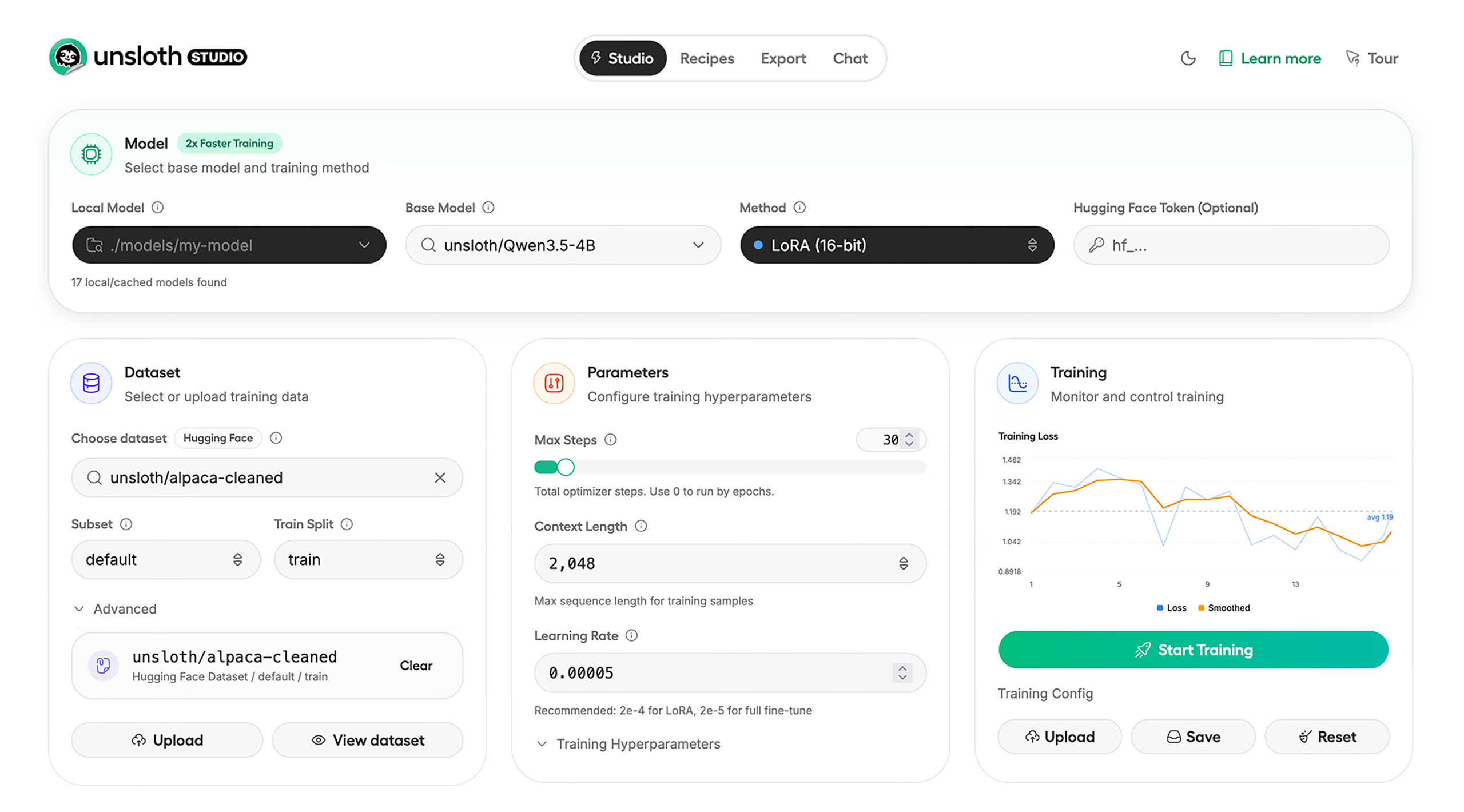
Unsloth Studio (Beta) lets you run and train text, audio, embedding, vision models on Windows, Linux and macOS.
Unsloth provides several key features for both inference and training:
- Search + download + run models including GGUF, LoRA adapters, safetensors
- Export models: Save or export models to GGUF, 16-bit safetensors and other formats.
- Tool calling: Support for self-healing tool calling and web search
- Code execution: lets LLMs test code in Claude artifacts and sandbox environments
- Auto-tune inference parameters and customize chat templates.
- Upload images, audio, PDFs, code, DOCX and more file types to chat with.
- Train 500+ models up to 2x faster with up to 70% less VRAM, with no accuracy loss.
- Supports full fine-tuning, pretraining, 4-bit, 16-bit and, FP8 training.
- Observability: Monitor training live, track loss and GPU usage and customize graphs.
- Data Recipes: Auto-create datasets from PDF, CSV, DOCX etc. Edit data in a visual-node workflow.
- Reinforcement Learning: The most efficient RL library, using 80% less VRAM for GRPO, FP8 etc.
- Multi-GPU training is supported, with major improvements coming soon.
Unsloth can be used in two ways: through Unsloth Studio, the web UI, or through Unsloth Core, the code-based version. Each has different requirements.
Unsloth Studio (Beta) works on Windows, Linux, WSL and macOS.
- CPU: Supported for Chat and Data Recipes currently
- NVIDIA: Training works on RTX 30/40/50, Blackwell, DGX Spark, Station and more
- macOS: Currently supports chat and Data Recipes. MLX training is coming very soon
- AMD: Chat works. Train with Unsloth Core. Studio support is coming soon.
- Coming soon: Training support for Apple MLX, AMD, and Intel.
- Multi-GPU: Available now, with a major upgrade on the way
curl -fsSL https://unsloth.ai/install.sh | shIf you don't have curl, use wget. Launch after setup via:
source unsloth_studio/bin/activate
unsloth studio -H 0.0.0.0 -p 8888irm https://unsloth.ai/install.ps1 | iexLaunch after setup via:
& .\unsloth_studio\Scripts\unsloth.exe studio -H 0.0.0.0 -p 8888Use our Docker image unsloth/unsloth container. Run:
docker run -d -e JUPYTER_PASSWORD="mypassword" \
  -p 8888:8888 -p 8000:8000 -p 2222:22 \
  -v $(pwd)/work:/workspace/work \
  --gpus all \
unsloth/unslothcurl -LsSf https://astral.sh/uv/install.sh | sh
uv venv unsloth_studio --python 3.13
source unsloth_studio/bin/activate
uv pip install unsloth --torch-backend=auto
unsloth studio setup
unsloth studio -H 0.0.0.0 -p 8888winget install -e --id Python.Python.3.13
winget install --id=astral-sh.uv -e
uv venv unsloth_studio --python 3.13
.\unsloth_studio\Scripts\activate
uv pip install unsloth --torch-backend=auto
unsloth studio setup
unsloth studio -H 0.0.0.0 -p 8888curl -LsSf https://astral.sh/uv/install.sh | sh
git clone --filter=blob:none https://github.com/unslothai/unsloth.git unsloth_studio
cd unsloth_studio
uv venv --python 3.13
source .venv/bin/activate
uv pip install -e . --torch-backend=auto
unsloth studio setup
unsloth studio -H 0.0.0.0 -p 8888Then to launch every time:
cd unsloth_studio
source .venv/bin/activate
unsloth studio -H 0.0.0.0 -p 8888Run in Windows Powershell:
winget install -e --id Python.Python.3.13
winget install --id=astral-sh.uv  -e
git clone --filter=blob:none https://github.com/unslothai/unsloth.git unsloth_studio
cd unsloth_studio
uv venv --python 3.13
.\.venv\Scripts\activate
uv pip install -e . --torch-backend=auto
unsloth studio setup
unsloth studio -H 0.0.0.0 -p 8888
Then to launch every time:
cd unsloth_studio
.\.venv\Scripts\activate
unsloth studio -H 0.0.0.0 -p 8888curl -LsSf https://astral.sh/uv/install.sh | sh
uv venv unsloth_env --python 3.13
source unsloth_env/bin/activate
uv pip install unsloth --torch-backend=autowinget install -e --id Python.Python.3.13
winget install --id=astral-sh.uv -e
uv venv unsloth_env --python 3.13
.\unsloth_env\Scripts\activate
uv pip install unsloth --torch-backend=autoFor Windows, pip install unsloth works only if you have PyTorch installed. Read our Windows Guide.
You can use the same Docker image as Unsloth Studio.
For RTX 50x, B200, 6000 GPUs: uv pip install unsloth --torch-backend=auto. Read our guides for: Blackwell and DGX Spark.
To install Unsloth on AMD and Intel GPUs, follow our AMD Guide and Intel Guide.
Train for free with our notebooks. Read our guide. Add dataset, run, then deploy your trained model.
| Model | Free Notebooks | Performance | Memory use |
|---|---|---|---|
| Qwen3.5 (4B) | 1.5x faster | 60% less | |
| gpt-oss (20B) | 2x faster | 70% less | |
| gpt-oss (20B): GRPO | 2x faster | 80% less | |
| Qwen3: Advanced GRPO | 2x faster | 50% less | |
| Gemma 3 (4B) Vision | 1.7x faster | 60% less | |
| embeddinggemma (300M) | 2x faster | 20% less | |
| Mistral Ministral 3 (3B) | 1.5x faster | 60% less | |
| Llama 3.1 (8B) Alpaca | 2x faster | 70% less | |
| Llama 3.2 Conversational | 2x faster | 70% less | |
| Orpheus-TTS (3B) | 1.5x faster | 50% less |
- See all our notebooks for: Kaggle, GRPO, TTS, embedding & Vision
- See all our models and all our notebooks
- See detailed documentation for Unsloth here
- Introducing Unsloth Studio: our new web UI for running and training LLMs. Blog
- Qwen3.5 - 0.8B, 2B, 4B, 9B, 27B, 35-A3B, 112B-A10B are now supported. Guide + notebooks
- Train MoE LLMs 12x faster with 35% less VRAM - DeepSeek, GLM, Qwen and gpt-oss. Blog
- Embedding models: Unsloth now supports ~1.8-3.3x faster embedding fine-tuning. Blog • Notebooks
- New 7x longer context RL vs. all other setups, via our new batching algorithms. Blog
- New RoPE & MLP Triton Kernels & Padding Free + Packing: 3x faster training & 30% less VRAM. Blog
- 500K Context: Training a 20B model with >500K context is now possible on an 80GB GPU. Blog
- FP8 & Vision RL: You can now do FP8 & VLM GRPO on consumer GPUs. FP8 Blog • Vision RL
- gpt-oss by OpenAI: Read our RL blog, Flex Attention blog and Guide.
| Type | Links |
|---|---|
 r/unsloth Reddit r/unsloth Reddit |
Join Reddit community |
| 📚 Documentation & Wiki | Read Our Docs |
_logo_late_2025.svg) Twitter (aka X) Twitter (aka X) |
Follow us on X |
| 💾 Installation | Pip & Docker Install |
| 🔮 Our Models | Unsloth Catalog |
| ✍️ Blog | Read our Blogs |
You can cite the Unsloth repo as follows:
@software{unsloth,
  author = {Daniel Han, Michael Han and Unsloth team},
  title = {Unsloth},
  url = {https://github.com/unslothai/unsloth},
  year = {2023}
}
If you trained a model with 🦥Unsloth, you can use this cool sticker! 
Unsloth uses a dual-licensing model of Apache 2.0 and AGPL-3.0. The core Unsloth package remains licensed under Apache 2.0, while certain optional components, such as the Unsloth Studio UI are licensed under the open-source license AGPL-3.0.
This structure helps support ongoing Unsloth development while keeping the project open source and enabling the broader ecosystem to continue growing.
- The llama.cpp library that lets users run and save models with Unsloth
- The Hugging Face team and their libraries: transformers and TRL
- The Pytorch and Torch AO team for their contributions
- NVIDIA for their NeMo DataDesigner library and their contributions
- And of course for every single person who has contributed or has used Unsloth!


![@pre-commit-ci[bot]](https://avatars.githubusercontent.com/in/68672?s=64&v=4)


![@gemini-code-assist[bot]](https://avatars.githubusercontent.com/in/956858?s=64&v=4)


